<!DOCTYPE html>
    <html lang="vi" xmlns="http://www.w3.org/1999/xhtml" prefix="og: http://ogp.me/ns#">
    <head>
<title>Thông tin SMTP Gmail, Cách cấu hình SMTP Gmail Free</title>
<meta name="description" content="Thông tin SMTP Gmail, Cách cấu hình SMTP Gmail Free - Savefile - Blog -...">
<meta name="author" content="Tốc Độ Việt - Dịch vụ Hosting, Tên miền, Máy chủ, Thiết kế Website">
<meta name="copyright" content="Tốc Độ Việt - Dịch vụ Hosting, Tên miền, Máy chủ, Thiết kế Website [loc.thb@bazan.vn]">
<meta name="generator" content="NukeViet v4.5">
<meta name="viewport" content="width=device-width, initial-scale=1">
<meta http-equiv="Content-Type" content="text/html; charset=utf-8">
<meta property="og:title" content="Thông tin SMTP Gmail, Cách cấu hình SMTP Gmail Free">
<meta property="og:type" content="website">
<meta property="og:description" content="Savefile - Blog - https&#x3A;&#x002F;&#x002F;tocdoviet.com&#x002F;blog&#x002F;savefile&#x002F;Tai-lieu-Website&#x002F;thong-tin-smtp-gmail-cach-cau-hinh-smtp-gmail-free-306.html">
<meta property="og:site_name" content="Tốc Độ Việt - Dịch vụ Hosting, Tên miền, Máy chủ, Thiết kế Website">
<meta property="og:url" content="https://tocdoviet.com/blog/savefile/Tai-lieu-Website/thong-tin-smtp-gmail-cach-cau-hinh-smtp-gmail-free-306.html">
<link rel="shortcut icon" href="https://tocdoviet.com/favicon.ico">
<link rel="canonical" href="https://tocdoviet.com/blog/savefile/Tai-lieu-Website/thong-tin-smtp-gmail-cach-cau-hinh-smtp-gmail-free-306.html">
<link rel="alternate" href="https://tocdoviet.com/blog/rss/" title="Blog" type="application/rss+xml">
<link rel="alternate" href="https://tocdoviet.com/blog/rss/Cau-hoi-thuong-gap/" title="Blog - Câu hỏi thường gặp" type="application/rss+xml">
<link rel="alternate" href="https://tocdoviet.com/blog/rss/Tai-lieu-Ten-Mien/" title="Blog - Tài liệu Tên Miền" type="application/rss+xml">
<link rel="alternate" href="https://tocdoviet.com/blog/rss/Tai-lieu-Hosting/" title="Blog - Tài liệu Hosting" type="application/rss+xml">
<link rel="alternate" href="https://tocdoviet.com/blog/rss/Tai-lieu-May-Chu/" title="Blog - Tài liệu Máy Chủ" type="application/rss+xml">
<link rel="alternate" href="https://tocdoviet.com/blog/rss/Tai-lieu-Ma-Nguon/" title="Blog - Tài liệu Mã Nguồn" type="application/rss+xml">
<link rel="alternate" href="https://tocdoviet.com/blog/rss/Tai-lieu-SEO/" title="Blog - Tài liệu SEO" type="application/rss+xml">
<link rel="alternate" href="https://tocdoviet.com/blog/rss/Tai-lieu-Website/" title="Blog - Tài liệu Website" type="application/rss+xml">
<link rel="alternate" href="https://tocdoviet.com/blog/rss/Tai-lieu-Phan-Mem/" title="Blog - Tài liệu Phần Mềm" type="application/rss+xml">
<link rel="alternate" href="https://tocdoviet.com/blog/rss/Tai-lieu-May-Tinh/" title="Blog - Tài liệu Máy Tính" type="application/rss+xml">
<link rel="preload" as="style" href="https://tocdoviet.com/assets/css/font-awesome.min.css" type="text/css">
<link rel="preload" as="style" href="https://tocdoviet.com/themes/default/css/bootstrap.min.css" type="text/css">
<link rel="preload" as="style" href="https://tocdoviet.com/themes/default/css/style.css" type="text/css">
<link rel="preload" as="style" href="https://tocdoviet.com/themes/default/css/style.responsive.css" type="text/css">
<link rel="preload" as="style" href="https://tocdoviet.com/themes/default/css/news.css" type="text/css">
<link rel="preload" as="style" href="https://tocdoviet.com/themes/default/css/custom.css" type="text/css">
<link rel="preload" as="script" href="https://tocdoviet.com/assets/js/jquery/jquery.min.js" type="text/javascript">
<link rel="preload" as="script" href="https://tocdoviet.com/assets/js/language/vi.js" type="text/javascript">
<link rel="preload" as="script" href="https://tocdoviet.com/assets/js/DOMPurify/purify3.js" type="text/javascript">
<link rel="preload" as="script" href="https://tocdoviet.com/assets/js/global.js" type="text/javascript">
<link rel="preload" as="script" href="https://tocdoviet.com/assets/js/site.js" type="text/javascript">
<link rel="preload" as="script" href="https://tocdoviet.com/themes/default/js/news.js" type="text/javascript">
<link rel="preload" as="script" href="https://tocdoviet.com/themes/default/js/main.js" type="text/javascript">
<link rel="preload" as="script" href="https://tocdoviet.com/themes/default/js/custom.js" type="text/javascript">
<link rel="preload" as="script" href="https://tocdoviet.com/themes/default/js/bootstrap.min.js" type="text/javascript">
<link rel="stylesheet" href="https://tocdoviet.com/assets/css/font-awesome.min.css">
<link rel="stylesheet" href="https://tocdoviet.com/themes/default/css/bootstrap.min.css">
<link rel="stylesheet" href="https://tocdoviet.com/themes/default/css/style.css">
<link rel="stylesheet" href="https://tocdoviet.com/themes/default/css/style.responsive.css">
<link rel="StyleSheet" href="https://tocdoviet.com/themes/default/css/news.css">
<link rel="stylesheet" href="https://tocdoviet.com/themes/default/css/custom.css">
<style>
#gom-all-in-one{margin-bottom: 150px;}
@-webkit-keyframes phone-vr-circle-fill {
0% {-webkit-transform: rotate(0) scale(1) skew(1deg); }
10% {-webkit-transform: rotate(-25deg) scale(1) skew(1deg);}
20% {-webkit-transform: rotate(25deg) scale(1) skew(1deg);}
30% {-webkit-transform: rotate(-25deg) scale(1) skew(1deg);}
40% {-webkit-transform: rotate(25deg) scale(1) skew(1deg);}
50% {-webkit-transform: rotate(0) scale(1) skew(1deg);}
100% {-webkit-transform: rotate(0) scale(1) skew(1deg);}
}
@-webkit-keyframes zoom{0%{transform:scale(.9)}70%{transform:scale(1);box-shadow:0 0 0 15px transparent}100%{transform:scale(.9);box-shadow:0 0 0 0 transparent}}@keyframes zoom{0%{transform:scale(.9)}70%{transform:scale(1);box-shadow:0 0 0 15px transparent}100%{transform:scale(.9);box-shadow:0 0 0 0 transparent}}
#button-contact-vr{right:0}
.phone-bar a{
left:auto;right:30px;padding:8px 55px 7px 15px
}
#button-contact-vr.active #gom-all-in-one .button-contact
{
margin-left:100%
}
#button-contact-vr{bottom:30%}
#gom-all-in-one #zalo-vr {
transition: 1s all;
-moz-transition: 1s all;
-webkit-transition: 1s all;
}
#zalo-vr .phone-vr-circle-fill {
box-shadow: 0 0 0 0 #2196f3;
background-color: rgba(33,150,243,.7);
}
.phone-vr-circle-fill {
width: 65px;
height: 65px;
top: 12px;
left: 12px;
position: absolute;
box-shadow: 0 0 0 0 #c31d1d;
background-color: rgba(230,8,8,.7);
border-radius: 50%;
border: 2px solid transparent;
-webkit-animation: phone-vr-circle-fill 2.3s infinite ease-in-out;
animation: phone-vr-circle-fill 2.3s infinite ease-in-out;
transition: all .5s;
-webkit-transform-origin: 50% 50%;
-ms-transform-origin: 50% 50%;
transform-origin: 50% 50%;
-webkit-animuiion: zoom 1.3s infinite;
animation: zoom 1.3s infinite;
}
.phone-vr-img-circle a {
display: block;
line-height: 37px;
}
.phone-vr-img-circle img {
max-height: 25px;
max-width: 27px;
position: absolute;
top: 50%;
left: 50%;
transform: translate(-50%,-50%);
-moz-transform: translate(-50%,-50%);
-webkit-transform: translate(-50%,-50%);
-o-transform: translate(-50%,-50%);
}
#zalo-vr .phone-vr-img-circle {
background-color: #2196f3;
}
.phone-vr-img-circle {
background-color: #e60808;
width: 40px;
height: 40px;
line-height: 40px;
top: 25px;
left: 25px;
position: absolute;
border-radius: 50%;
overflow: hidden;
display: flex;
justify-content: center;
-webkit-animation: phonering-alo-circle-img-anim 1s infinite ease-in-out;
animation: phone-vr-circle-fill 1s infinite ease-in-out;
}
#button-contact-vr .button-contact .phone-vr {
position: relative;
visibility: visible;
background-color: transparent;
width: 90px;
height: 90px;
cursor: pointer;
z-index: 11;
-webkit-backface-visibility: hidden;
-webkit-transform: translateZ(0);
transition: visibility .5s;
left: 0;
bottom: 0;
display: block;
}
#gom-all-in-one #phone-vr {
transition: .7s all;
-moz-transition: .7s all;
-webkit-transition: .7s all;
}
#button-contact-vr .button-contact {
position: relative;
margin-top: 5px;
}
#phone-vr .phone-vr-circle-fill {
opacity: .7;
box-shadow: 0 0 0 0 #d33;
}
.phone-bar a, #phone-vr .phone-vr-circle-fill, #phone-vr .phone-vr-img-circle, #phone-vr .phone-bar a {
background-color: #d33;
}
#button-contact-vr {
bottom: 30%;
}
#button-contact-vr {
position: fixed;
bottom: 0;
z-index: 99999;
}
#popup-showroom-vr, div#popup-form-contact-vr {
display: none;
}
.bg-popup-vr {
position: absolute;
left: 0;
top: 0;
background: rgb(51 51 51/50%);
width: 100%;
height: 100vh;
}
@media (max-width: 673px)
div#popup-form-contact-vr .content-popup-vr {
display: block;
}
.content-popup-vr {
background: #fff;
position: absolute;
left: 50%;
top: 50%;
transform: translate(-50%,-50%);
width: 95%;
border-radius: 5px;
box-shadow: 0 0 14px 5px rgb(0 0 0/49%);
max-width: 600px;
display: flex;
}
.content-popup-vr .content-popup-div-vr {
width: 100%;
padding: 25px;
}
.content-popup-vr .close-popup-vr {
font-family: sans-serif;
width: 23px;
height: 23px;
background: #000;
position: absolute;
top: -10px;
right: -10px;
color: #fff;
text-align: center;
line-height: 23px;
font-size: 17px;
border-radius: 50%;
cursor: pointer;
}
</style>
<style type="text/css">
	body{background: #fff;}
</style>
<style type="text/css"></style>
    </head>
    <body>
<div id="print">
	<div id="hd_print">
		<h2 class="pull-left">Tốc Độ Việt - Dịch vụ Hosting, Tên miền, Máy chủ, Thiết kế Website</h2>
		<p class="pull-right"><a title="Tốc Độ Việt - Dịch vụ Hosting, Tên miền, Máy chủ, Thiết kế Website" href="https://tocdoviet.com/">https://tocdoviet.com</a></p>
	</div>
	<div class="clear"></div>
	<hr />
	<div id="content">
		<h1>Thông tin SMTP Gmail, Cách cấu hình SMTP Gmail Free</h1>
		<ul class="list-inline">
			<li>Thứ ba - 07/10/2025 23:09</li>
			<li class="hidden-print txtrequired"><em class="fa fa-print">&nbsp;</em><a title="In ra" href="javascript:;" onclick="window.print()">In ra</a></li>
			<li class="hidden-print txtrequired"><em class="fa fa-power-off">&nbsp;</em><a title="Đóng cửa sổ này" href="javascript:;" onclick="window.close()">Đóng cửa sổ này</a></li>
		</ul>
		<div class="clear"></div>
		<div id="hometext">
			Các website đều có mục gửi mail khi có người liên hệ. Gửi mail khi có đơn hàng mới, nhưng không phải Hosting nào cũng cho phép gửi mail thông qua hàm mail php, gửi mail smtp theo tên miền. Vì vậy chúng ta phải sử dụng mail smtp của Google (SMTP Gmail) để gởi mail.
		</div>
				<div class="imghome">
			<img alt="Thông tin SMTP Gmail, Cách cấu hình SMTP Gmail Free" src="https://tocdoviet.com/uploads/blog/2025/7146cau-hinh-smtp-gmail-1.jpg" width="460" class="img-thumbnail" />
		</div>
		<div class="clear"></div>
		<div id="bodytext" class="clearfix">
			<p id="loi-ich-cua-viec-su-may-chu-su-dung-smtp-gmail"><strong>Lợi ích của việc sử máy chủ sử dụng SMTP Gmail?</strong></p>

<ul>
	<li>
	<p>Khả năng gửi mail của bạn có tỷ lệ thành công cao hơn nhiều.</p>
	</li>
	<li>
	<p>Mail của bạn ít khi bị đánh dấu là spam.</p>
	</li>
	<li>
	<p>Không tốn chi phí đăng ký Email.</p>
	</li>
</ul>

<p id="cach-cau-hinh-may-chu-smtp-gmail"><br />
<strong>Cách cấu hình máy chủ SMTP Gmail như sau:</strong><br />
<br />
<strong>- Tạo mật khẩu ứng dụng cho tài khoản Gmail</strong><br />
<br />
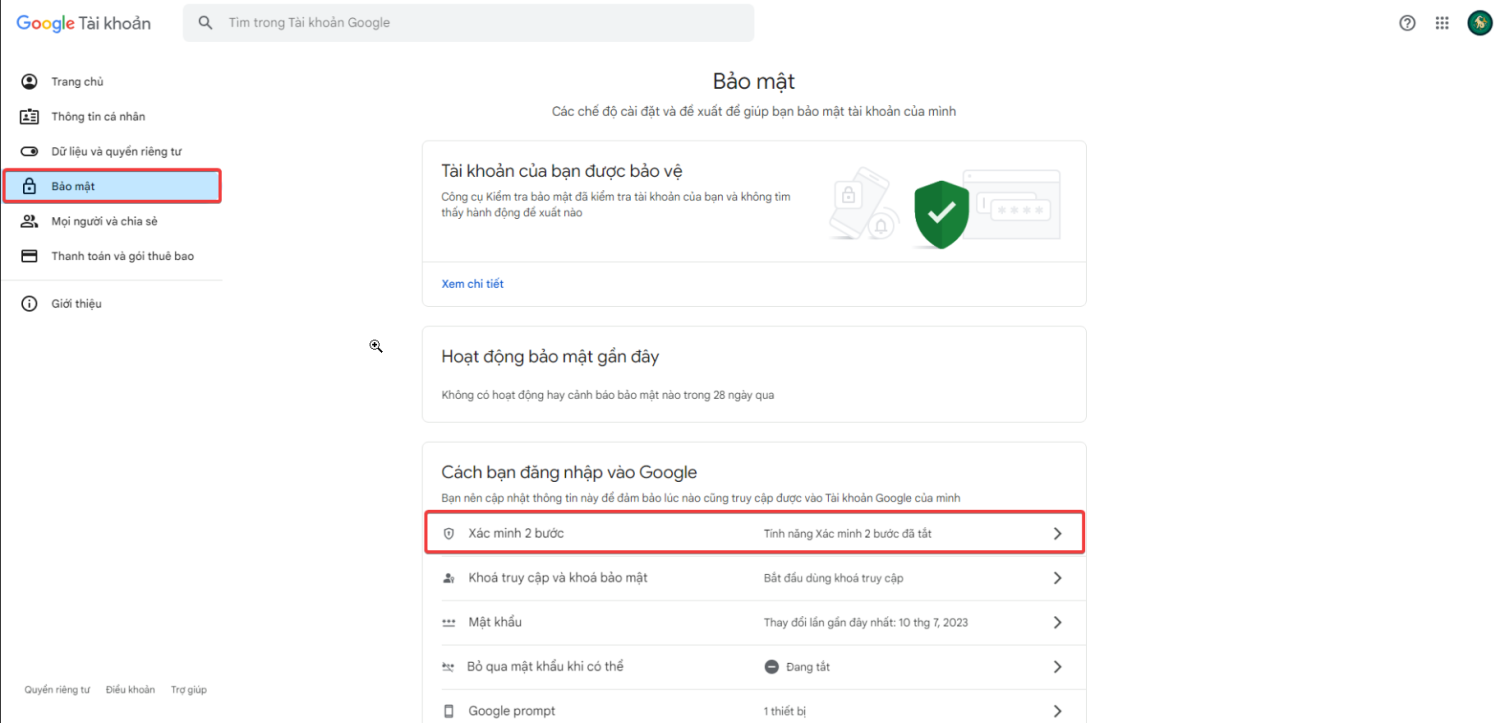
Truy cập vào link:&nbsp;<a href="https://myaccount.google.com/" rel="noopener" target="_blank">https://myaccount.google.com/</a>&nbsp;sau đó đăng nhập tài khoản Gmail của bạn.</p>

<div class="image-center">
<figure class="image"><img alt="AsPowerBar eSWkMY1aml" height="482" src="https://tocdoviet.com/uploads/blog/2025/aspowerbar_eswkmy1aml.png" width="1000" />
<figcaption><strong>Vào mục Bảo Mật và bật xác minh 2 bước ( nếu trạng thái này đang tắt ).</strong></figcaption>
</figure>
</div>
&nbsp;

<div class="image-center">
<figure class="image"><img alt="AsPowerBar 2qukiK3jfO" height="483" src="https://tocdoviet.com/uploads/blog/2025/aspowerbar_2qukik3jfo.png" width="1000" />
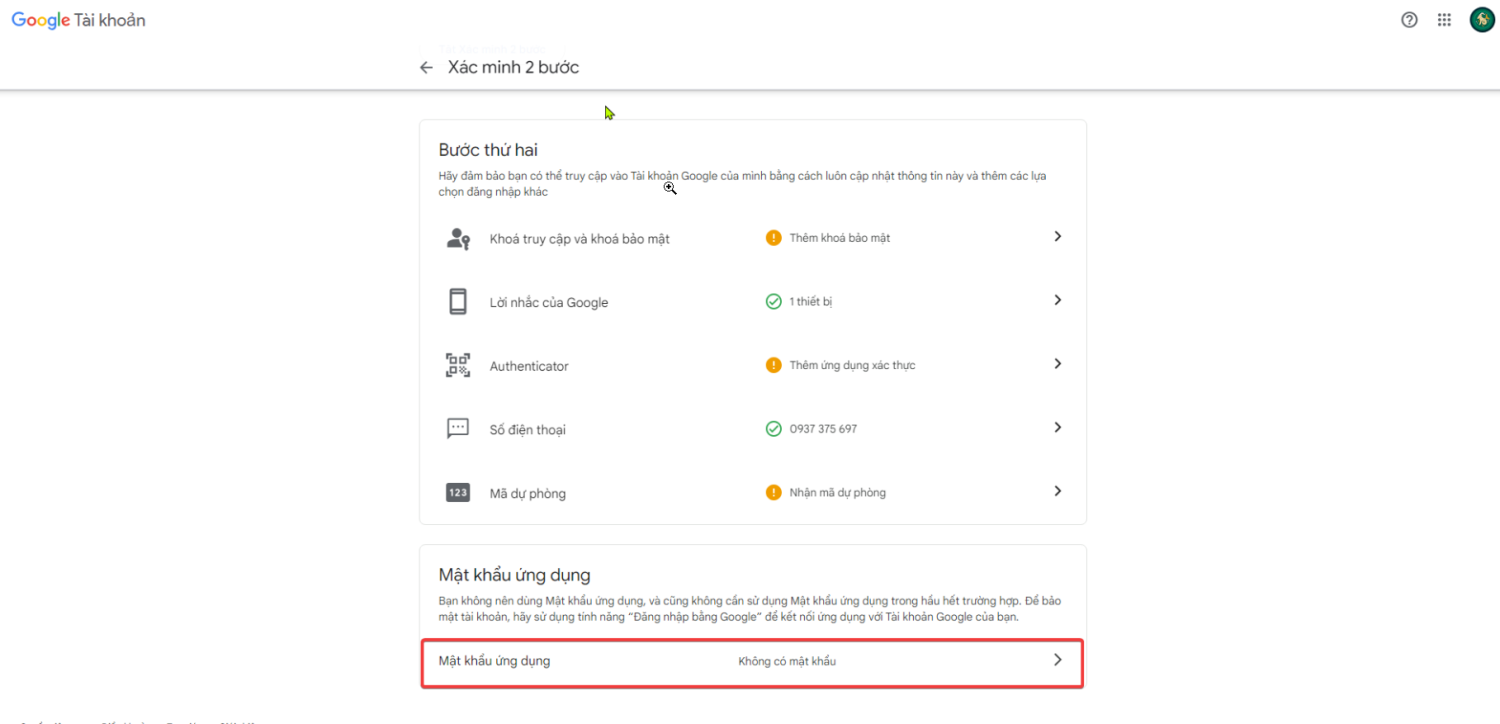
<figcaption><strong>Lấy&nbsp;Mật khẩu ứng dụng,&nbsp;bằng cách truy cập vào&nbsp;Xác minh 2 bước&nbsp;và kéo xuống dưới cuối cùng</strong></figcaption>
</figure>
</div>
&nbsp;

<div class="image-center">
<figure class="image"><img alt="chrome QNJO1LLpuI" height="493" src="https://tocdoviet.com/uploads/blog/2025/chrome_qnjo1llpui.png" width="1000" />
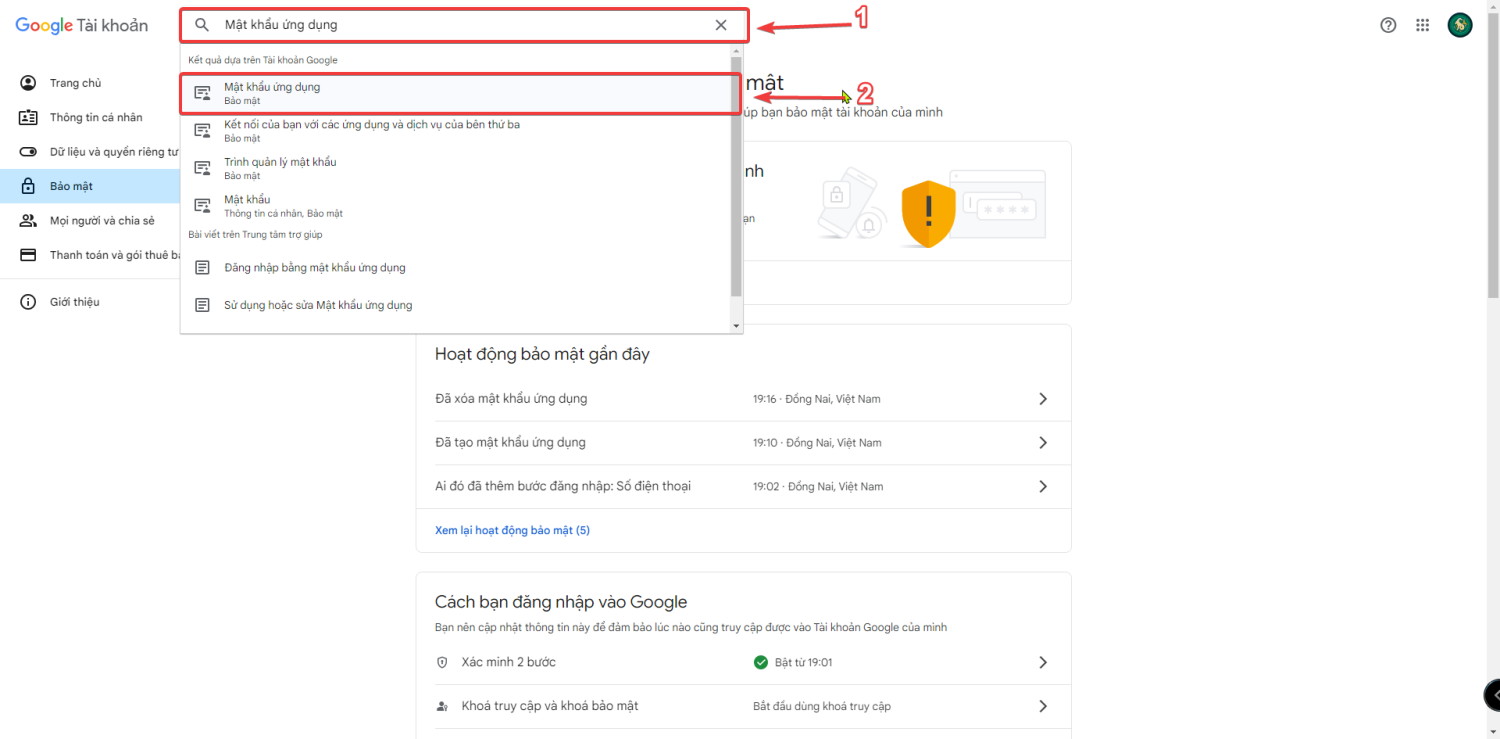
<figcaption><strong>Trường hợp không thấy&nbsp;phần&nbsp;Mật khẩu ứng dụng&nbsp;bạn có thể tìm chức năng đó trên thanh công cụ bằng cánh gõ cụm từ&nbsp;Mật khẩu ứng dụng&nbsp;như sau</strong></figcaption>
</figure>
</div>
&nbsp;

<div class="image-center">
<figure class="image"><img alt="chrome GCI3LSN9mH" height="493" src="https://tocdoviet.com/uploads/blog/2025/chrome_gci3lsn9mh.png" width="1000" />
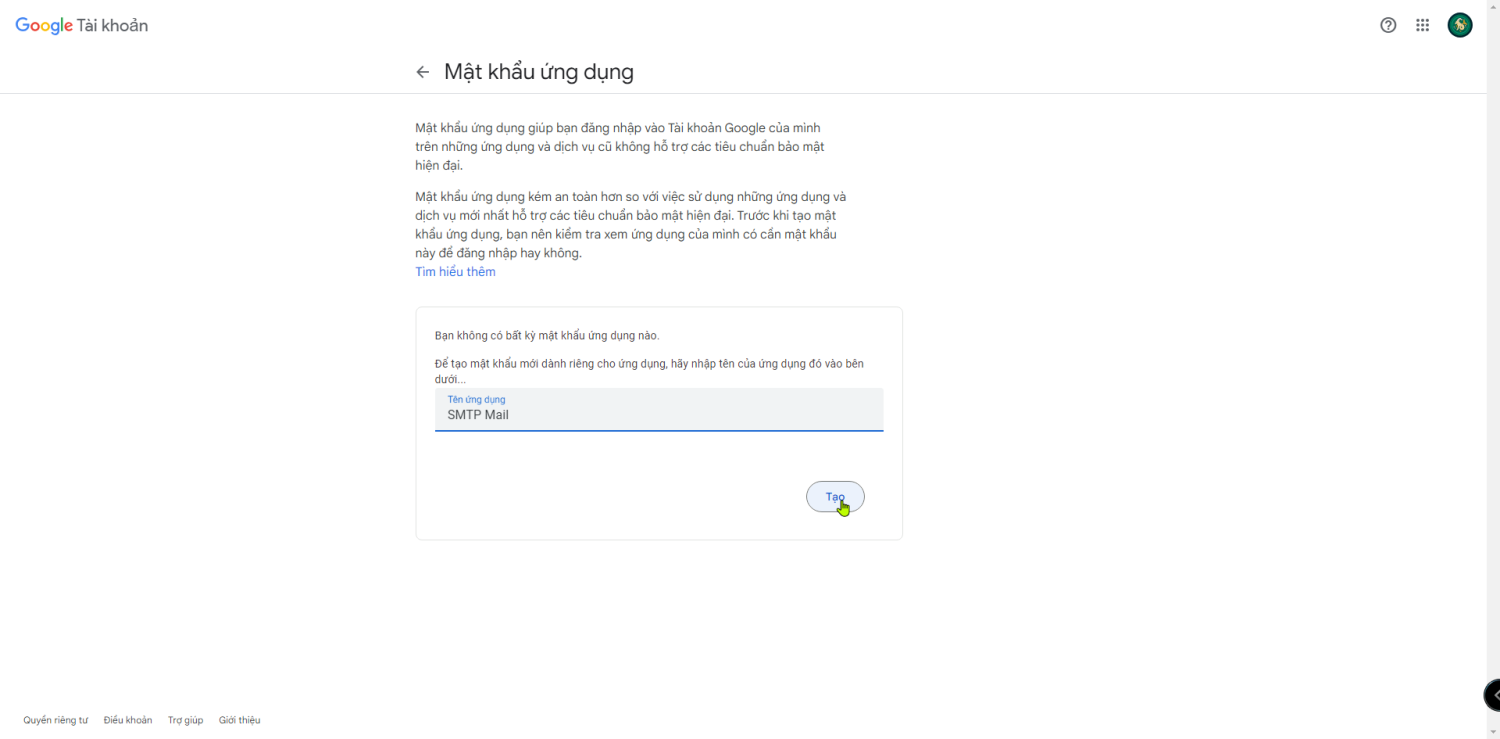
<figcaption><strong>Đặt tên ứng dung để tạo mật khẩu ( ở đây mình sẽ đặt tên là SMTP Mail)</strong></figcaption>
</figure>
</div>
&nbsp;

<div class="image-center">
<figure class="image"><img alt="chrome t5Z1zpV2An" height="493" src="https://tocdoviet.com/uploads/blog/2025/chrome_t5z1zpv2an.png" width="1000" />
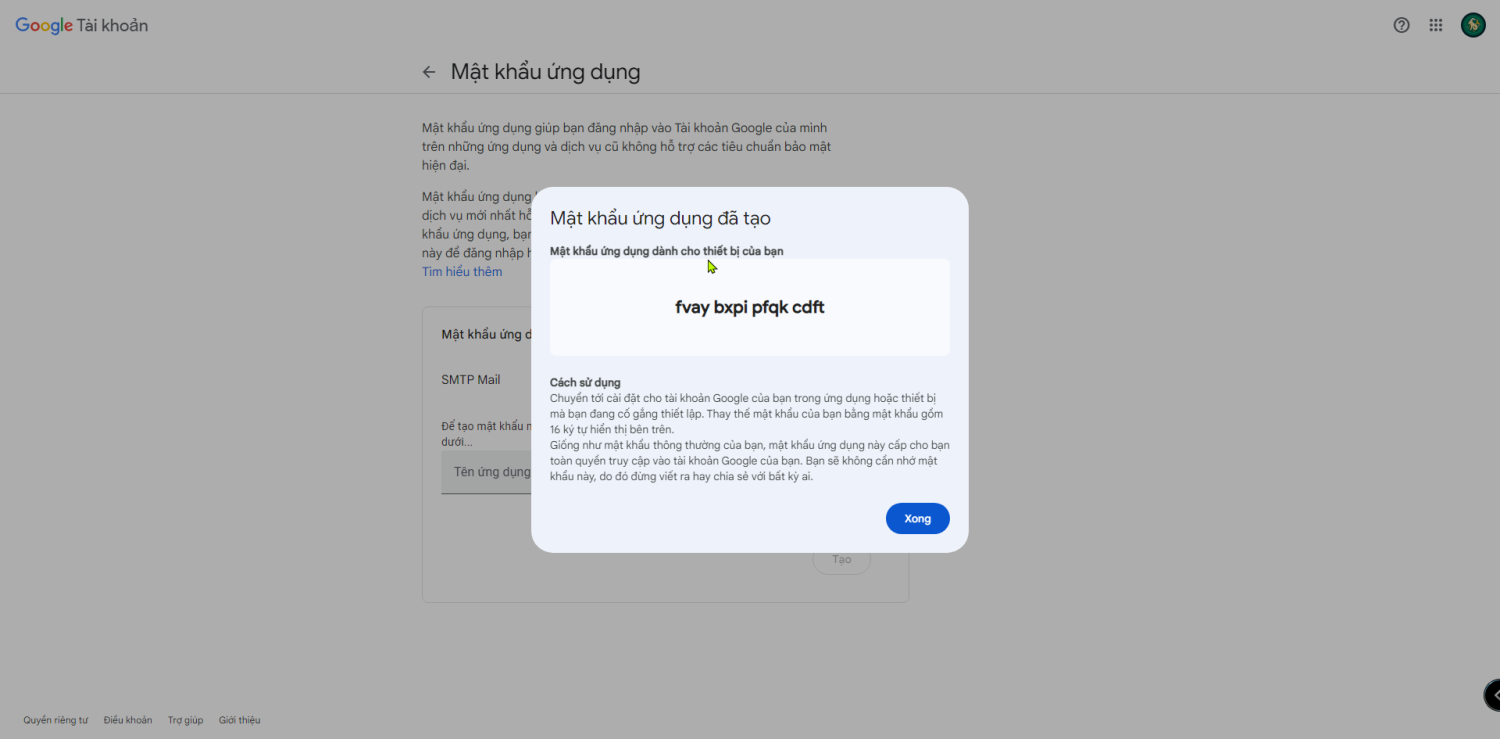
<figcaption><strong>Cuối cùng chúng ta bấm nút “Tạo“. Mật khẩu ứng dụng sẽ được hiển thị, bạn chỉ cần lưu lại mật khẩu này để sử dụng cấu hình SMTP trên website.</strong></figcaption>
</figure>
</div>

<p><br />
<strong>- Khai báo kết nối máy chủ&nbsp;SMTP</strong></p>

<ul>
	<li>
	<p>Địa chỉ Email gửi từ: Nhập Gmail của bạn hoặc từ địa chỉ Email bất kỳ nào khác.</p>
	</li>
	<li>
	<p>Tên người gửi: Tên người gửi Email.</p>
	</li>
	<li>
	<p>Máy chủ SMTP: Chúng ta đang sử dụng Gmail, cho nên giá trị sẽ là:&nbsp;smtp.gmail.com</p>
	</li>
	<li>
	<p>Bảo mật SMTP&nbsp;và&nbsp;Cổng SMTP: Tùy chọn (để bảo mật hơn thì chúng ta nên chọn SSL/TLS).</p>
	</li>
	<li>
	<p>Xác thực SMTP: Yes</p>
	</li>
	<li>
	<p>Tên đăng nhập SMTP: Địa chỉ tài khoản Gmail đã lấy mật khẩu ứng dụng ở trên, ví dụ: admin@gmail.com.</p>
	</li>
	<li>
	<p>Mật khẩu SMTP:&nbsp;Mật khẩu ứng dụng Gmail bạn đã tạo ở trên.</p>
	</li>
</ul>

<p data-sourcepos="30:4-30:28"><br />
<strong>- Gửi email thử nghiệm:</strong></p>

<ul data-sourcepos="32:4-34:0">
	<li data-sourcepos="32:4-32:58">
	<p>Sử dụng chức năng gửi email thử nghiệm trong website.</p>
	</li>
	<li data-sourcepos="33:4-34:0">
	<p>Kiểm tra hộp thư đến để xác nhận email đã được gửi thành công.</p>
	</li>
</ul>

<p>Cấu hình SMTP Gmail cho website không chỉ đơn giản mà còn mang lại nhiều lợi ích đáng kể. Hy vọng hướng dẫn này giúp bạn dễ dàng thiết lập và tận dụng tối đa dịch vụ email chuyên nghiệp của Gmail cho website của mình.</p>
		</div>
				<div id="author">
						<p>
				<strong>Tác giả:</strong>
				<a href="https://tocdoviet.com/blog/author/Loc-Trinh-Hoang-Bao/">Lộc Trịnh Hoàng Bảo</a>
			</p>
		</div>
	</div>
	<div id="footer" class="clearfix">
		<div id="url">
			<strong>URL của bản tin này: </strong><a href="https://tocdoviet.com/blog/savefile/Tai-lieu-Website/thong-tin-smtp-gmail-cach-cau-hinh-smtp-gmail-free-306.html" title="Thông tin SMTP Gmail, Cách cấu hình SMTP Gmail Free">https://tocdoviet.com/blog/savefile/Tai-lieu-Website/thong-tin-smtp-gmail-cach-cau-hinh-smtp-gmail-free-306.html</a>

		</div>
		<div class="clear"></div>
		<div class="copyright">
			&copy; Tốc Độ Việt - Dịch vụ Hosting, Tên miền, Máy chủ, Thiết kế Website
		</div>
		<div id="contact">
			<a href="mailto:loc.thb@bazan.vn">loc.thb@bazan.vn</a>
		</div>
	</div>
</div>
        <div id="timeoutsess" class="chromeframe">
            Bạn đã không sử dụng Site, <a onclick="timeoutsesscancel();" href="https://tocdoviet.com/#">Bấm vào đây để duy trì trạng thái đăng nhập</a>. Thời gian chờ: <span id="secField"> 60 </span> giây
        </div>
        <div id="openidResult" class="nv-alert" style="display:none"></div>
        <div id="openidBt" data-result="" data-redirect=""></div>
        <div id="button-contact-vr" class=""><div id="gom-all-in-one"><div id="zalo-vr" class="button-contact"><div class="phone-vr"><div class="phone-vr-circle-fill"></div><div class="phone-vr-img-circle">
<a target="_blank" href="https://zalo.me/0888037777">
<img src="https://tocdoviet.com/themes/default/images/zalo.png">
</a></div></div></div><div id="phone-vr" class="button-contact"><div class="phone-vr"><div class="phone-vr-circle-fill"></div><div class="phone-vr-img-circle">
<a href="tel:0888037777">
<img src="https://tocdoviet.com/themes/default/images/phone.png">
</a></div></div></div></div></div><div id="popup-form-contact-vr"><div class="bg-popup-vr"></div><div class="content-popup-vr" id="loco-" style=" "><div class="content-popup-div-vr"></div><div class="close-popup-vr">x</div></div></div><div id="popup-showroom-vr"><div class="bg-popup-vr"></div><div class="content-popup-vr" id="loco-" style=" "><div class="content-popup-div-vr"></div><div class="close-popup-vr">x</div></div></div>
<script src="https://tocdoviet.com/assets/js/jquery/jquery.min.js"></script>
<script>var nv_base_siteurl="/",nv_lang_data="vi",nv_lang_interface="vi",nv_name_variable="nv",nv_fc_variable="op",nv_lang_variable="language",nv_module_name="blog",nv_func_name="savefile",nv_is_user=0, nv_my_ofs=-4,nv_my_abbr="EDT",nv_cookie_prefix="nv4",nv_check_pass_mstime=1738000,nv_area_admin=0,nv_safemode=0,theme_responsive=1,nv_recaptcha_ver=2,nv_recaptcha_sitekey="",nv_recaptcha_type="image",XSSsanitize=1;</script>
<script src="https://tocdoviet.com/assets/js/language/vi.js"></script>
<script src="https://tocdoviet.com/assets/js/DOMPurify/purify3.js"></script>
<script src="https://tocdoviet.com/assets/js/global.js"></script>
<script src="https://tocdoviet.com/assets/js/site.js"></script>
<script src="https://tocdoviet.com/themes/default/js/news.js"></script>
<script src="https://tocdoviet.com/themes/default/js/main.js"></script>
<script src="https://tocdoviet.com/themes/default/js/custom.js"></script>
<script type="application/ld+json">
        {
            "@context": "https://schema.org",
            "@type": "Organization",
            "url": "https://tocdoviet.com",
            "logo": "https://tocdoviet.com/assets/images/logo.png"
        }
        </script>
<script src="https://tocdoviet.com/themes/default/js/bootstrap.min.js"></script>
</body>
</html>