<!DOCTYPE html>
    <html lang="vi" xmlns="http://www.w3.org/1999/xhtml" prefix="og: http://ogp.me/ns#">
    <head>
<title>Đưa trang Web của bạn vào Google cách nhanh nhất&#33;</title>
<meta name="description" content="Đưa trang Web của bạn vào Google cách nhanh nhất&#33; - Savefile - Blog -...">
<meta name="author" content="Tốc Độ Việt - Dịch vụ Hosting, Tên miền, Máy chủ, Thiết kế Website">
<meta name="copyright" content="Tốc Độ Việt - Dịch vụ Hosting, Tên miền, Máy chủ, Thiết kế Website [loc.thb@bazan.vn]">
<meta name="generator" content="NukeViet v4.5">
<meta name="viewport" content="width=device-width, initial-scale=1">
<meta http-equiv="Content-Type" content="text/html; charset=utf-8">
<meta property="og:title" content="Đưa trang Web của bạn vào Google cách nhanh nhất&#33;">
<meta property="og:type" content="website">
<meta property="og:description" content="Savefile - Blog - https&#x3A;&#x002F;&#x002F;tocdoviet.com&#x002F;blog&#x002F;savefile&#x002F;Tai-lieu-SEO&#x002F;dua-trang-web-cua-ban-vao-google-cach-nhanh-nhat-257.html">
<meta property="og:site_name" content="Tốc Độ Việt - Dịch vụ Hosting, Tên miền, Máy chủ, Thiết kế Website">
<meta property="og:url" content="https://tocdoviet.com/blog/savefile/Tai-lieu-SEO/dua-trang-web-cua-ban-vao-google-cach-nhanh-nhat-257.html">
<link rel="shortcut icon" href="https://tocdoviet.com/favicon.ico">
<link rel="canonical" href="https://tocdoviet.com/blog/savefile/Tai-lieu-SEO/dua-trang-web-cua-ban-vao-google-cach-nhanh-nhat-257.html">
<link rel="alternate" href="https://tocdoviet.com/blog/rss/" title="Blog" type="application/rss+xml">
<link rel="alternate" href="https://tocdoviet.com/blog/rss/Cau-hoi-thuong-gap/" title="Blog - Câu hỏi thường gặp" type="application/rss+xml">
<link rel="alternate" href="https://tocdoviet.com/blog/rss/Tai-lieu-Ten-Mien/" title="Blog - Tài liệu Tên Miền" type="application/rss+xml">
<link rel="alternate" href="https://tocdoviet.com/blog/rss/Tai-lieu-Hosting/" title="Blog - Tài liệu Hosting" type="application/rss+xml">
<link rel="alternate" href="https://tocdoviet.com/blog/rss/Tai-lieu-May-Chu/" title="Blog - Tài liệu Máy Chủ" type="application/rss+xml">
<link rel="alternate" href="https://tocdoviet.com/blog/rss/Tai-lieu-Ma-Nguon/" title="Blog - Tài liệu Mã Nguồn" type="application/rss+xml">
<link rel="alternate" href="https://tocdoviet.com/blog/rss/Tai-lieu-SEO/" title="Blog - Tài liệu SEO" type="application/rss+xml">
<link rel="alternate" href="https://tocdoviet.com/blog/rss/Tai-lieu-Website/" title="Blog - Tài liệu Website" type="application/rss+xml">
<link rel="alternate" href="https://tocdoviet.com/blog/rss/Tai-lieu-Phan-Mem/" title="Blog - Tài liệu Phần Mềm" type="application/rss+xml">
<link rel="alternate" href="https://tocdoviet.com/blog/rss/Tai-lieu-May-Tinh/" title="Blog - Tài liệu Máy Tính" type="application/rss+xml">
<link rel="preload" as="style" href="https://tocdoviet.com/assets/css/font-awesome.min.css" type="text/css">
<link rel="preload" as="style" href="https://tocdoviet.com/themes/default/css/bootstrap.min.css" type="text/css">
<link rel="preload" as="style" href="https://tocdoviet.com/themes/default/css/style.css" type="text/css">
<link rel="preload" as="style" href="https://tocdoviet.com/themes/default/css/style.responsive.css" type="text/css">
<link rel="preload" as="style" href="https://tocdoviet.com/themes/default/css/news.css" type="text/css">
<link rel="preload" as="style" href="https://tocdoviet.com/themes/default/css/custom.css" type="text/css">
<link rel="preload" as="script" href="https://tocdoviet.com/assets/js/jquery/jquery.min.js" type="text/javascript">
<link rel="preload" as="script" href="https://tocdoviet.com/assets/js/language/vi.js" type="text/javascript">
<link rel="preload" as="script" href="https://tocdoviet.com/assets/js/DOMPurify/purify3.js" type="text/javascript">
<link rel="preload" as="script" href="https://tocdoviet.com/assets/js/global.js" type="text/javascript">
<link rel="preload" as="script" href="https://tocdoviet.com/assets/js/site.js" type="text/javascript">
<link rel="preload" as="script" href="https://tocdoviet.com/themes/default/js/news.js" type="text/javascript">
<link rel="preload" as="script" href="https://tocdoviet.com/themes/default/js/main.js" type="text/javascript">
<link rel="preload" as="script" href="https://tocdoviet.com/themes/default/js/custom.js" type="text/javascript">
<link rel="preload" as="script" href="https://tocdoviet.com/themes/default/js/bootstrap.min.js" type="text/javascript">
<link rel="stylesheet" href="https://tocdoviet.com/assets/css/font-awesome.min.css">
<link rel="stylesheet" href="https://tocdoviet.com/themes/default/css/bootstrap.min.css">
<link rel="stylesheet" href="https://tocdoviet.com/themes/default/css/style.css">
<link rel="stylesheet" href="https://tocdoviet.com/themes/default/css/style.responsive.css">
<link rel="StyleSheet" href="https://tocdoviet.com/themes/default/css/news.css">
<link rel="stylesheet" href="https://tocdoviet.com/themes/default/css/custom.css">
<style>
#gom-all-in-one{margin-bottom: 150px;}
@-webkit-keyframes phone-vr-circle-fill {
0% {-webkit-transform: rotate(0) scale(1) skew(1deg); }
10% {-webkit-transform: rotate(-25deg) scale(1) skew(1deg);}
20% {-webkit-transform: rotate(25deg) scale(1) skew(1deg);}
30% {-webkit-transform: rotate(-25deg) scale(1) skew(1deg);}
40% {-webkit-transform: rotate(25deg) scale(1) skew(1deg);}
50% {-webkit-transform: rotate(0) scale(1) skew(1deg);}
100% {-webkit-transform: rotate(0) scale(1) skew(1deg);}
}
@-webkit-keyframes zoom{0%{transform:scale(.9)}70%{transform:scale(1);box-shadow:0 0 0 15px transparent}100%{transform:scale(.9);box-shadow:0 0 0 0 transparent}}@keyframes zoom{0%{transform:scale(.9)}70%{transform:scale(1);box-shadow:0 0 0 15px transparent}100%{transform:scale(.9);box-shadow:0 0 0 0 transparent}}
#button-contact-vr{right:0}
.phone-bar a{
left:auto;right:30px;padding:8px 55px 7px 15px
}
#button-contact-vr.active #gom-all-in-one .button-contact
{
margin-left:100%
}
#button-contact-vr{bottom:30%}
#gom-all-in-one #zalo-vr {
transition: 1s all;
-moz-transition: 1s all;
-webkit-transition: 1s all;
}
#zalo-vr .phone-vr-circle-fill {
box-shadow: 0 0 0 0 #2196f3;
background-color: rgba(33,150,243,.7);
}
.phone-vr-circle-fill {
width: 65px;
height: 65px;
top: 12px;
left: 12px;
position: absolute;
box-shadow: 0 0 0 0 #c31d1d;
background-color: rgba(230,8,8,.7);
border-radius: 50%;
border: 2px solid transparent;
-webkit-animation: phone-vr-circle-fill 2.3s infinite ease-in-out;
animation: phone-vr-circle-fill 2.3s infinite ease-in-out;
transition: all .5s;
-webkit-transform-origin: 50% 50%;
-ms-transform-origin: 50% 50%;
transform-origin: 50% 50%;
-webkit-animuiion: zoom 1.3s infinite;
animation: zoom 1.3s infinite;
}
.phone-vr-img-circle a {
display: block;
line-height: 37px;
}
.phone-vr-img-circle img {
max-height: 25px;
max-width: 27px;
position: absolute;
top: 50%;
left: 50%;
transform: translate(-50%,-50%);
-moz-transform: translate(-50%,-50%);
-webkit-transform: translate(-50%,-50%);
-o-transform: translate(-50%,-50%);
}
#zalo-vr .phone-vr-img-circle {
background-color: #2196f3;
}
.phone-vr-img-circle {
background-color: #e60808;
width: 40px;
height: 40px;
line-height: 40px;
top: 25px;
left: 25px;
position: absolute;
border-radius: 50%;
overflow: hidden;
display: flex;
justify-content: center;
-webkit-animation: phonering-alo-circle-img-anim 1s infinite ease-in-out;
animation: phone-vr-circle-fill 1s infinite ease-in-out;
}
#button-contact-vr .button-contact .phone-vr {
position: relative;
visibility: visible;
background-color: transparent;
width: 90px;
height: 90px;
cursor: pointer;
z-index: 11;
-webkit-backface-visibility: hidden;
-webkit-transform: translateZ(0);
transition: visibility .5s;
left: 0;
bottom: 0;
display: block;
}
#gom-all-in-one #phone-vr {
transition: .7s all;
-moz-transition: .7s all;
-webkit-transition: .7s all;
}
#button-contact-vr .button-contact {
position: relative;
margin-top: 5px;
}
#phone-vr .phone-vr-circle-fill {
opacity: .7;
box-shadow: 0 0 0 0 #d33;
}
.phone-bar a, #phone-vr .phone-vr-circle-fill, #phone-vr .phone-vr-img-circle, #phone-vr .phone-bar a {
background-color: #d33;
}
#button-contact-vr {
bottom: 30%;
}
#button-contact-vr {
position: fixed;
bottom: 0;
z-index: 99999;
}
#popup-showroom-vr, div#popup-form-contact-vr {
display: none;
}
.bg-popup-vr {
position: absolute;
left: 0;
top: 0;
background: rgb(51 51 51/50%);
width: 100%;
height: 100vh;
}
@media (max-width: 673px)
div#popup-form-contact-vr .content-popup-vr {
display: block;
}
.content-popup-vr {
background: #fff;
position: absolute;
left: 50%;
top: 50%;
transform: translate(-50%,-50%);
width: 95%;
border-radius: 5px;
box-shadow: 0 0 14px 5px rgb(0 0 0/49%);
max-width: 600px;
display: flex;
}
.content-popup-vr .content-popup-div-vr {
width: 100%;
padding: 25px;
}
.content-popup-vr .close-popup-vr {
font-family: sans-serif;
width: 23px;
height: 23px;
background: #000;
position: absolute;
top: -10px;
right: -10px;
color: #fff;
text-align: center;
line-height: 23px;
font-size: 17px;
border-radius: 50%;
cursor: pointer;
}
</style>
<style type="text/css">
	body{background: #fff;}
</style>
<style type="text/css"></style>
    </head>
    <body>
<div id="print">
	<div id="hd_print">
		<h2 class="pull-left">Tốc Độ Việt - Dịch vụ Hosting, Tên miền, Máy chủ, Thiết kế Website</h2>
		<p class="pull-right"><a title="Tốc Độ Việt - Dịch vụ Hosting, Tên miền, Máy chủ, Thiết kế Website" href="https://tocdoviet.com/">https://tocdoviet.com</a></p>
	</div>
	<div class="clear"></div>
	<hr />
	<div id="content">
		<h1>Đưa trang Web của bạn vào Google cách nhanh nhất&#33;</h1>
		<ul class="list-inline">
			<li>Thứ sáu - 17/07/2009 01:50</li>
			<li class="hidden-print txtrequired"><em class="fa fa-print">&nbsp;</em><a title="In ra" href="javascript:;" onclick="window.print()">In ra</a></li>
			<li class="hidden-print txtrequired"><em class="fa fa-power-off">&nbsp;</em><a title="Đóng cửa sổ này" href="javascript:;" onclick="window.close()">Đóng cửa sổ này</a></li>
		</ul>
		<div class="clear"></div>
		<div id="hometext">
			Ý nghĩa của việc đưa website của bạn vào Google là gì chắc không phải bàn cãi. Vậy làm thế nào để đưa Website của bạn vào Google một cách nhanh nhất? Cho dù bạn đã thực hiện mọi thủ thuật SEO (Search Engine Optimization) hay cập nhật đầy đủ nội dung cho Website thì đây là bước không thể thiếu. MangVN.Org sẽ chia sẻ với bạn những công cụ hữu ích nhất để website của bạn được Google biết đến sớm nhất.

		</div>
				<div class="imghome">
			<img alt="Đưa trang Web của bạn vào Google cách nhanh nhất&#33;" src="https://tocdoviet.com/uploads/blog/2017_11/google-seo-search.png" width="460" class="img-thumbnail" />
		</div>
		<div class="clear"></div>
		<div id="bodytext" class="clearfix">
			<span style="color: rgb(51, 51, 51); font-family: &#039;Helvetica Neue&#039;, Helvetica, Arial, sans-serif; font-size: 14px; text-align: justify;">Đây là một trong những thủ thuật SEO hiệu quả nhất nhưng thường bị các Webmaster ở Việt Nam bỏ qua trong khi chúng ta mải tìm hiểu những thủ thuật sao siêu, tốn thời gian mà chẳng hiệu quả.</span><span style="color: rgb(51, 51, 51); font-family: &#039;Helvetica Neue&#039;, Helvetica, Arial, sans-serif; font-size: 14px; text-align: justify; box-sizing: border-box; font-weight: bold;">&nbsp;</span><span style="color: rgb(51, 51, 51); font-family: &#039;Helvetica Neue&#039;, Helvetica, Arial, sans-serif; font-size: 14px; text-align: justify;">&nbsp;</span><br />
<br style="box-sizing: border-box;" />
<span style="box-sizing: border-box; color: rgb(51, 51, 51); font-family: &#039;Helvetica Neue&#039;, Helvetica, Arial, sans-serif; font-size: 14px; font-weight: bold;">Các bước để đưa Website của bạn vào Google:</span><span style="color: rgb(51, 51, 51); font-family: &#039;Helvetica Neue&#039;, Helvetica, Arial, sans-serif; font-size: 14px;">&nbsp;</span><br style="box-sizing: border-box; color: rgb(51, 51, 51); font-family: &#039;Helvetica Neue&#039;, Helvetica, Arial, sans-serif; font-size: 14px;" />
<br style="box-sizing: border-box; color: rgb(51, 51, 51); font-family: &#039;Helvetica Neue&#039;, Helvetica, Arial, sans-serif; font-size: 14px;" />
<span style="box-sizing: border-box; color: rgb(51, 51, 51); font-family: &#039;Helvetica Neue&#039;, Helvetica, Arial, sans-serif; font-size: 14px; font-weight: bold;">1. Cập nhật nội dung cho Website của bạn càng nhiều càng tốt.&nbsp;</span>
<div style="box-sizing: border-box; color: rgb(51, 51, 51); font-family: &#039;Helvetica Neue&#039;, Helvetica, Arial, sans-serif; font-size: 14px; text-align: justify;">Lần cập nhật đầu tiên trước khi Website của bạn được tạo chỉ mục luôn là lần cập nhật quan trọng nhất vì những hình ảnh đầu tiên về Website của bạn cũng được lưu trữ lại và không thể biết chắc bản cache đầu tiên được lưu trữ bao lâu. Do đó, mọi lỗi lầm nếu có sẽ bị ghi nhận lại và khó mà xóa bỏ. Vậy nên dù đã cập nhật nội dung rồi, bạn cũng đừng quên kiểm tra lại một lượt xem site có lỗi gì không.&nbsp;</div>
<br style="box-sizing: border-box; color: rgb(51, 51, 51); font-family: &#039;Helvetica Neue&#039;, Helvetica, Arial, sans-serif; font-size: 14px;" />
<span style="box-sizing: border-box; color: rgb(51, 51, 51); font-family: &#039;Helvetica Neue&#039;, Helvetica, Arial, sans-serif; font-size: 14px; font-weight: bold;">2. Gửi nội dung Website của bạn đến Google.</span><span style="color: rgb(51, 51, 51); font-family: &#039;Helvetica Neue&#039;, Helvetica, Arial, sans-serif; font-size: 14px;">&nbsp;</span>

<div style="box-sizing: border-box; color: rgb(51, 51, 51); font-family: &#039;Helvetica Neue&#039;, Helvetica, Arial, sans-serif; font-size: 14px; text-align: justify;">Thông thường google sẽ tự tìm đến Website của bạn nhờ các liên kết trên web. Tuy nhiên, song song với việc trao đổi các liên kết với các website khác bạn hãy trực tiếp tự mình gửi Website của mình đến máy chủ Google. Việc này rất đơn giản và hoàn toàn miễn phí nhưng hay bị bỏ qua. Với thao tác này, khoảng 2-3 tuần sau Website của bạn có thể sẽ xuất hiện thứ nhất hoặc nhì ở những từ khóa tìm kiếm đặc biệt. Ví dụ như trang http://doson.vn tôi tạo ngày 01/04/2009, đến ngày 20/04/2009 Website đã đứng top đầu với các từ khóa như:&nbsp;<a href="http://www.google.com.vn/search?hl=vi&amp;client=firefox-a&amp;rls=org.mozilla%3Avi-VN%3Aofficial&amp;hs=PVI&amp;q=Trang+th%C3%B4ng+tin+%C4%90%E1%BB%93+S%C6%A1n&amp;btnG=T%C3%ACm+ki%E1%BA%BFm&amp;meta=" style="box-sizing: border-box; background-color: transparent; color: rgb(26, 63, 94); text-decoration-line: none;" target="_blank">Trang thông tin Đồ Sơn</a>,&nbsp;<a href="http://www.google.com.vn/search?hl=vi&amp;client=firefox-a&amp;rls=org.mozilla%3Avi-VN%3Aofficial&amp;hs=oWI&amp;q=%C4%91%E1%BA%BFn+%C4%91%E1%BB%93+s%C6%A1n&amp;btnG=T%C3%ACm+ki%E1%BA%BFm&amp;meta=" style="box-sizing: border-box; background-color: transparent; color: rgb(26, 63, 94); text-decoration-line: none;" target="_blank">đến đồ sơn</a>,&nbsp;<a href="http://www.google.com/search?q=gi%C3%A1+nh%C3%A0+ngh%E1%BB%89+%E1%BB%9F+%C4%91%E1%BB%93+s%C6%A1n" style="box-sizing: border-box; background-color: transparent; color: rgb(26, 63, 94); text-decoration-line: none;" target="_blank">Giá nhà nghỉ ở Đồ Sơn</a>... chỉ với một thủ thuật này. Địa chỉ gửi Website của bạn cho Google là:&nbsp;</div>
<a href="http://www.google.com/addurl/?continue=/addurl" style="box-sizing: border-box; color: rgb(26, 63, 94); text-decoration-line: none; font-family: &#039;Helvetica Neue&#039;, Helvetica, Arial, sans-serif; font-size: 14px;" target="_blank">http://www.google.com/addurl/?continue=/addurl</a><span style="color: rgb(51, 51, 51); font-family: &#039;Helvetica Neue&#039;, Helvetica, Arial, sans-serif; font-size: 14px;">&nbsp;</span><br style="box-sizing: border-box; color: rgb(51, 51, 51); font-family: &#039;Helvetica Neue&#039;, Helvetica, Arial, sans-serif; font-size: 14px;" />
<br style="box-sizing: border-box; color: rgb(51, 51, 51); font-family: &#039;Helvetica Neue&#039;, Helvetica, Arial, sans-serif; font-size: 14px;" />
<span style="box-sizing: border-box; color: rgb(51, 51, 51); font-family: &#039;Helvetica Neue&#039;, Helvetica, Arial, sans-serif; font-size: 14px; font-weight: bold;">3. Kiểm tra xem máy chủ Google đã lập chỉ mục cho Website của bạn chưa?</span><span style="color: rgb(51, 51, 51); font-family: &#039;Helvetica Neue&#039;, Helvetica, Arial, sans-serif; font-size: 14px;">&nbsp;</span><br style="box-sizing: border-box; color: rgb(51, 51, 51); font-family: &#039;Helvetica Neue&#039;, Helvetica, Arial, sans-serif; font-size: 14px;" />
<span style="color: rgb(51, 51, 51); font-family: &#039;Helvetica Neue&#039;, Helvetica, Arial, sans-serif; font-size: 14px;">Để kiểm tra việc này, bạn hãy sử dụng tài khoản Gmail của mình để login vào bất cứ dịch vụ nào của google, sau đó truy cập tới địa chỉ&nbsp;</span><br style="box-sizing: border-box; color: rgb(51, 51, 51); font-family: &#039;Helvetica Neue&#039;, Helvetica, Arial, sans-serif; font-size: 14px;" />
<a href="https://www.google.com/webmasters/sitemaps/sitestatus?hl=vi" style="box-sizing: border-box; color: rgb(26, 63, 94); text-decoration-line: none; font-family: &#039;Helvetica Neue&#039;, Helvetica, Arial, sans-serif; font-size: 14px;" target="_blank">https://www.google.com/webmasters/sitemaps/sitestatus?hl=vi</a><span style="color: rgb(51, 51, 51); font-family: &#039;Helvetica Neue&#039;, Helvetica, Arial, sans-serif; font-size: 14px;">&nbsp;</span><br style="box-sizing: border-box; color: rgb(51, 51, 51); font-family: &#039;Helvetica Neue&#039;, Helvetica, Arial, sans-serif; font-size: 14px;" />
<span style="color: rgb(51, 51, 51); font-family: &#039;Helvetica Neue&#039;, Helvetica, Arial, sans-serif; font-size: 14px;">Nhập địa chỉ Website của bạn và nhấp nút &quot;Tiếp theo&quot;. Google sẽ kiểm tra và báo cho bạn biết Website đã được Google tạo chỉ mục chưa.&nbsp;</span><br style="box-sizing: border-box; color: rgb(51, 51, 51); font-family: &#039;Helvetica Neue&#039;, Helvetica, Arial, sans-serif; font-size: 14px;" />
<span style="color: rgb(51, 51, 51); font-family: &#039;Helvetica Neue&#039;, Helvetica, Arial, sans-serif; font-size: 14px;">Một cách khác là vào trang chủ google, tìm kiếm với từ khóa:&nbsp;</span><span style="box-sizing: border-box; color: rgb(51, 51, 51); font-family: &#039;Helvetica Neue&#039;, Helvetica, Arial, sans-serif; font-size: 14px; font-weight: bold;">site:mangvn.org</span><span style="color: rgb(51, 51, 51); font-family: &#039;Helvetica Neue&#039;, Helvetica, Arial, sans-serif; font-size: 14px;">, trong đó&nbsp;</span><span style="box-sizing: border-box; color: rgb(51, 51, 51); font-family: &#039;Helvetica Neue&#039;, Helvetica, Arial, sans-serif; font-size: 14px; font-weight: bold;">mangvn.org</span><span style="color: rgb(51, 51, 51); font-family: &#039;Helvetica Neue&#039;, Helvetica, Arial, sans-serif; font-size: 14px;">&nbsp;thay bằng địa chỉ Website của bạn.&nbsp;</span><br style="box-sizing: border-box; color: rgb(51, 51, 51); font-family: &#039;Helvetica Neue&#039;, Helvetica, Arial, sans-serif; font-size: 14px;" />
<br style="box-sizing: border-box; color: rgb(51, 51, 51); font-family: &#039;Helvetica Neue&#039;, Helvetica, Arial, sans-serif; font-size: 14px;" />
<span style="box-sizing: border-box; color: rgb(51, 51, 51); font-family: &#039;Helvetica Neue&#039;, Helvetica, Arial, sans-serif; font-size: 14px; font-weight: bold;">4. Chủ động tạo Sơ đồ Site để gửi đến Google.</span><span style="color: rgb(51, 51, 51); font-family: &#039;Helvetica Neue&#039;, Helvetica, Arial, sans-serif; font-size: 14px;">&nbsp;</span>

<div style="box-sizing: border-box; color: rgb(51, 51, 51); font-family: &#039;Helvetica Neue&#039;, Helvetica, Arial, sans-serif; font-size: 14px; text-align: justify;">Cho dù Google đã tạo chỉ mục và đánh dấu cho Website của bạn hay chưa thì bước này. Trong thông báo của mình, Google cũng nói rõ rằng máy chủ Google không thể tạo chỉ mục hết và quá trình này có thể có lỗi. Vì vậy dù site của bạn có mặt trên google hay chưa bạn cũng nên tự gửi Sơ đồ site của mình lên cho google. Sơ đồ site mà google yêu cầu có thể là&nbsp;<span style="box-sizing: border-box; font-weight: bold;">một nguồn cấp RSS, một file .txt trên web của bạn</span>trong đó có chứa tất các các link của website của bạn&nbsp;<span style="box-sizing: border-box; font-weight: bold;">hoặc một cấu trúc xml&nbsp;</span>trong đó liệt kê tất cả danh sách các link của Website của bạn.&nbsp;<br style="box-sizing: border-box;" />
<br style="box-sizing: border-box;" />
Nếu site của bạn là một hệ thống Web động xây dựng trên nền tảng các phần mềm PHP như NukeViet thì bạn nên viết một Script tự động để thực hiện quá trình này. RSS được dựng sẵn trong NukeViet 2.0 RC1 chính là một nguồn hữu ích để bạn gửi đến Google.&nbsp;</div>
<br style="box-sizing: border-box; color: rgb(51, 51, 51); font-family: &#039;Helvetica Neue&#039;, Helvetica, Arial, sans-serif; font-size: 14px;" />
<span style="color: rgb(51, 51, 51); font-family: &#039;Helvetica Neue&#039;, Helvetica, Arial, sans-serif; font-size: 14px;">Nếu bạn không biết gì về lập trình thì cách đơn giản nhất để tạo sitemap gửi lên máy chủ google là tạo một file .txt liệt kê các URL của Website của bạn và upload lên thư mục gốc trên website của bạn. Nội dung file này phải thỏa mãn:&nbsp;</span>

<ul style="box-sizing: border-box; margin: 0px; list-style-position: initial; list-style-image: initial; padding-right: 0px; padding-left: 0px; color: rgb(51, 51, 51); font-family: &#039;Helvetica Neue&#039;, Helvetica, Arial, sans-serif; font-size: 14px;">
	<li style="box-sizing: border-box; margin-bottom: 10px;" value="-1">Mỗi địa chỉ đặt ở 1 dòng.</li>
	<li style="box-sizing: border-box; margin-bottom: 10px;" value="-1">Bạn phải xác định đầy đủ các URL, bao gồm cả http://</li>
	<li style="box-sizing: border-box; margin-bottom: 10px;" value="-1">Mỗi tập tin văn bản có thể chứa tối đa là 50.000 các URL và phải không lớn hơn 10MB (10485760 bytes). Nếu bạn trang web bao gồm hơn 50.000 URL, bạn có thể tách thành nhiều danh sách các tập tin văn bản và thêm vào máy chủ Google nhiều lần.</li>
	<li style="box-sizing: border-box; margin-bottom: 10px;" value="-1">Các tập tin văn bản phải được mã hóa UTF-8. Bạn có thể chỉ định điều này khi bạn lưu các tập tin (ví dụ, trong Notepad, bạn chỉ định nó ở hộp thoại Save As).</li>
	<li style="box-sizing: border-box; margin-bottom: 10px;" value="-1">Các tập tin văn bản chỉ nên chứa danh sách các URL.&nbsp; Không nên đưa vào bất cứ thành phần nào khác như tiêu đề hoặc các thông tin khác.</li>
	<li style="box-sizing: border-box; margin-bottom: 10px;" value="-1">Bạn có thể nén file này dưới dạng gzip để giảm băng thông.</li>
	<li style="box-sizing: border-box; margin-bottom: 10px;" value="-1">Tên file có thể là bất cứ gì nhưng phải tuân thủ quy định đặt tên thông thường. Tốt nhất nên để là sitemap.txt</li>
	<li style="box-sizing: border-box; margin-bottom: 0px;" value="-1">Bạn nên upload file sitemap.txt vào thư mục cấp cao nhất mà bạn muốn công cụ tìm kiếm google thu thập thông tin và chắc chắn rằng không có file simap.txt nào khác được đặt ở cấp cao hơn.</li>
</ul>
<span style="color: rgb(51, 51, 51); font-family: &#039;Helvetica Neue&#039;, Helvetica, Arial, sans-serif; font-size: 14px;">Sau khi đã có được file sitemap hợp lệ, ví dụ là file sitemap.txt và upload nó lên web của bạn, ví dụ http://mangvn.org/sitemap.txt bạn hãy login vào trang webmasters tools của google tại địa chỉ&nbsp;</span><a href="https://www.google.com/webmasters/tools/home?hl=vi" style="box-sizing: border-box; color: rgb(26, 63, 94); text-decoration-line: none; font-family: &#039;Helvetica Neue&#039;, Helvetica, Arial, sans-serif; font-size: 14px;" target="_blank">https://www.google.com/webmasters/tools/home?hl=vi</a><span style="color: rgb(51, 51, 51); font-family: &#039;Helvetica Neue&#039;, Helvetica, Arial, sans-serif; font-size: 14px;">, sau đó làm các bước sau:&nbsp;</span><br style="box-sizing: border-box; color: rgb(51, 51, 51); font-family: &#039;Helvetica Neue&#039;, Helvetica, Arial, sans-serif; font-size: 14px;" />
<br style="box-sizing: border-box; color: rgb(51, 51, 51); font-family: &#039;Helvetica Neue&#039;, Helvetica, Arial, sans-serif; font-size: 14px;" />
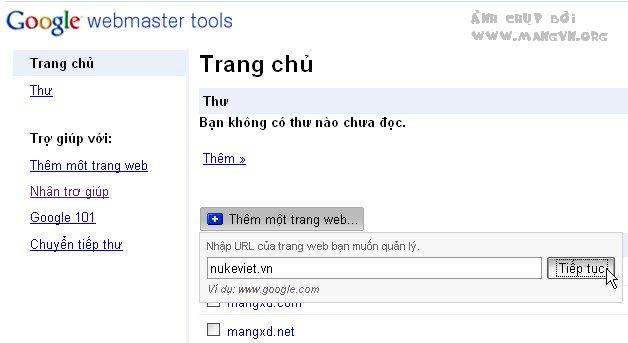
<span style="box-sizing: border-box; color: rgb(51, 51, 51); font-family: &#039;Helvetica Neue&#039;, Helvetica, Arial, sans-serif; font-size: 14px; font-weight: bold;">1.&nbsp;</span><span style="color: rgb(51, 51, 51); font-family: &#039;Helvetica Neue&#039;, Helvetica, Arial, sans-serif; font-size: 14px;">Thêm website của bạn vào danh sách website quản lý. (Hình 1)&nbsp;</span>

<div style="box-sizing: border-box; color: rgb(51, 51, 51); font-family: &#039;Helvetica Neue&#039;, Helvetica, Arial, sans-serif; font-size: 14px; text-align: center;">
<div class="image-center"><img alt="" height="343" src="https://tocdoviet.com/uploads/blog/2017_11/1245259674.nv.jpg" style="box-sizing: border-box; border: 0px; vertical-align: middle; margin-right: 5px; width: 628px; height: 343px;" width="628" /></div>
&nbsp;<br style="box-sizing: border-box;" />
Hình 1: Khai báo địa chỉ Web&nbsp;</div>
<br style="box-sizing: border-box; color: rgb(51, 51, 51); font-family: &#039;Helvetica Neue&#039;, Helvetica, Arial, sans-serif; font-size: 14px;" />
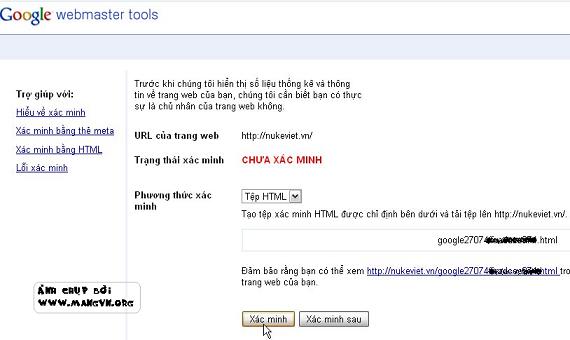
<span style="box-sizing: border-box; color: rgb(51, 51, 51); font-family: &#039;Helvetica Neue&#039;, Helvetica, Arial, sans-serif; font-size: 14px; font-weight: bold;">2.&nbsp;</span><span style="color: rgb(51, 51, 51); font-family: &#039;Helvetica Neue&#039;, Helvetica, Arial, sans-serif; font-size: 14px;">Xác thực bằng 1 trong 2 các mà google yêu cầu. Ví dụ tôi chọn cách tải lên file html mà google cung cấp. (Hình 2)&nbsp;</span>

<div style="box-sizing: border-box; color: rgb(51, 51, 51); font-family: &#039;Helvetica Neue&#039;, Helvetica, Arial, sans-serif; font-size: 14px; text-align: center;">
<div class="image-center"><img alt="" height="340" src="https://tocdoviet.com/uploads/blog/2017_11/1245259691.nv.jpg" style="box-sizing: border-box; border: 0px; vertical-align: middle; margin-right: 5px; width: 570px; height: 340px;" width="570" /></div>
&nbsp;<br style="box-sizing: border-box;" />
Hình 2: Xác minh.&nbsp;</div>
<br style="box-sizing: border-box; color: rgb(51, 51, 51); font-family: &#039;Helvetica Neue&#039;, Helvetica, Arial, sans-serif; font-size: 14px;" />
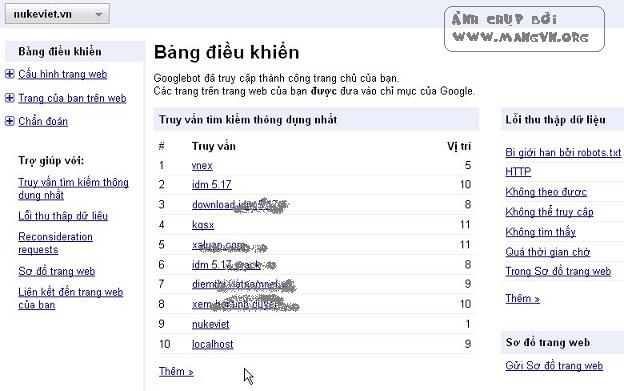
<span style="box-sizing: border-box; color: rgb(51, 51, 51); font-family: &#039;Helvetica Neue&#039;, Helvetica, Arial, sans-serif; font-size: 14px; font-weight: bold;">3.&nbsp;</span><span style="color: rgb(51, 51, 51); font-family: &#039;Helvetica Neue&#039;, Helvetica, Arial, sans-serif; font-size: 14px;">Nếu xác thực thành công, bạn sẽ được Google cung cấp tất cả các thông tin liên quan đến Website của mình. Nhấp vào link &quot;</span><span style="box-sizing: border-box; color: rgb(51, 51, 51); font-family: &#039;Helvetica Neue&#039;, Helvetica, Arial, sans-serif; font-size: 14px; font-weight: bold;">Gửi sơ đồ trang Web</span><span style="color: rgb(51, 51, 51); font-family: &#039;Helvetica Neue&#039;, Helvetica, Arial, sans-serif; font-size: 14px;">&quot;. (Hình 3) Bạn sẽ được chuyển đến trang tiếp theo.&nbsp;</span>

<div style="box-sizing: border-box; color: rgb(51, 51, 51); font-family: &#039;Helvetica Neue&#039;, Helvetica, Arial, sans-serif; font-size: 14px; text-align: center;">
<div class="image-center"><img alt="" height="391" src="https://tocdoviet.com/uploads/blog/2017_11/1245259710.nv.jpg" style="box-sizing: border-box; border: 0px; vertical-align: middle; margin-right: 5px; width: 478px; height: 299px;" width="624" /></div>
&nbsp;<br style="box-sizing: border-box;" />
Hình 3: Bảng điều khiển.&nbsp;</div>
<br style="box-sizing: border-box; color: rgb(51, 51, 51); font-family: &#039;Helvetica Neue&#039;, Helvetica, Arial, sans-serif; font-size: 14px;" />
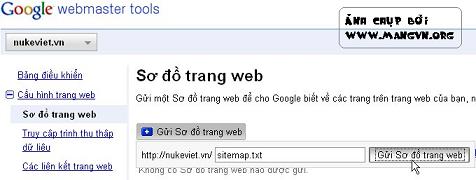
<span style="box-sizing: border-box; color: rgb(51, 51, 51); font-family: &#039;Helvetica Neue&#039;, Helvetica, Arial, sans-serif; font-size: 14px; font-weight: bold;">4.&nbsp;</span><span style="color: rgb(51, 51, 51); font-family: &#039;Helvetica Neue&#039;, Helvetica, Arial, sans-serif; font-size: 14px;">Tại đây nhấp nút &quot;</span><span style="box-sizing: border-box; color: rgb(51, 51, 51); font-family: &#039;Helvetica Neue&#039;, Helvetica, Arial, sans-serif; font-size: 14px; font-weight: bold;">Gửi sơ đồ trang Web</span><span style="color: rgb(51, 51, 51); font-family: &#039;Helvetica Neue&#039;, Helvetica, Arial, sans-serif; font-size: 14px;">&quot; và nhập vào địa chỉ tới file sitemap.txt của bạn (Hình 4). Trong giây láy, google sẽ lập chỉ mục cho website theo những gì bạn cung cấp. Kết quả sẽ báo trên màn hình.&nbsp;</span>

<div style="box-sizing: border-box; color: rgb(51, 51, 51); font-family: &#039;Helvetica Neue&#039;, Helvetica, Arial, sans-serif; font-size: 14px; text-align: center;">
<div class="image-center"><img alt="" height="180" src="https://tocdoviet.com/uploads/blog/2017_11/1245259721.nv.jpg" style="box-sizing: border-box; border: 0px; vertical-align: middle; margin-right: 5px; width: 476px; height: 180px;" width="476" /></div>
&nbsp;<br style="box-sizing: border-box;" />
Hình 4: Gửi sơ đồ trang Web.&nbsp;</div>
<br style="box-sizing: border-box; color: rgb(51, 51, 51); font-family: &#039;Helvetica Neue&#039;, Helvetica, Arial, sans-serif; font-size: 14px;" />
<span style="color: rgb(51, 51, 51); font-family: &#039;Helvetica Neue&#039;, Helvetica, Arial, sans-serif; font-size: 14px;">Như vậy bạn đã chắc chắn Website của mình được Google lập chỉ mục. Rất đơn giản mà chẳng cần tốn tiền thuê các công ty làm SEO đúng không?&nbsp;</span><br style="box-sizing: border-box; color: rgb(51, 51, 51); font-family: &#039;Helvetica Neue&#039;, Helvetica, Arial, sans-serif; font-size: 14px;" />
&nbsp;
<div style="box-sizing: border-box; color: rgb(51, 51, 51); font-family: &#039;Helvetica Neue&#039;, Helvetica, Arial, sans-serif; font-size: 14px;">Cách tạo sitemap ở trên, bạn có thể sử dụng phần mềm có tên&nbsp;<a href="http://code.google.com/p/googlesitemapgenerator/" style="box-sizing: border-box; background-color: transparent; color: rgb(26, 63, 94); text-decoration-line: none;" target="_blank">Google Sitemap Generator</a>&nbsp;để nó tự tạo chỉ mục cho bạn. Chi tiết về cấu trúc sitemap bạn tham khảo tại trang&nbsp;<a href="http://sitemaps.org/protocol.php" style="box-sizing: border-box; background-color: transparent; color: rgb(26, 63, 94); text-decoration-line: none;" target="_blank">http://sitemaps.org/protocol.php</a></div>
<br style="box-sizing: border-box; color: rgb(51, 51, 51); font-family: &#039;Helvetica Neue&#039;, Helvetica, Arial, sans-serif; font-size: 14px;" />
<span style="color: rgb(51, 51, 51); font-family: &#039;Helvetica Neue&#039;, Helvetica, Arial, sans-serif; font-size: 14px;">Tất cả các công cụ của Google có tại:&nbsp;</span><a href="http://www.google.com/intl/vi/webmasters/" style="box-sizing: border-box; color: rgb(26, 63, 94); text-decoration-line: none; font-family: &#039;Helvetica Neue&#039;, Helvetica, Arial, sans-serif; font-size: 14px;">http://www.google.com/intl/vi/webmasters/</a><span style="color: rgb(51, 51, 51); font-family: &#039;Helvetica Neue&#039;, Helvetica, Arial, sans-serif; font-size: 14px;">&nbsp;</span>

<div style="text-align: right;"><span style="color: rgb(51, 51, 51); font-family: &#039;Helvetica Neue&#039;, Helvetica, Arial, sans-serif; font-size: 14px;">Nguồn:&nbsp;</span>mangvn.org</div>
		</div>
	</div>
	<div id="footer" class="clearfix">
		<div id="url">
			<strong>URL của bản tin này: </strong><a href="https://tocdoviet.com/blog/savefile/Tai-lieu-SEO/dua-trang-web-cua-ban-vao-google-cach-nhanh-nhat-257.html" title="Đưa trang Web của bạn vào Google cách nhanh nhất&#33;">https://tocdoviet.com/blog/savefile/Tai-lieu-SEO/dua-trang-web-cua-ban-vao-google-cach-nhanh-nhat-257.html</a>

		</div>
		<div class="clear"></div>
		<div class="copyright">
			&copy; Tốc Độ Việt - Dịch vụ Hosting, Tên miền, Máy chủ, Thiết kế Website
		</div>
		<div id="contact">
			<a href="mailto:loc.thb@bazan.vn">loc.thb@bazan.vn</a>
		</div>
	</div>
</div>
        <div id="timeoutsess" class="chromeframe">
            Bạn đã không sử dụng Site, <a onclick="timeoutsesscancel();" href="https://tocdoviet.com/#">Bấm vào đây để duy trì trạng thái đăng nhập</a>. Thời gian chờ: <span id="secField"> 60 </span> giây
        </div>
        <div id="openidResult" class="nv-alert" style="display:none"></div>
        <div id="openidBt" data-result="" data-redirect=""></div>
        <div id="button-contact-vr" class=""><div id="gom-all-in-one"><div id="zalo-vr" class="button-contact"><div class="phone-vr"><div class="phone-vr-circle-fill"></div><div class="phone-vr-img-circle">
<a target="_blank" href="https://zalo.me/0888037777">
<img src="https://tocdoviet.com/themes/default/images/zalo.png">
</a></div></div></div><div id="phone-vr" class="button-contact"><div class="phone-vr"><div class="phone-vr-circle-fill"></div><div class="phone-vr-img-circle">
<a href="tel:0888037777">
<img src="https://tocdoviet.com/themes/default/images/phone.png">
</a></div></div></div></div></div><div id="popup-form-contact-vr"><div class="bg-popup-vr"></div><div class="content-popup-vr" id="loco-" style=" "><div class="content-popup-div-vr"></div><div class="close-popup-vr">x</div></div></div><div id="popup-showroom-vr"><div class="bg-popup-vr"></div><div class="content-popup-vr" id="loco-" style=" "><div class="content-popup-div-vr"></div><div class="close-popup-vr">x</div></div></div>

<div id="run_cronjobs" style="visibility:hidden;display:none;"><img alt="cron" src="/index.php?second=cronjobs&amp;p=i0jWAVu5" width="1" height="1" /></div>
<script src="https://tocdoviet.com/assets/js/jquery/jquery.min.js"></script>
<script>var nv_base_siteurl="/",nv_lang_data="vi",nv_lang_interface="vi",nv_name_variable="nv",nv_fc_variable="op",nv_lang_variable="language",nv_module_name="blog",nv_func_name="savefile",nv_is_user=0, nv_my_ofs=-4,nv_my_abbr="EDT",nv_cookie_prefix="nv4",nv_check_pass_mstime=1738000,nv_area_admin=0,nv_safemode=0,theme_responsive=1,nv_recaptcha_ver=2,nv_recaptcha_sitekey="",nv_recaptcha_type="image",XSSsanitize=1;</script>
<script src="https://tocdoviet.com/assets/js/language/vi.js"></script>
<script src="https://tocdoviet.com/assets/js/DOMPurify/purify3.js"></script>
<script src="https://tocdoviet.com/assets/js/global.js"></script>
<script src="https://tocdoviet.com/assets/js/site.js"></script>
<script src="https://tocdoviet.com/themes/default/js/news.js"></script>
<script src="https://tocdoviet.com/themes/default/js/main.js"></script>
<script src="https://tocdoviet.com/themes/default/js/custom.js"></script>
<script type="application/ld+json">
        {
            "@context": "https://schema.org",
            "@type": "Organization",
            "url": "https://tocdoviet.com",
            "logo": "https://tocdoviet.com/assets/images/logo.png"
        }
        </script>
<script src="https://tocdoviet.com/themes/default/js/bootstrap.min.js"></script>
</body>
</html>