<!DOCTYPE html>
    <html lang="vi" xmlns="http://www.w3.org/1999/xhtml" prefix="og: http://ogp.me/ns#">
    <head>
<title>Sự khác nhau giữa MBR và GPT, BIOS và UEFI&#x002F;EFI</title>
<meta name="description" content="Sự khác nhau giữa MBR và GPT, BIOS và UEFI&#x002F;EFI - Savefile - Blog -...">
<meta name="author" content="Tốc Độ Việt - Dịch vụ Hosting, Tên miền, Máy chủ, Thiết kế Website">
<meta name="copyright" content="Tốc Độ Việt - Dịch vụ Hosting, Tên miền, Máy chủ, Thiết kế Website [loc.thb@bazan.vn]">
<meta name="generator" content="NukeViet v4.5">
<meta name="viewport" content="width=device-width, initial-scale=1">
<meta http-equiv="Content-Type" content="text/html; charset=utf-8">
<meta property="og:title" content="Sự khác nhau giữa MBR và GPT, BIOS và UEFI&#x002F;EFI">
<meta property="og:type" content="website">
<meta property="og:description" content="Savefile - Blog - https&#x3A;&#x002F;&#x002F;tocdoviet.com&#x002F;blog&#x002F;savefile&#x002F;Tai-lieu-May-Tinh&#x002F;su-khac-nhau-giua-mbr-va-gpt-bios-va-uefi-efi-251.html">
<meta property="og:site_name" content="Tốc Độ Việt - Dịch vụ Hosting, Tên miền, Máy chủ, Thiết kế Website">
<meta property="og:url" content="https://tocdoviet.com/blog/savefile/Tai-lieu-May-Tinh/su-khac-nhau-giua-mbr-va-gpt-bios-va-uefi-efi-251.html">
<link rel="shortcut icon" href="https://tocdoviet.com/favicon.ico">
<link rel="canonical" href="https://tocdoviet.com/blog/savefile/Tai-lieu-May-Tinh/su-khac-nhau-giua-mbr-va-gpt-bios-va-uefi-efi-251.html">
<link rel="alternate" href="https://tocdoviet.com/blog/rss/" title="Blog" type="application/rss+xml">
<link rel="alternate" href="https://tocdoviet.com/blog/rss/Cau-hoi-thuong-gap/" title="Blog - Câu hỏi thường gặp" type="application/rss+xml">
<link rel="alternate" href="https://tocdoviet.com/blog/rss/Tai-lieu-Ten-Mien/" title="Blog - Tài liệu Tên Miền" type="application/rss+xml">
<link rel="alternate" href="https://tocdoviet.com/blog/rss/Tai-lieu-Hosting/" title="Blog - Tài liệu Hosting" type="application/rss+xml">
<link rel="alternate" href="https://tocdoviet.com/blog/rss/Tai-lieu-May-Chu/" title="Blog - Tài liệu Máy Chủ" type="application/rss+xml">
<link rel="alternate" href="https://tocdoviet.com/blog/rss/Tai-lieu-Ma-Nguon/" title="Blog - Tài liệu Mã Nguồn" type="application/rss+xml">
<link rel="alternate" href="https://tocdoviet.com/blog/rss/Tai-lieu-SEO/" title="Blog - Tài liệu SEO" type="application/rss+xml">
<link rel="alternate" href="https://tocdoviet.com/blog/rss/Tai-lieu-Website/" title="Blog - Tài liệu Website" type="application/rss+xml">
<link rel="alternate" href="https://tocdoviet.com/blog/rss/Tai-lieu-Phan-Mem/" title="Blog - Tài liệu Phần Mềm" type="application/rss+xml">
<link rel="alternate" href="https://tocdoviet.com/blog/rss/Tai-lieu-May-Tinh/" title="Blog - Tài liệu Máy Tính" type="application/rss+xml">
<link rel="preload" as="style" href="https://tocdoviet.com/assets/css/font-awesome.min.css" type="text/css">
<link rel="preload" as="style" href="https://tocdoviet.com/themes/default/css/bootstrap.min.css" type="text/css">
<link rel="preload" as="style" href="https://tocdoviet.com/themes/default/css/style.css" type="text/css">
<link rel="preload" as="style" href="https://tocdoviet.com/themes/default/css/style.responsive.css" type="text/css">
<link rel="preload" as="style" href="https://tocdoviet.com/themes/default/css/news.css" type="text/css">
<link rel="preload" as="style" href="https://tocdoviet.com/themes/default/css/custom.css" type="text/css">
<link rel="preload" as="script" href="https://tocdoviet.com/assets/js/jquery/jquery.min.js" type="text/javascript">
<link rel="preload" as="script" href="https://tocdoviet.com/assets/js/language/vi.js" type="text/javascript">
<link rel="preload" as="script" href="https://tocdoviet.com/assets/js/DOMPurify/purify3.js" type="text/javascript">
<link rel="preload" as="script" href="https://tocdoviet.com/assets/js/global.js" type="text/javascript">
<link rel="preload" as="script" href="https://tocdoviet.com/assets/js/site.js" type="text/javascript">
<link rel="preload" as="script" href="https://tocdoviet.com/themes/default/js/news.js" type="text/javascript">
<link rel="preload" as="script" href="https://tocdoviet.com/themes/default/js/main.js" type="text/javascript">
<link rel="preload" as="script" href="https://tocdoviet.com/themes/default/js/custom.js" type="text/javascript">
<link rel="preload" as="script" href="https://tocdoviet.com/themes/default/js/bootstrap.min.js" type="text/javascript">
<link rel="stylesheet" href="https://tocdoviet.com/assets/css/font-awesome.min.css">
<link rel="stylesheet" href="https://tocdoviet.com/themes/default/css/bootstrap.min.css">
<link rel="stylesheet" href="https://tocdoviet.com/themes/default/css/style.css">
<link rel="stylesheet" href="https://tocdoviet.com/themes/default/css/style.responsive.css">
<link rel="StyleSheet" href="https://tocdoviet.com/themes/default/css/news.css">
<link rel="stylesheet" href="https://tocdoviet.com/themes/default/css/custom.css">
<style>
#gom-all-in-one{margin-bottom: 150px;}
@-webkit-keyframes phone-vr-circle-fill {
0% {-webkit-transform: rotate(0) scale(1) skew(1deg); }
10% {-webkit-transform: rotate(-25deg) scale(1) skew(1deg);}
20% {-webkit-transform: rotate(25deg) scale(1) skew(1deg);}
30% {-webkit-transform: rotate(-25deg) scale(1) skew(1deg);}
40% {-webkit-transform: rotate(25deg) scale(1) skew(1deg);}
50% {-webkit-transform: rotate(0) scale(1) skew(1deg);}
100% {-webkit-transform: rotate(0) scale(1) skew(1deg);}
}
@-webkit-keyframes zoom{0%{transform:scale(.9)}70%{transform:scale(1);box-shadow:0 0 0 15px transparent}100%{transform:scale(.9);box-shadow:0 0 0 0 transparent}}@keyframes zoom{0%{transform:scale(.9)}70%{transform:scale(1);box-shadow:0 0 0 15px transparent}100%{transform:scale(.9);box-shadow:0 0 0 0 transparent}}
#button-contact-vr{right:0}
.phone-bar a{
left:auto;right:30px;padding:8px 55px 7px 15px
}
#button-contact-vr.active #gom-all-in-one .button-contact
{
margin-left:100%
}
#button-contact-vr{bottom:30%}
#gom-all-in-one #zalo-vr {
transition: 1s all;
-moz-transition: 1s all;
-webkit-transition: 1s all;
}
#zalo-vr .phone-vr-circle-fill {
box-shadow: 0 0 0 0 #2196f3;
background-color: rgba(33,150,243,.7);
}
.phone-vr-circle-fill {
width: 65px;
height: 65px;
top: 12px;
left: 12px;
position: absolute;
box-shadow: 0 0 0 0 #c31d1d;
background-color: rgba(230,8,8,.7);
border-radius: 50%;
border: 2px solid transparent;
-webkit-animation: phone-vr-circle-fill 2.3s infinite ease-in-out;
animation: phone-vr-circle-fill 2.3s infinite ease-in-out;
transition: all .5s;
-webkit-transform-origin: 50% 50%;
-ms-transform-origin: 50% 50%;
transform-origin: 50% 50%;
-webkit-animuiion: zoom 1.3s infinite;
animation: zoom 1.3s infinite;
}
.phone-vr-img-circle a {
display: block;
line-height: 37px;
}
.phone-vr-img-circle img {
max-height: 25px;
max-width: 27px;
position: absolute;
top: 50%;
left: 50%;
transform: translate(-50%,-50%);
-moz-transform: translate(-50%,-50%);
-webkit-transform: translate(-50%,-50%);
-o-transform: translate(-50%,-50%);
}
#zalo-vr .phone-vr-img-circle {
background-color: #2196f3;
}
.phone-vr-img-circle {
background-color: #e60808;
width: 40px;
height: 40px;
line-height: 40px;
top: 25px;
left: 25px;
position: absolute;
border-radius: 50%;
overflow: hidden;
display: flex;
justify-content: center;
-webkit-animation: phonering-alo-circle-img-anim 1s infinite ease-in-out;
animation: phone-vr-circle-fill 1s infinite ease-in-out;
}
#button-contact-vr .button-contact .phone-vr {
position: relative;
visibility: visible;
background-color: transparent;
width: 90px;
height: 90px;
cursor: pointer;
z-index: 11;
-webkit-backface-visibility: hidden;
-webkit-transform: translateZ(0);
transition: visibility .5s;
left: 0;
bottom: 0;
display: block;
}
#gom-all-in-one #phone-vr {
transition: .7s all;
-moz-transition: .7s all;
-webkit-transition: .7s all;
}
#button-contact-vr .button-contact {
position: relative;
margin-top: 5px;
}
#phone-vr .phone-vr-circle-fill {
opacity: .7;
box-shadow: 0 0 0 0 #d33;
}
.phone-bar a, #phone-vr .phone-vr-circle-fill, #phone-vr .phone-vr-img-circle, #phone-vr .phone-bar a {
background-color: #d33;
}
#button-contact-vr {
bottom: 30%;
}
#button-contact-vr {
position: fixed;
bottom: 0;
z-index: 99999;
}
#popup-showroom-vr, div#popup-form-contact-vr {
display: none;
}
.bg-popup-vr {
position: absolute;
left: 0;
top: 0;
background: rgb(51 51 51/50%);
width: 100%;
height: 100vh;
}
@media (max-width: 673px)
div#popup-form-contact-vr .content-popup-vr {
display: block;
}
.content-popup-vr {
background: #fff;
position: absolute;
left: 50%;
top: 50%;
transform: translate(-50%,-50%);
width: 95%;
border-radius: 5px;
box-shadow: 0 0 14px 5px rgb(0 0 0/49%);
max-width: 600px;
display: flex;
}
.content-popup-vr .content-popup-div-vr {
width: 100%;
padding: 25px;
}
.content-popup-vr .close-popup-vr {
font-family: sans-serif;
width: 23px;
height: 23px;
background: #000;
position: absolute;
top: -10px;
right: -10px;
color: #fff;
text-align: center;
line-height: 23px;
font-size: 17px;
border-radius: 50%;
cursor: pointer;
}
</style>
<style type="text/css">
	body{background: #fff;}
</style>
<style type="text/css"></style>
    </head>
    <body>
<div id="print">
	<div id="hd_print">
		<h2 class="pull-left">Tốc Độ Việt - Dịch vụ Hosting, Tên miền, Máy chủ, Thiết kế Website</h2>
		<p class="pull-right"><a title="Tốc Độ Việt - Dịch vụ Hosting, Tên miền, Máy chủ, Thiết kế Website" href="https://tocdoviet.com/">https://tocdoviet.com</a></p>
	</div>
	<div class="clear"></div>
	<hr />
	<div id="content">
		<h1>Sự khác nhau giữa MBR và GPT, BIOS và UEFI&#x002F;EFI</h1>
		<ul class="list-inline">
			<li>Thứ tư - 26/08/2015 04:06</li>
			<li class="hidden-print txtrequired"><em class="fa fa-print">&nbsp;</em><a title="In ra" href="javascript:;" onclick="window.print()">In ra</a></li>
			<li class="hidden-print txtrequired"><em class="fa fa-power-off">&nbsp;</em><a title="Đóng cửa sổ này" href="javascript:;" onclick="window.close()">Đóng cửa sổ này</a></li>
		</ul>
		<div class="clear"></div>
		<div id="hometext">
			Bạn đã nghe về thuật ngữ GPT, MBR, BIOS và UEFI? Chắc chắn bạn đã từng nghe nếu như đang sử dụng máy tính, vậy bạn có biết sự khác nhau giữa GPT và MBR, cũng như sự khác biệt giữa BIOS và UEFI/EFI?
		</div>
				<div class="imghome">
			<img alt="Sự khác nhau giữa MBR và GPT, BIOS và UEFI&#x002F;EFI" src="https://tocdoviet.com/uploads/blog/2015_08/uefi_logo.gif" width="460" class="img-thumbnail" />
		</div>
		<div class="clear"></div>
		<div id="bodytext" class="clearfix">
			<p style="box-sizing: border-box; margin: 0px 0px 26px; padding: 0px; color: rgb(51, 51, 51); font-family: HelveticaNeueLight, Arial, serif; font-size: 16px; line-height: 26px;">Trong bài viết này&nbsp;<span style="box-sizing: border-box; transition-duration: 0.1s; transition-timing-function: ease-in-out; transition-delay: initial; border-bottom-width: 1px; border-bottom-style: dotted; border-bottom-color: rgb(14, 191, 233);">Toonima</span>&nbsp;sẽ giúp bạn hiểu&nbsp;sự khác nhau cơ bản giữa các thuật ngữ này, giúp bạn hình dung một cách dễ dàng hơn về chúng.</p>

<h2 style="box-sizing: border-box; color: rgb(51, 51, 51); font-family: Arial, sans-serif; font-weight: normal; line-height: 1.3; margin: 0px 0px 15px; font-size: 28px;">Phân vùng ổ cứng là gì?</h2>

<p style="box-sizing: border-box; margin: 0px 0px 26px; padding: 0px; color: rgb(51, 51, 51); font-family: HelveticaNeueLight, Arial, serif; font-size: 16px; line-height: 26px;">Ổ cứng của bạn cần được phân vùng để cài đặt&nbsp;<span style="box-sizing: border-box; transition-duration: 0.1s; transition-timing-function: ease-in-out; transition-delay: initial; border-bottom-width: 1px; border-bottom-style: dotted; border-bottom-color: rgb(14, 191, 233);">Windows</span>, chứa dữ liệu… chúng chính là các ổ C, D, E.. mà bạn thường thấy. Nhưng để hệ điều hành có thể hiểu được ổ cứng đã phân vùng như thế nào thì nó cần tới một nơi chứa thông tin về chúng, đó chính là MBR và GPT. Như vậy về cơ bản thì chức năng của MBR và GPT là như nhau, nhưng về nâng cao thì có hơi khác nhau một chút.</p>

<h2 style="box-sizing: border-box; color: rgb(51, 51, 51); font-family: Arial, sans-serif; font-weight: normal; line-height: 1.3; margin: 0px 0px 15px; font-size: 28px;">Sự khác nhau giữa MBR và GPT</h2>

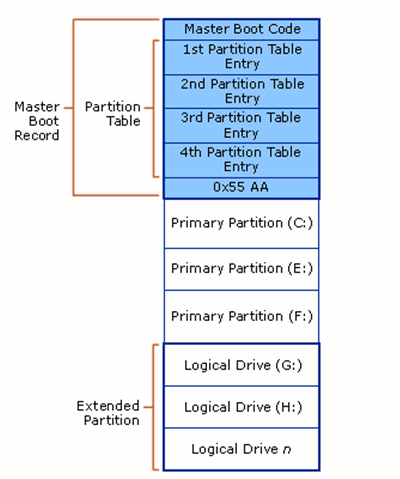
<h3 style="box-sizing: border-box; color: rgb(51, 51, 51); font-family: Arial, sans-serif; font-weight: normal; line-height: 1.3; margin: 0px 0px 15px; font-size: 24px;">Master Boot Record (MBR) là gì?</h3>

<p style="box-sizing: border-box; margin: 0px 0px 26px; padding: 0px; color: rgb(51, 51, 51); font-family: HelveticaNeueLight, Arial, serif; font-size: 16px; line-height: 26px;"><span style="transition-duration: 0.1s; transition-timing-function: ease-in-out; transition-delay: initial; border-style: initial; border-color: initial; border-image-source: initial; border-image-slice: initial; border-image-width: initial; border-image-outset: initial; border-image-repeat: initial; height: auto; margin-right: auto; margin-left: auto;"><img alt="mbr-disk-layout" class="aligncenter size-full wp-image-2220" src="https://tocdoviet.com/uploads/blog/2015_08/mbr-disk-layout.png" style="box-sizing: border-box; border: 0px; max-width: 100%; height: 479px; margin: 0px auto 24px; display: block; width: 400px;" /></span></p>

<p style="box-sizing: border-box; margin: 0px 0px 26px; padding: 0px; color: rgb(51, 51, 51); font-family: HelveticaNeueLight, Arial, serif; font-size: 16px; line-height: 26px;">Đây là một chuẩn quản lí thông tin phân vùng cũ, nhưng tới ngày nay chúng vẫn được sử dụng rất rất nhiều.&nbsp;<span style="box-sizing: border-box; transition-duration: 0.1s; transition-timing-function: ease-in-out; transition-delay: initial; border-bottom-width: 1px; border-bottom-style: dotted; border-bottom-color: rgb(14, 191, 233);">MBR</span>&nbsp;lưu trữ thông tin về phân vùng ổ cứng ở một phân vùng nhỏ trong ổ cứng, nó chứa các mã thực thi để hệ điều hành chạy nó trước khi khởi động.</p>

<p style="box-sizing: border-box; margin: 0px 0px 26px; padding: 0px; color: rgb(51, 51, 51); font-family: HelveticaNeueLight, Arial, serif; font-size: 16px; line-height: 26px;">MBR có nhiều nhược điểm, như bạn chỉ có thể tạo được 4 phân vùng, nếu nhiều hơn bạn phải để hệ điều hành hiểu rằng các phân vùng tạo thêm là phân vùng gắn ngoài (tạm hiểu như là usb, ổ cứng gắn ngoài). Ngoài ra, một phân vùng không thể hơn có kích thước lớn hơn 2 TB.</p>

<p style="box-sizing: border-box; margin: 0px 0px 26px; padding: 0px; color: rgb(51, 51, 51); font-family: HelveticaNeueLight, Arial, serif; font-size: 16px; line-height: 26px;">Nhược điểm cuối cùng và lớn nhất ổ cứng MBR sử dụng MBR là nơi lưu trữ thông tin phân vùng duy nhất, nếu phân vùng này chẳng may bị hỏng là ổ cứng của bạn sẽ đi tong ngay.</p>

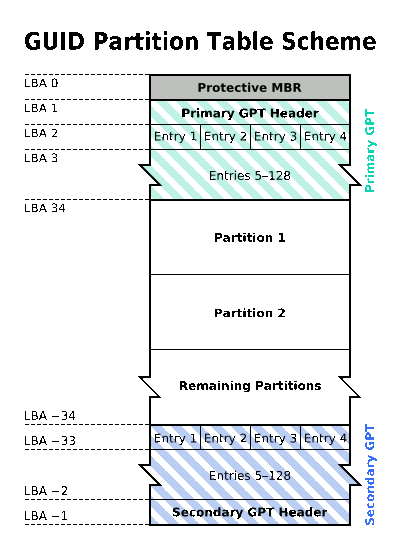
<h3 style="box-sizing: border-box; color: rgb(51, 51, 51); font-family: Arial, sans-serif; font-weight: normal; line-height: 1.3; margin: 0px 0px 15px; font-size: 24px;">GUID Partition Table (GPT) là gì?</h3>

<p style="box-sizing: border-box; margin: 0px 0px 26px; padding: 0px; color: rgb(51, 51, 51); font-family: HelveticaNeueLight, Arial, serif; font-size: 16px; line-height: 26px;"><img alt="gpt-partition-scheme" class="aligncenter size-full wp-image-2219" src="https://tocdoviet.com/uploads/blog/2015_08/gpt-partition-scheme.png" style="box-sizing: border-box; border: 0px; max-width: 100%; height: 550px; display: block; margin: 0px auto 24px; width: 400px;" /></p>

<p style="box-sizing: border-box; margin: 0px 0px 26px; padding: 0px; color: rgb(51, 51, 51); font-family: HelveticaNeueLight, Arial, serif; font-size: 16px; line-height: 26px;">GPT là một chuẩn quản lí thông tin phân vùng mới hiện nay. Điểm khác với MBR là nó sử dụng GUID (Globally unique identifiers), tạm dịch định danh duy nhất&nbsp;toàn cầu, hay ổ cứng của bạn sẽ được xác định bởi một mã số duy nhất hay nói cách khác bạn là bạn không có ai giống bạn trên thế giới này.</p>

<p style="box-sizing: border-box; margin: 0px 0px 26px; padding: 0px; color: rgb(51, 51, 51); font-family: HelveticaNeueLight, Arial, serif; font-size: 16px; line-height: 26px;">Với GPT, bạn có thể tạo nhiều hơn 4 phân vùng, một phân vùng GPT có kích thước tối đa là 1 ZB. (1 ZB bằng 1 tỉ TB), và thay vì MBR chỉ có một nơi duy nhất lưu trữ thông tin phân vùng thì GPT có hai nơi như vậy, một ở đầu và một ở cuối để tránh việc một trong hai nơi bị hỏng hóc.</p>

<p style="box-sizing: border-box; margin: 0px 0px 26px; padding: 0px; color: rgb(51, 51, 51); font-family: HelveticaNeueLight, Arial, serif; font-size: 16px; line-height: 26px;">Mặc dù theo lí thuyết trên, GPT cho bạn khả năng lưu trữ vô hạn, nhưng thực tế thì Windows chỉ hỗ trợ 128 phân vùng khác nhau, và kích thước tối đa bạn có thể đạt được là 256 TB.</p>

<p style="box-sizing: border-box; margin: 0px 0px 26px; padding: 0px; color: rgb(51, 51, 51); font-family: HelveticaNeueLight, Arial, serif; font-size: 16px; line-height: 26px;">Tóm lại với GPT có nhiều ưu điểm vượt trội hơn so với MBR, và đang được thay thế dần trên các máy tính hiện nay.</p>

<h2 style="box-sizing: border-box; color: rgb(51, 51, 51); font-family: Arial, sans-serif; font-weight: normal; line-height: 1.3; margin: 0px 0px 15px; font-size: 28px;">Sự khác nhau giữa BIOS và UEFI/EFI</h2>

<p style="box-sizing: border-box; margin: 0px 0px 26px; padding: 0px; color: rgb(51, 51, 51); font-family: HelveticaNeueLight, Arial, serif; font-size: 16px; line-height: 26px;"><span style="transition-duration: 0.1s; transition-timing-function: ease-in-out; transition-delay: initial; border-style: initial; border-color: initial; border-image-source: initial; border-image-slice: initial; border-image-width: initial; border-image-outset: initial; border-image-repeat: initial; height: auto; margin-right: auto; margin-left: auto;"><img alt="BIOS-21" class="aligncenter size-full wp-image-2221" src="https://tocdoviet.com/uploads/blog/2015_08/bios-21.png" style="box-sizing: border-box; border: 0px; max-width: 100%; height: 309px; margin: 0px auto 24px; display: block; width: 500px;" /></span></p>

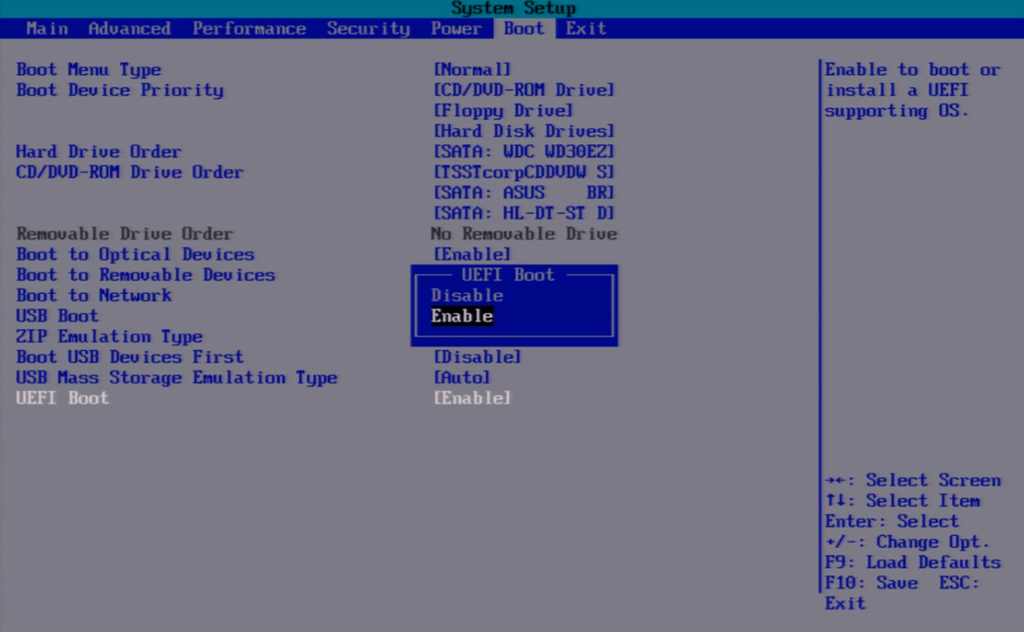
<p style="box-sizing: border-box; margin: 0px 0px 26px; padding: 0px; color: rgb(51, 51, 51); font-family: HelveticaNeueLight, Arial, serif; font-size: 16px; line-height: 26px;">Khi tìm hiểu về UEFI mà mình không đề cập tới BIOS sẽ là một thiếu sót lớn. Do bài viết của mình sẽ tổng hợp và đơn giản các kiến thức để bạn có thể hình dung một cách dễ dàng hơn, nên mình sẽ không đề cập nhiều tới các chi tiết kĩ thuật.</p>

<h3 style="box-sizing: border-box; color: rgb(51, 51, 51); font-family: Arial, sans-serif; font-weight: normal; line-height: 1.3; margin: 0px 0px 15px; font-size: 24px;">BIOS là gì?</h3>

<p style="box-sizing: border-box; margin: 0px 0px 26px; padding: 0px; color: rgb(51, 51, 51); font-family: HelveticaNeueLight, Arial, serif; font-size: 16px; line-height: 26px;"><span style="box-sizing: border-box; transition-duration: 0.1s; transition-timing-function: ease-in-out; transition-delay: initial; border-bottom-width: 1px; border-bottom-style: dotted; border-bottom-color: rgb(14, 191, 233);">BIOS</span>&nbsp;chính là một phần mềm nhằm kiểm tra hệ thống của bạn trước khi máy tính khởi động, hiểu đơn giản là nó kiểm tra xem máy bạn có card màn hình không, có chuột không, có bàn phím không… sau đó nó sẽ gửi thông tin đó tới hệ điều hành để nhận các thiết bị này, và máy bạn sẽ khởi động.</p>

<h3 style="box-sizing: border-box; color: rgb(51, 51, 51); font-family: Arial, sans-serif; font-weight: normal; line-height: 1.3; margin: 0px 0px 15px; font-size: 24px;">UEFI và EFI là gì?</h3>

<p style="box-sizing: border-box; margin: 0px 0px 26px; padding: 0px; color: rgb(51, 51, 51); font-family: HelveticaNeueLight, Arial, serif; font-size: 16px; line-height: 26px;">UEFI cũng có tác dụng tương tự như BIOS, nhưng nó là chuẩn mới hơn, nên sẽ giúp việc nạp và kiểm tra hệ thống bạn nhanh hơn BIOS.&nbsp;Vì ngày nay, các thiết bị ngoại vi đa giao tiếp gắn trên một máy tính quá nhiều làm cho BIOS gặp nhiều khó khăn khi máy tính khởi động, nên UEFI đã được sử dụng để thay thế dần BIOS.</p>

<p style="box-sizing: border-box; margin: 0px 0px 26px; padding: 0px; color: rgb(51, 51, 51); font-family: HelveticaNeueLight, Arial, serif; font-size: 16px; line-height: 26px;">EFI cũng tương tự như&nbsp;<span style="box-sizing: border-box; transition-duration: 0.1s; transition-timing-function: ease-in-out; transition-delay: initial; border-bottom-width: 1px; border-bottom-style: dotted; border-bottom-color: rgb(14, 191, 233);">UEFI</span>, nó là tên gọi được Apple sử dụng trong các dòng máy Mac, còn các máy tính của hãng khác thì sử dụng tên gọi UEFI.</p>

<p style="box-sizing: border-box; margin: 0px 0px 26px; padding: 0px; color: rgb(51, 51, 51); font-family: HelveticaNeueLight, Arial, serif; font-size: 16px; line-height: 26px;">Apple đã áp dụng chuẩn EFI khá lâu, còn mãi đến sau này UEFI mới được Microsoft sử dụng trên Windows 8, đó cũng là lí do mà việc khởi động Windows 8 nhanh hơn các phiên bản trước rất nhiều nhờ sự kết hợp giữa UEFI và GPT cho tốc độ truy xuất siêu nhanh.</p>

<h2 style="box-sizing: border-box; color: rgb(51, 51, 51); font-family: Arial, sans-serif; font-weight: normal; line-height: 1.3; margin: 0px 0px 15px; font-size: 28px;">GPT có nhanh hơn MBR không?</h2>

<p style="box-sizing: border-box; margin: 0px 0px 26px; padding: 0px; color: rgb(51, 51, 51); font-family: HelveticaNeueLight, Arial, serif; font-size: 16px; line-height: 26px;">Nhiều bạn hiện cho rằng ổ cứng&nbsp;<span style="box-sizing: border-box; transition-duration: 0.1s; transition-timing-function: ease-in-out; transition-delay: initial; border-bottom-width: 1px; border-bottom-style: dotted; border-bottom-color: rgb(14, 191, 233);">G</span><span style="box-sizing: border-box; transition-duration: 0.1s; transition-timing-function: ease-in-out; transition-delay: initial; border-bottom-width: 1px; border-bottom-style: dotted; border-bottom-color: rgb(14, 191, 233);">PT</span>&nbsp;cho hiệu suất nhanh hơn ổ cứng MBR, nhưng theo tài liệu mình đọc được cùng những kinh nghiệm cá nhân của mình, thì tốc độ của các ổ cứng GPT không hề nhanh hơn các ổ cứng MBR.</p>

<p style="box-sizing: border-box; margin: 0px 0px 26px; padding: 0px; color: rgb(51, 51, 51); font-family: HelveticaNeueLight, Arial, serif; font-size: 16px; line-height: 26px;">Do GPT luôn đi kèm với UEFI boot, nên bạn sẽ thấy tốc độ khởi động của máy nhanh hơn đáng kể, qua đó đánh giá chủ quan về hiệu suất mà GPT mang lại chứ thật sự nó không hề tốt hơn.</p>

<p style="box-sizing: border-box; margin: 0px 0px 26px; padding: 0px; color: rgb(51, 51, 51); font-family: HelveticaNeueLight, Arial, serif; font-size: 16px; line-height: 26px;">Vậy, bạn nên chuyển đổi ổ cứng sang chuẩn GPT để ổ cứng bạn trở nên an toàn hơn, tránh các hỏng hóc có thể phát sinh chứ không vì hiệu năng nó mang lại.</p>

<h2 style="box-sizing: border-box; color: rgb(51, 51, 51); font-family: Arial, sans-serif; font-weight: normal; line-height: 1.3; margin: 0px 0px 15px; font-size: 28px;">Windows 32 bit có thể dùng được GPT không?</h2>

<p style="box-sizing: border-box; margin: 0px 0px 26px; padding: 0px; color: rgb(51, 51, 51); font-family: HelveticaNeueLight, Arial, serif; font-size: 16px; line-height: 26px;">Ổ cứng GPT chỉ hỗ trợ Windows 64 bit, bạn không thể cài đặt Windows 32 bit trên ổ cứng GPT.</p>

<h2 style="box-sizing: border-box; color: rgb(51, 51, 51); font-family: Arial, sans-serif; font-weight: normal; line-height: 1.3; margin: 0px 0px 15px; font-size: 28px;">Chuyển đổi giữa MBR và GPT có thể làm mất dữ liệu không?</h2>

<p style="box-sizing: border-box; margin: 0px 0px 26px; padding: 0px; color: rgb(51, 51, 51); font-family: HelveticaNeueLight, Arial, serif; font-size: 16px; line-height: 26px;">Có hai cách chuyển đổi giữa MBR và GPT, một cách dùng phần mềm chuyển đổi&nbsp;ổ đĩa (cách này sẽ không làm mất dữ liệu của bạn) và cách còn lại là chia lại ổ đĩa (sẽ làm cho ổ cứng bạn mất toàn bộ dữ liệu), nhưng mình lại thích cách thứ hai hơn.</p>

<h3 style="box-sizing: border-box; color: rgb(51, 51, 51); font-family: Arial, sans-serif; font-weight: normal; line-height: 1.3; margin: 0px 0px 15px; font-size: 24px;">1.&nbsp;Sử dụng phần mềm để chuyển đổi giữa GPT và MBR.</h3>

<p style="box-sizing: border-box; margin: 0px 0px 26px; padding: 0px; color: rgb(51, 51, 51); font-family: HelveticaNeueLight, Arial, serif; font-size: 16px; line-height: 26px;">Bạn có thể sử dụng&nbsp;<a href="http://download.cnet.com/AOMEI-Partition-Assistant-Standard-Edition/3000-18512_4-75118871.html" rel="nofollow" style="box-sizing: border-box; transition: all 0.1s ease-in-out; border-bottom-width: 1px; border-bottom-style: dotted; border-bottom-color: rgb(14, 191, 233); color: rgb(14, 191, 233); text-decoration: none;" target="_blank">AOMEI Partition Assistant Standard Edition</a>&nbsp;hoặc&nbsp;<a href="http://www.partition-tool.com/" rel="nofollow" style="box-sizing: border-box; transition: all 0.1s ease-in-out; border-bottom-width: 1px; border-bottom-style: dotted; border-bottom-color: rgb(14, 191, 233); color: rgb(14, 191, 233); text-decoration: none;" target="_blank">Easeus Partition Master</a>&nbsp;để chuyển đổi giữa MBR và GPT. Chúng sẽ bảo toàn nguyên vẹn dữ&nbsp;liệu của bạn.</p>

<h3 style="box-sizing: border-box; color: rgb(51, 51, 51); font-family: Arial, sans-serif; font-weight: normal; line-height: 1.3; margin: 0px 0px 15px; font-size: 24px;">2.&nbsp;Xóa và phân vùng lại ổ cứng.</h3>

<p style="box-sizing: border-box; margin: 0px 0px 26px; padding: 0px; color: rgb(51, 51, 51); font-family: HelveticaNeueLight, Arial, serif; font-size: 16px; line-height: 26px;">Bạn chỉ có thể chuyển đổi MBR sang GPT và ngược lại khi cài đặt lại hệ điều hành, bạn có thể đọc bài viết về , chú ý ở tùy chọn&nbsp;<span style="box-sizing: border-box; font-family: HelveticaNeueBold, Arial, sans-serif;">Partition cheme and target system type&nbsp;</span>trong bài viết&nbsp;<span style="box-sizing: border-box; transition-duration: 0.1s; transition-timing-function: ease-in-out; transition-delay: initial; border-bottom-width: 1px; border-bottom-style: dotted; border-bottom-color: rgb(14, 191, 233);">Tạo USB Boot dễ dàng với phần mềm Rufus</span>. Tùy chọn này quyết định ổ cứng của bạn sẽ ở định dạng gì, MBR hay GPT.</p>

<p style="box-sizing: border-box; margin: 0px 0px 26px; padding: 0px; color: rgb(51, 51, 51); font-family: HelveticaNeueLight, Arial, serif; font-size: 16px; line-height: 26px;">Khi cài đặt lại Windows, sẽ có một lúc Windows hỏi bạn chọn ổ cứng để cài Windows vào, lúc đó hãy chọn&nbsp;<span style="box-sizing: border-box; font-family: HelveticaNeueBold, Arial, sans-serif;">De-lete Partition</span>&nbsp;để xóa tất cả các phân vùng ổ cứng hiện tại của bạn, sau đó chọn&nbsp;<span style="box-sizing: border-box; font-family: HelveticaNeueBold, Arial, sans-serif;">Cre-ate Partition</span>&nbsp;để phần mềm tự tạo lại chuẩn phân vùng thích hợp cho máy bạn.</p>

<h2 style="box-sizing: border-box; color: rgb(51, 51, 51); font-family: Arial, sans-serif; font-weight: normal; line-height: 1.3; margin: 0px 0px 15px; font-size: 28px;">Lời kết</h2>

<p style="box-sizing: border-box; margin: 0px 0px 26px; padding: 0px; color: rgb(51, 51, 51); font-family: HelveticaNeueLight, Arial, serif; font-size: 16px; line-height: 26px;">Hy vọng bạn đã phân biệt được sự khác nhau cơ bản giữa GPT và MBR, cũng như là giữa UEFI và BIOS. Cũng như có câu trả lời về những gì bạn đang thắc mắc qua bài viết này.</p>
		</div>
	</div>
	<div id="footer" class="clearfix">
		<div id="url">
			<strong>URL của bản tin này: </strong><a href="https://tocdoviet.com/blog/savefile/Tai-lieu-May-Tinh/su-khac-nhau-giua-mbr-va-gpt-bios-va-uefi-efi-251.html" title="Sự khác nhau giữa MBR và GPT, BIOS và UEFI&#x002F;EFI">https://tocdoviet.com/blog/savefile/Tai-lieu-May-Tinh/su-khac-nhau-giua-mbr-va-gpt-bios-va-uefi-efi-251.html</a>

		</div>
		<div class="clear"></div>
		<div class="copyright">
			&copy; Tốc Độ Việt - Dịch vụ Hosting, Tên miền, Máy chủ, Thiết kế Website
		</div>
		<div id="contact">
			<a href="mailto:loc.thb@bazan.vn">loc.thb@bazan.vn</a>
		</div>
	</div>
</div>
        <div id="timeoutsess" class="chromeframe">
            Bạn đã không sử dụng Site, <a onclick="timeoutsesscancel();" href="https://tocdoviet.com/#">Bấm vào đây để duy trì trạng thái đăng nhập</a>. Thời gian chờ: <span id="secField"> 60 </span> giây
        </div>
        <div id="openidResult" class="nv-alert" style="display:none"></div>
        <div id="openidBt" data-result="" data-redirect=""></div>
        <div id="button-contact-vr" class=""><div id="gom-all-in-one"><div id="zalo-vr" class="button-contact"><div class="phone-vr"><div class="phone-vr-circle-fill"></div><div class="phone-vr-img-circle">
<a target="_blank" href="https://zalo.me/0888037777">
<img src="https://tocdoviet.com/themes/default/images/zalo.png">
</a></div></div></div><div id="phone-vr" class="button-contact"><div class="phone-vr"><div class="phone-vr-circle-fill"></div><div class="phone-vr-img-circle">
<a href="tel:0888037777">
<img src="https://tocdoviet.com/themes/default/images/phone.png">
</a></div></div></div></div></div><div id="popup-form-contact-vr"><div class="bg-popup-vr"></div><div class="content-popup-vr" id="loco-" style=" "><div class="content-popup-div-vr"></div><div class="close-popup-vr">x</div></div></div><div id="popup-showroom-vr"><div class="bg-popup-vr"></div><div class="content-popup-vr" id="loco-" style=" "><div class="content-popup-div-vr"></div><div class="close-popup-vr">x</div></div></div>
<script src="https://tocdoviet.com/assets/js/jquery/jquery.min.js"></script>
<script>var nv_base_siteurl="/",nv_lang_data="vi",nv_lang_interface="vi",nv_name_variable="nv",nv_fc_variable="op",nv_lang_variable="language",nv_module_name="blog",nv_func_name="savefile",nv_is_user=0, nv_my_ofs=-4,nv_my_abbr="EDT",nv_cookie_prefix="nv4",nv_check_pass_mstime=1738000,nv_area_admin=0,nv_safemode=0,theme_responsive=1,nv_recaptcha_ver=2,nv_recaptcha_sitekey="",nv_recaptcha_type="image",XSSsanitize=1;</script>
<script src="https://tocdoviet.com/assets/js/language/vi.js"></script>
<script src="https://tocdoviet.com/assets/js/DOMPurify/purify3.js"></script>
<script src="https://tocdoviet.com/assets/js/global.js"></script>
<script src="https://tocdoviet.com/assets/js/site.js"></script>
<script src="https://tocdoviet.com/themes/default/js/news.js"></script>
<script src="https://tocdoviet.com/themes/default/js/main.js"></script>
<script src="https://tocdoviet.com/themes/default/js/custom.js"></script>
<script type="application/ld+json">
        {
            "@context": "https://schema.org",
            "@type": "Organization",
            "url": "https://tocdoviet.com",
            "logo": "https://tocdoviet.com/assets/images/logo.png"
        }
        </script>
<script src="https://tocdoviet.com/themes/default/js/bootstrap.min.js"></script>
</body>
</html>