<!DOCTYPE html>
    <html lang="vi" xmlns="http://www.w3.org/1999/xhtml" prefix="og: http://ogp.me/ns#">
    <head>
<title>Hướng dẫn xóa thư mục Windows.old trên Windows 7&#x002F;8&#x002F;10</title>
<meta name="description" content="Hướng dẫn xóa thư mục Windows.old trên Windows 7&#x002F;8&#x002F;10 - Savefile - Blog -...">
<meta name="author" content="Tốc Độ Việt - Dịch vụ Hosting, Tên miền, Máy chủ, Thiết kế Website">
<meta name="copyright" content="Tốc Độ Việt - Dịch vụ Hosting, Tên miền, Máy chủ, Thiết kế Website [loc.thb@bazan.vn]">
<meta name="generator" content="NukeViet v4.5">
<meta name="viewport" content="width=device-width, initial-scale=1">
<meta http-equiv="Content-Type" content="text/html; charset=utf-8">
<meta property="og:title" content="Hướng dẫn xóa thư mục Windows.old trên Windows 7&#x002F;8&#x002F;10">
<meta property="og:type" content="website">
<meta property="og:description" content="Savefile - Blog - https&#x3A;&#x002F;&#x002F;tocdoviet.com&#x002F;blog&#x002F;savefile&#x002F;Tai-lieu-May-Tinh&#x002F;huong-dan-xoa-thu-muc-windows-old-tren-windows-7-8-10-247.html">
<meta property="og:site_name" content="Tốc Độ Việt - Dịch vụ Hosting, Tên miền, Máy chủ, Thiết kế Website">
<meta property="og:url" content="https://tocdoviet.com/blog/savefile/Tai-lieu-May-Tinh/huong-dan-xoa-thu-muc-windows-old-tren-windows-7-8-10-247.html">
<link rel="shortcut icon" href="https://tocdoviet.com/favicon.ico">
<link rel="canonical" href="https://tocdoviet.com/blog/savefile/Tai-lieu-May-Tinh/huong-dan-xoa-thu-muc-windows-old-tren-windows-7-8-10-247.html">
<link rel="alternate" href="https://tocdoviet.com/blog/rss/" title="Blog" type="application/rss+xml">
<link rel="alternate" href="https://tocdoviet.com/blog/rss/Cau-hoi-thuong-gap/" title="Blog - Câu hỏi thường gặp" type="application/rss+xml">
<link rel="alternate" href="https://tocdoviet.com/blog/rss/Tai-lieu-Ten-Mien/" title="Blog - Tài liệu Tên Miền" type="application/rss+xml">
<link rel="alternate" href="https://tocdoviet.com/blog/rss/Tai-lieu-Hosting/" title="Blog - Tài liệu Hosting" type="application/rss+xml">
<link rel="alternate" href="https://tocdoviet.com/blog/rss/Tai-lieu-May-Chu/" title="Blog - Tài liệu Máy Chủ" type="application/rss+xml">
<link rel="alternate" href="https://tocdoviet.com/blog/rss/Tai-lieu-Ma-Nguon/" title="Blog - Tài liệu Mã Nguồn" type="application/rss+xml">
<link rel="alternate" href="https://tocdoviet.com/blog/rss/Tai-lieu-SEO/" title="Blog - Tài liệu SEO" type="application/rss+xml">
<link rel="alternate" href="https://tocdoviet.com/blog/rss/Tai-lieu-Website/" title="Blog - Tài liệu Website" type="application/rss+xml">
<link rel="alternate" href="https://tocdoviet.com/blog/rss/Tai-lieu-Phan-Mem/" title="Blog - Tài liệu Phần Mềm" type="application/rss+xml">
<link rel="alternate" href="https://tocdoviet.com/blog/rss/Tai-lieu-May-Tinh/" title="Blog - Tài liệu Máy Tính" type="application/rss+xml">
<link rel="preload" as="style" href="https://tocdoviet.com/assets/css/font-awesome.min.css" type="text/css">
<link rel="preload" as="style" href="https://tocdoviet.com/themes/default/css/bootstrap.min.css" type="text/css">
<link rel="preload" as="style" href="https://tocdoviet.com/themes/default/css/style.css" type="text/css">
<link rel="preload" as="style" href="https://tocdoviet.com/themes/default/css/style.responsive.css" type="text/css">
<link rel="preload" as="style" href="https://tocdoviet.com/themes/default/css/news.css" type="text/css">
<link rel="preload" as="style" href="https://tocdoviet.com/themes/default/css/custom.css" type="text/css">
<link rel="preload" as="script" href="https://tocdoviet.com/assets/js/jquery/jquery.min.js" type="text/javascript">
<link rel="preload" as="script" href="https://tocdoviet.com/assets/js/language/vi.js" type="text/javascript">
<link rel="preload" as="script" href="https://tocdoviet.com/assets/js/DOMPurify/purify3.js" type="text/javascript">
<link rel="preload" as="script" href="https://tocdoviet.com/assets/js/global.js" type="text/javascript">
<link rel="preload" as="script" href="https://tocdoviet.com/assets/js/site.js" type="text/javascript">
<link rel="preload" as="script" href="https://tocdoviet.com/themes/default/js/news.js" type="text/javascript">
<link rel="preload" as="script" href="https://tocdoviet.com/themes/default/js/main.js" type="text/javascript">
<link rel="preload" as="script" href="https://tocdoviet.com/themes/default/js/custom.js" type="text/javascript">
<link rel="preload" as="script" href="https://tocdoviet.com/themes/default/js/bootstrap.min.js" type="text/javascript">
<link rel="stylesheet" href="https://tocdoviet.com/assets/css/font-awesome.min.css">
<link rel="stylesheet" href="https://tocdoviet.com/themes/default/css/bootstrap.min.css">
<link rel="stylesheet" href="https://tocdoviet.com/themes/default/css/style.css">
<link rel="stylesheet" href="https://tocdoviet.com/themes/default/css/style.responsive.css">
<link rel="StyleSheet" href="https://tocdoviet.com/themes/default/css/news.css">
<link rel="stylesheet" href="https://tocdoviet.com/themes/default/css/custom.css">
<style>
#gom-all-in-one{margin-bottom: 150px;}
@-webkit-keyframes phone-vr-circle-fill {
0% {-webkit-transform: rotate(0) scale(1) skew(1deg); }
10% {-webkit-transform: rotate(-25deg) scale(1) skew(1deg);}
20% {-webkit-transform: rotate(25deg) scale(1) skew(1deg);}
30% {-webkit-transform: rotate(-25deg) scale(1) skew(1deg);}
40% {-webkit-transform: rotate(25deg) scale(1) skew(1deg);}
50% {-webkit-transform: rotate(0) scale(1) skew(1deg);}
100% {-webkit-transform: rotate(0) scale(1) skew(1deg);}
}
@-webkit-keyframes zoom{0%{transform:scale(.9)}70%{transform:scale(1);box-shadow:0 0 0 15px transparent}100%{transform:scale(.9);box-shadow:0 0 0 0 transparent}}@keyframes zoom{0%{transform:scale(.9)}70%{transform:scale(1);box-shadow:0 0 0 15px transparent}100%{transform:scale(.9);box-shadow:0 0 0 0 transparent}}
#button-contact-vr{right:0}
.phone-bar a{
left:auto;right:30px;padding:8px 55px 7px 15px
}
#button-contact-vr.active #gom-all-in-one .button-contact
{
margin-left:100%
}
#button-contact-vr{bottom:30%}
#gom-all-in-one #zalo-vr {
transition: 1s all;
-moz-transition: 1s all;
-webkit-transition: 1s all;
}
#zalo-vr .phone-vr-circle-fill {
box-shadow: 0 0 0 0 #2196f3;
background-color: rgba(33,150,243,.7);
}
.phone-vr-circle-fill {
width: 65px;
height: 65px;
top: 12px;
left: 12px;
position: absolute;
box-shadow: 0 0 0 0 #c31d1d;
background-color: rgba(230,8,8,.7);
border-radius: 50%;
border: 2px solid transparent;
-webkit-animation: phone-vr-circle-fill 2.3s infinite ease-in-out;
animation: phone-vr-circle-fill 2.3s infinite ease-in-out;
transition: all .5s;
-webkit-transform-origin: 50% 50%;
-ms-transform-origin: 50% 50%;
transform-origin: 50% 50%;
-webkit-animuiion: zoom 1.3s infinite;
animation: zoom 1.3s infinite;
}
.phone-vr-img-circle a {
display: block;
line-height: 37px;
}
.phone-vr-img-circle img {
max-height: 25px;
max-width: 27px;
position: absolute;
top: 50%;
left: 50%;
transform: translate(-50%,-50%);
-moz-transform: translate(-50%,-50%);
-webkit-transform: translate(-50%,-50%);
-o-transform: translate(-50%,-50%);
}
#zalo-vr .phone-vr-img-circle {
background-color: #2196f3;
}
.phone-vr-img-circle {
background-color: #e60808;
width: 40px;
height: 40px;
line-height: 40px;
top: 25px;
left: 25px;
position: absolute;
border-radius: 50%;
overflow: hidden;
display: flex;
justify-content: center;
-webkit-animation: phonering-alo-circle-img-anim 1s infinite ease-in-out;
animation: phone-vr-circle-fill 1s infinite ease-in-out;
}
#button-contact-vr .button-contact .phone-vr {
position: relative;
visibility: visible;
background-color: transparent;
width: 90px;
height: 90px;
cursor: pointer;
z-index: 11;
-webkit-backface-visibility: hidden;
-webkit-transform: translateZ(0);
transition: visibility .5s;
left: 0;
bottom: 0;
display: block;
}
#gom-all-in-one #phone-vr {
transition: .7s all;
-moz-transition: .7s all;
-webkit-transition: .7s all;
}
#button-contact-vr .button-contact {
position: relative;
margin-top: 5px;
}
#phone-vr .phone-vr-circle-fill {
opacity: .7;
box-shadow: 0 0 0 0 #d33;
}
.phone-bar a, #phone-vr .phone-vr-circle-fill, #phone-vr .phone-vr-img-circle, #phone-vr .phone-bar a {
background-color: #d33;
}
#button-contact-vr {
bottom: 30%;
}
#button-contact-vr {
position: fixed;
bottom: 0;
z-index: 99999;
}
#popup-showroom-vr, div#popup-form-contact-vr {
display: none;
}
.bg-popup-vr {
position: absolute;
left: 0;
top: 0;
background: rgb(51 51 51/50%);
width: 100%;
height: 100vh;
}
@media (max-width: 673px)
div#popup-form-contact-vr .content-popup-vr {
display: block;
}
.content-popup-vr {
background: #fff;
position: absolute;
left: 50%;
top: 50%;
transform: translate(-50%,-50%);
width: 95%;
border-radius: 5px;
box-shadow: 0 0 14px 5px rgb(0 0 0/49%);
max-width: 600px;
display: flex;
}
.content-popup-vr .content-popup-div-vr {
width: 100%;
padding: 25px;
}
.content-popup-vr .close-popup-vr {
font-family: sans-serif;
width: 23px;
height: 23px;
background: #000;
position: absolute;
top: -10px;
right: -10px;
color: #fff;
text-align: center;
line-height: 23px;
font-size: 17px;
border-radius: 50%;
cursor: pointer;
}
</style>
<style type="text/css">
	body{background: #fff;}
</style>
<style type="text/css"></style>
    </head>
    <body>
<div id="print">
	<div id="hd_print">
		<h2 class="pull-left">Tốc Độ Việt - Dịch vụ Hosting, Tên miền, Máy chủ, Thiết kế Website</h2>
		<p class="pull-right"><a title="Tốc Độ Việt - Dịch vụ Hosting, Tên miền, Máy chủ, Thiết kế Website" href="https://tocdoviet.com/">https://tocdoviet.com</a></p>
	</div>
	<div class="clear"></div>
	<hr />
	<div id="content">
		<h1>Hướng dẫn xóa thư mục Windows.old trên Windows 7&#x002F;8&#x002F;10</h1>
		<ul class="list-inline">
			<li>Thứ bảy - 22/08/2015 05:24</li>
			<li class="hidden-print txtrequired"><em class="fa fa-print">&nbsp;</em><a title="In ra" href="javascript:;" onclick="window.print()">In ra</a></li>
			<li class="hidden-print txtrequired"><em class="fa fa-power-off">&nbsp;</em><a title="Đóng cửa sổ này" href="javascript:;" onclick="window.close()">Đóng cửa sổ này</a></li>
		</ul>
		<div class="clear"></div>
		<div id="hometext">
			Trong quá trình bạn nâng cấp Windows lên phiên bản mới, cài windows trực tiếp từ ổ cứng hoặc là cài lại Windows nhưng không Format ổ hệ thống thì mặc định trong phân vùng chứa hệ điều hành cũ (thường là ổ C) sẽ xuất hiện thêm một thư mục mới mang tên “Windows.old”. Vậy thư mục này được tạo ra với mục đích gì, có quan trọng không? bạn sẽ biết được câu trả lời ngay trong bài viết này:
		</div>
				<div class="imghome">
			<img alt="Hướng dẫn xóa thư mục Windows.old trên Windows 7&#x002F;8&#x002F;10" src="https://tocdoviet.com/uploads/blog/2015_08/windows-old.jpg" width="460" class="img-thumbnail" />
		</div>
		<div class="clear"></div>
		<div id="bodytext" class="clearfix">
			<strong>Có nên xóa thư mục Windows.old không?</strong><br />
<br />
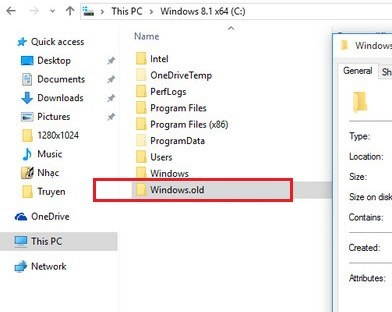
Một câu hỏi mình tin chắc là rất nhiều bạn đặt ra, thư mục Windows.old chứa dữ liệu backup của hệ điều hành trước, nếu như bạn đã quyết định nâng cấp lên windows mới rồi và không có ý định trở lại hệ điều hành trước đó nữa thì bạn nên xóa thư mục này đi vì dung lượng khá nặng (~10GB).
<p><br />
Trường hợp ngược lại nếu như bạn vẫn chưa muốn nâng cấp lên để sử dụng luôn hệ điều hành mới thì bạn có thể giữ lại folder “Windows.old” này hoặc copy nó sang ổ khác để khi muốn quay lại hệ điều hành cũ bạn có cái mà khôi phục.</p>
<strong>Cách xóa thư mục Windows.old</strong><br />
<br />
Để xóa được folder Windows.old thì bạn không thể thực hiện bằng những cách thông thường được, vì thế&nbsp;mà nó gây khó khăn cho nhiều người. Chính vì vậy mà trong bài viết này, blogchiasekienthuc.com sẽ hướng dẫn cho các bạn cách xóa Folder Windows.old nhanh chóng và đơn giản nhất. Mình sẽ hướng dẫn cho các bạn 2 cách để xóa nó:
<div class="image-center">
<figure class="image"><img alt="xoa-thu-muc-windows-old-9" height="478" src="https://tocdoviet.com/uploads/blog/2015_08/xoa-thu-muc-windows-old-9.jpg" style="padding: 0px; margin: 0px; outline: none; list-style: none; border: 0px none; max-width: 100%; height: 312px; width: 392px;" width="600" />
<figcaption>Xóa thư mục Windows.old</figcaption>
</figure>
</div>

<h4><strong>1. Sử dụng công cụ&nbsp;Disk Cleanup</strong></h4>

<p>Theo mình thì đây là cách đơn giản nhất bởi vì&nbsp;nó rất dễ thực hiện và ko phải nhớ những dòng lệnh dài ngoằng :D. Để thực hiện thì các bạn làm như sau:</p>

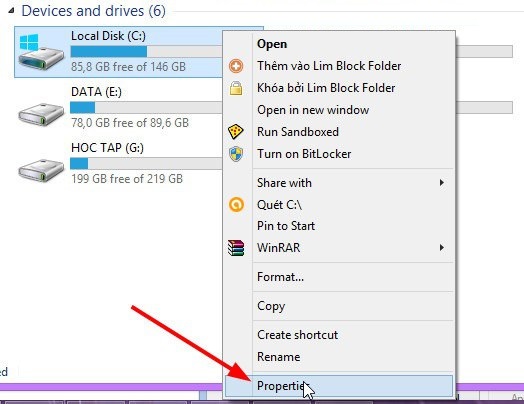
<p>Đầu tiên các bạn vào&nbsp;<strong>My Computer&nbsp;</strong>&gt; nhấn chuột phải vào ổ chứa hệ điều hành chọn&nbsp;<strong>Properties</strong></p>

<div class="image-center"><img alt="xoa-thu-muc-windows-old-1" class="wp-image-2743 size-full aligncenter" height="463" src="https://tocdoviet.com/uploads/blog/2015_08/xoa-thu-muc-windows-old-1.jpg" style="padding: 4px; margin: 2px auto; outline: none; list-style: none; border: 1px solid rgb(203, 205, 204); clear: both; max-width: 100%; height: 404px; display: block; width: 524px;" width="600" /></div>

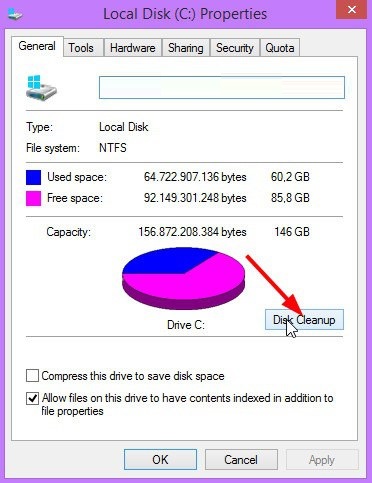
<p>Tiếp theo bạn nhấn vào lựa chọn<strong>&nbsp;Disk Cleanup</strong>&nbsp;.</p>

<div class="image-center"><img alt="xoa-thu-muc-windows-old-2" class="aligncenter size-full wp-image-2744" height="779" src="https://tocdoviet.com/uploads/blog/2015_08/xoa-thu-muc-windows-old-2.jpg" style="padding: 4px; margin: 2px auto; outline: none; list-style: none; border: 1px solid rgb(203, 205, 204); clear: both; max-width: 100%; height: 483px; display: block; width: 372px;" width="600" /></div>

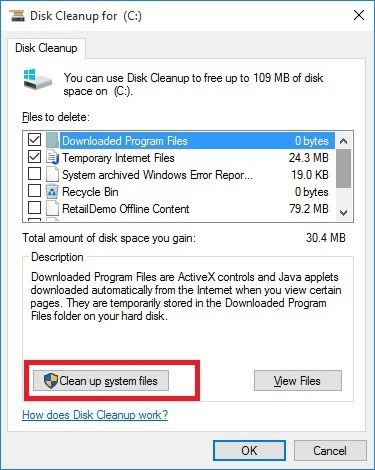
<p>Tiếp theo bạn chọn&nbsp;<strong>Clean up System file</strong>&nbsp;để vào xóa file&nbsp;backup của phiên bản&nbsp;cũ.</p>

<div class="image-center"><img alt="xoa-thu-muc-windows-old-3" class="aligncenter size-full wp-image-2745" height="752" src="https://tocdoviet.com/uploads/blog/2015_08/xoa-thu-muc-windows-old-3.jpg" style="padding: 4px; margin: 2px auto; outline: none; list-style: none; border: 1px solid rgb(203, 205, 204); clear: both; max-width: 100%; height: 470px; display: block; width: 375px;" width="600" /></div>

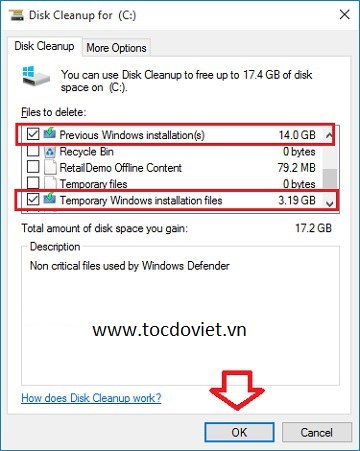
<p>OK! Giờ chúng ta đã nhìn thấy 2 file có dung lượng rất lớn đó là:</p>
- Previous Windows installation(s): Bản backup của hệ thống windows cũ.<br />
- Temporary Windows installation files
<p>Các bạn tích vào 2 lựa chọn đó và nhấn&nbsp;<strong>OK</strong>&nbsp;để bắt đầu xóa.</p>

<div class="image-center"><img alt="xoa-thu-muc-windows-old-4" class="aligncenter size-full wp-image-2746" height="752" src="https://tocdoviet.com/uploads/blog/2015_08/xoa-thu-muc-windows-old-4.jpg" style="padding: 4px; margin: 2px auto; outline: none; list-style: none; border: 1px solid rgb(203, 205, 204); clear: both; max-width: 100%; height: 451px; display: block; width: 360px;" width="600" /></div>

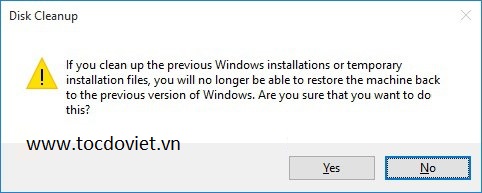
<p>Một hộp thoại cảnh báo hiện ra, đại loại là bạn đã chắn chắn muốn xóa bản backup của hệ hiều hành cũ không?. Bạn&nbsp;cứ nhấn&nbsp;<em><strong>Yes</strong></em>&nbsp;để đồng ý nhé.</p>

<div class="image-center"><img alt="xoa-thu-muc-windows-old-5" class="aligncenter size-full wp-image-2747" height="240" src="https://tocdoviet.com/uploads/blog/2015_08/xoa-thu-muc-windows-old-5.jpg" style="padding: 4px; margin: 2px auto; outline: none; list-style: none; border: 1px solid rgb(203, 205, 204); clear: both; max-width: 100%; height: 193px; display: block; width: 482px;" width="600" /></div>

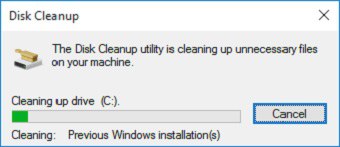
<p>Và quá trình xóa đang diễn ra, bạn chỉ việc ngồi chờ hoặc làm việc khác để chương trình hoàn thành công việc của mình. Rất đơn giả như thế thôi.</p>

<div class="image-center"><img alt="xoa-thu-muc-windows-old-6" class="aligncenter size-full wp-image-2748" height="259" src="https://tocdoviet.com/uploads/blog/2015_08/xoa-thu-muc-windows-old-6.jpg" style="padding: 4px; margin: 2px auto; outline: none; list-style: none; border: 1px solid rgb(203, 205, 204); clear: both; max-width: 100%; height: 147px; display: block; width: 340px;" width="600" /></div>

<h4>2. Sử dụng lệnh trong cmd để xóa thư mục Windows.old</h4>

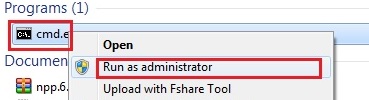
<p>Nhấn vào nút&nbsp;Start&nbsp;sau đó gõ lệnh&nbsp;cmd&nbsp;vào khung tìm kiếm và chạy&nbsp;cmd.exe&nbsp;dưới quyền quản trị (Run as adminstrator). Nếu đang sử dụng Windows 8 trở lên thì bạn có thể nhấn tổ hợp phím&nbsp;Windows + X&nbsp;và chọn Command Prompt (admin)</p>

<div class="image-center"><img alt="xoa-thu-muc-windows-old-7" class="aligncenter size-full wp-image-2749" height="163" src="https://tocdoviet.com/uploads/blog/2015_08/xoa-thu-muc-windows-old-7.jpg" style="padding: 4px; margin: 2px auto; outline: none; list-style: none; border: 1px solid rgb(203, 205, 204); clear: both; max-width: 100%; height: 100px; display: block; width: 369px;" width="600" /></div>

<div class="image-center"><img alt="xoa-thu-muc-windows-old-8" class="aligncenter size-full wp-image-2750" height="103" src="https://tocdoviet.com/uploads/blog/2015_08/xoa-thu-muc-windows-old-8.jpg" style="padding: 4px; margin: 2px auto; outline: none; list-style: none; border: 1px solid rgb(203, 205, 204); clear: both; max-width: 100%; height: 103px; display: block; width: 600px;" width="600" /></div>

<p>Cửa sổ “Adminstrator: Command Prompt” hiện ra bạn nhập lệnh sau vào và nhấn Enter để thực hiện:</p>

<p><em>RD /S /Q %SystemDrive%\windows.old</em></p>

<p>OK. Đợi cho chương trình làm việc xong và bạn có thể quay trở lại ổ chứa hệ điều hành còn folder Windows.old nữa không nhé.</p>

<p><strong>Lời kết</strong></p>

<p>Trên đây là 2 cách&nbsp;xóa thư mục Windows.old&nbsp;đơn giản và nhanh chóng nhất, nếu như các bạn còn có phương pháp nào tối ưu hơn thì comment để chia sẻ cho mọi người cùng sử dụng nhé. Hi vọng bài viết sẽ hữu ích với bạn!</p>
		</div>
	</div>
	<div id="footer" class="clearfix">
		<div id="url">
			<strong>URL của bản tin này: </strong><a href="https://tocdoviet.com/blog/savefile/Tai-lieu-May-Tinh/huong-dan-xoa-thu-muc-windows-old-tren-windows-7-8-10-247.html" title="Hướng dẫn xóa thư mục Windows.old trên Windows 7&#x002F;8&#x002F;10">https://tocdoviet.com/blog/savefile/Tai-lieu-May-Tinh/huong-dan-xoa-thu-muc-windows-old-tren-windows-7-8-10-247.html</a>

		</div>
		<div class="clear"></div>
		<div class="copyright">
			&copy; Tốc Độ Việt - Dịch vụ Hosting, Tên miền, Máy chủ, Thiết kế Website
		</div>
		<div id="contact">
			<a href="mailto:loc.thb@bazan.vn">loc.thb@bazan.vn</a>
		</div>
	</div>
</div>
        <div id="timeoutsess" class="chromeframe">
            Bạn đã không sử dụng Site, <a onclick="timeoutsesscancel();" href="https://tocdoviet.com/#">Bấm vào đây để duy trì trạng thái đăng nhập</a>. Thời gian chờ: <span id="secField"> 60 </span> giây
        </div>
        <div id="openidResult" class="nv-alert" style="display:none"></div>
        <div id="openidBt" data-result="" data-redirect=""></div>
        <div id="button-contact-vr" class=""><div id="gom-all-in-one"><div id="zalo-vr" class="button-contact"><div class="phone-vr"><div class="phone-vr-circle-fill"></div><div class="phone-vr-img-circle">
<a target="_blank" href="https://zalo.me/0888037777">
<img src="https://tocdoviet.com/themes/default/images/zalo.png">
</a></div></div></div><div id="phone-vr" class="button-contact"><div class="phone-vr"><div class="phone-vr-circle-fill"></div><div class="phone-vr-img-circle">
<a href="tel:0888037777">
<img src="https://tocdoviet.com/themes/default/images/phone.png">
</a></div></div></div></div></div><div id="popup-form-contact-vr"><div class="bg-popup-vr"></div><div class="content-popup-vr" id="loco-" style=" "><div class="content-popup-div-vr"></div><div class="close-popup-vr">x</div></div></div><div id="popup-showroom-vr"><div class="bg-popup-vr"></div><div class="content-popup-vr" id="loco-" style=" "><div class="content-popup-div-vr"></div><div class="close-popup-vr">x</div></div></div>
<script src="https://tocdoviet.com/assets/js/jquery/jquery.min.js"></script>
<script>var nv_base_siteurl="/",nv_lang_data="vi",nv_lang_interface="vi",nv_name_variable="nv",nv_fc_variable="op",nv_lang_variable="language",nv_module_name="blog",nv_func_name="savefile",nv_is_user=0, nv_my_ofs=-4,nv_my_abbr="EDT",nv_cookie_prefix="nv4",nv_check_pass_mstime=1738000,nv_area_admin=0,nv_safemode=0,theme_responsive=1,nv_recaptcha_ver=2,nv_recaptcha_sitekey="",nv_recaptcha_type="image",XSSsanitize=1;</script>
<script src="https://tocdoviet.com/assets/js/language/vi.js"></script>
<script src="https://tocdoviet.com/assets/js/DOMPurify/purify3.js"></script>
<script src="https://tocdoviet.com/assets/js/global.js"></script>
<script src="https://tocdoviet.com/assets/js/site.js"></script>
<script src="https://tocdoviet.com/themes/default/js/news.js"></script>
<script src="https://tocdoviet.com/themes/default/js/main.js"></script>
<script src="https://tocdoviet.com/themes/default/js/custom.js"></script>
<script type="application/ld+json">
        {
            "@context": "https://schema.org",
            "@type": "Organization",
            "url": "https://tocdoviet.com",
            "logo": "https://tocdoviet.com/assets/images/logo.png"
        }
        </script>
<script src="https://tocdoviet.com/themes/default/js/bootstrap.min.js"></script>
</body>
</html>