<!DOCTYPE html>
    <html lang="vi" xmlns="http://www.w3.org/1999/xhtml" prefix="og: http://ogp.me/ns#">
    <head>
<title>Hướng dẫn sử dụng tính năng Upgrade của Windows 7</title>
<meta name="description" content="Hướng dẫn sử dụng tính năng Upgrade của Windows 7 - Savefile - Blog -...">
<meta name="author" content="Tốc Độ Việt - Dịch vụ Hosting, Tên miền, Máy chủ, Thiết kế Website">
<meta name="copyright" content="Tốc Độ Việt - Dịch vụ Hosting, Tên miền, Máy chủ, Thiết kế Website [loc.thb@bazan.vn]">
<meta name="generator" content="NukeViet v4.5">
<meta name="viewport" content="width=device-width, initial-scale=1">
<meta http-equiv="Content-Type" content="text/html; charset=utf-8">
<meta property="og:title" content="Hướng dẫn sử dụng tính năng Upgrade của Windows 7">
<meta property="og:type" content="website">
<meta property="og:description" content="Savefile - Blog - https&#x3A;&#x002F;&#x002F;tocdoviet.com&#x002F;blog&#x002F;savefile&#x002F;Tai-lieu-May-Tinh&#x002F;huong-dan-su-dung-tinh-nang-upgrade-cua-windows-7-250.html">
<meta property="og:site_name" content="Tốc Độ Việt - Dịch vụ Hosting, Tên miền, Máy chủ, Thiết kế Website">
<meta property="og:url" content="https://tocdoviet.com/blog/savefile/Tai-lieu-May-Tinh/huong-dan-su-dung-tinh-nang-upgrade-cua-windows-7-250.html">
<link rel="shortcut icon" href="https://tocdoviet.com/favicon.ico">
<link rel="canonical" href="https://tocdoviet.com/blog/savefile/Tai-lieu-May-Tinh/huong-dan-su-dung-tinh-nang-upgrade-cua-windows-7-250.html">
<link rel="alternate" href="https://tocdoviet.com/blog/rss/" title="Blog" type="application/rss+xml">
<link rel="alternate" href="https://tocdoviet.com/blog/rss/Cau-hoi-thuong-gap/" title="Blog - Câu hỏi thường gặp" type="application/rss+xml">
<link rel="alternate" href="https://tocdoviet.com/blog/rss/Tai-lieu-Ten-Mien/" title="Blog - Tài liệu Tên Miền" type="application/rss+xml">
<link rel="alternate" href="https://tocdoviet.com/blog/rss/Tai-lieu-Hosting/" title="Blog - Tài liệu Hosting" type="application/rss+xml">
<link rel="alternate" href="https://tocdoviet.com/blog/rss/Tai-lieu-May-Chu/" title="Blog - Tài liệu Máy Chủ" type="application/rss+xml">
<link rel="alternate" href="https://tocdoviet.com/blog/rss/Tai-lieu-Ma-Nguon/" title="Blog - Tài liệu Mã Nguồn" type="application/rss+xml">
<link rel="alternate" href="https://tocdoviet.com/blog/rss/Tai-lieu-SEO/" title="Blog - Tài liệu SEO" type="application/rss+xml">
<link rel="alternate" href="https://tocdoviet.com/blog/rss/Tai-lieu-Website/" title="Blog - Tài liệu Website" type="application/rss+xml">
<link rel="alternate" href="https://tocdoviet.com/blog/rss/Tai-lieu-Phan-Mem/" title="Blog - Tài liệu Phần Mềm" type="application/rss+xml">
<link rel="alternate" href="https://tocdoviet.com/blog/rss/Tai-lieu-May-Tinh/" title="Blog - Tài liệu Máy Tính" type="application/rss+xml">
<link rel="preload" as="style" href="https://tocdoviet.com/assets/css/font-awesome.min.css" type="text/css">
<link rel="preload" as="style" href="https://tocdoviet.com/themes/default/css/bootstrap.min.css" type="text/css">
<link rel="preload" as="style" href="https://tocdoviet.com/themes/default/css/style.css" type="text/css">
<link rel="preload" as="style" href="https://tocdoviet.com/themes/default/css/style.responsive.css" type="text/css">
<link rel="preload" as="style" href="https://tocdoviet.com/themes/default/css/news.css" type="text/css">
<link rel="preload" as="style" href="https://tocdoviet.com/themes/default/css/custom.css" type="text/css">
<link rel="preload" as="script" href="https://tocdoviet.com/assets/js/jquery/jquery.min.js" type="text/javascript">
<link rel="preload" as="script" href="https://tocdoviet.com/assets/js/language/vi.js" type="text/javascript">
<link rel="preload" as="script" href="https://tocdoviet.com/assets/js/DOMPurify/purify3.js" type="text/javascript">
<link rel="preload" as="script" href="https://tocdoviet.com/assets/js/global.js" type="text/javascript">
<link rel="preload" as="script" href="https://tocdoviet.com/assets/js/site.js" type="text/javascript">
<link rel="preload" as="script" href="https://tocdoviet.com/themes/default/js/news.js" type="text/javascript">
<link rel="preload" as="script" href="https://tocdoviet.com/themes/default/js/main.js" type="text/javascript">
<link rel="preload" as="script" href="https://tocdoviet.com/themes/default/js/custom.js" type="text/javascript">
<link rel="preload" as="script" href="https://tocdoviet.com/themes/default/js/bootstrap.min.js" type="text/javascript">
<link rel="stylesheet" href="https://tocdoviet.com/assets/css/font-awesome.min.css">
<link rel="stylesheet" href="https://tocdoviet.com/themes/default/css/bootstrap.min.css">
<link rel="stylesheet" href="https://tocdoviet.com/themes/default/css/style.css">
<link rel="stylesheet" href="https://tocdoviet.com/themes/default/css/style.responsive.css">
<link rel="StyleSheet" href="https://tocdoviet.com/themes/default/css/news.css">
<link rel="stylesheet" href="https://tocdoviet.com/themes/default/css/custom.css">
<style>
#gom-all-in-one{margin-bottom: 150px;}
@-webkit-keyframes phone-vr-circle-fill {
0% {-webkit-transform: rotate(0) scale(1) skew(1deg); }
10% {-webkit-transform: rotate(-25deg) scale(1) skew(1deg);}
20% {-webkit-transform: rotate(25deg) scale(1) skew(1deg);}
30% {-webkit-transform: rotate(-25deg) scale(1) skew(1deg);}
40% {-webkit-transform: rotate(25deg) scale(1) skew(1deg);}
50% {-webkit-transform: rotate(0) scale(1) skew(1deg);}
100% {-webkit-transform: rotate(0) scale(1) skew(1deg);}
}
@-webkit-keyframes zoom{0%{transform:scale(.9)}70%{transform:scale(1);box-shadow:0 0 0 15px transparent}100%{transform:scale(.9);box-shadow:0 0 0 0 transparent}}@keyframes zoom{0%{transform:scale(.9)}70%{transform:scale(1);box-shadow:0 0 0 15px transparent}100%{transform:scale(.9);box-shadow:0 0 0 0 transparent}}
#button-contact-vr{right:0}
.phone-bar a{
left:auto;right:30px;padding:8px 55px 7px 15px
}
#button-contact-vr.active #gom-all-in-one .button-contact
{
margin-left:100%
}
#button-contact-vr{bottom:30%}
#gom-all-in-one #zalo-vr {
transition: 1s all;
-moz-transition: 1s all;
-webkit-transition: 1s all;
}
#zalo-vr .phone-vr-circle-fill {
box-shadow: 0 0 0 0 #2196f3;
background-color: rgba(33,150,243,.7);
}
.phone-vr-circle-fill {
width: 65px;
height: 65px;
top: 12px;
left: 12px;
position: absolute;
box-shadow: 0 0 0 0 #c31d1d;
background-color: rgba(230,8,8,.7);
border-radius: 50%;
border: 2px solid transparent;
-webkit-animation: phone-vr-circle-fill 2.3s infinite ease-in-out;
animation: phone-vr-circle-fill 2.3s infinite ease-in-out;
transition: all .5s;
-webkit-transform-origin: 50% 50%;
-ms-transform-origin: 50% 50%;
transform-origin: 50% 50%;
-webkit-animuiion: zoom 1.3s infinite;
animation: zoom 1.3s infinite;
}
.phone-vr-img-circle a {
display: block;
line-height: 37px;
}
.phone-vr-img-circle img {
max-height: 25px;
max-width: 27px;
position: absolute;
top: 50%;
left: 50%;
transform: translate(-50%,-50%);
-moz-transform: translate(-50%,-50%);
-webkit-transform: translate(-50%,-50%);
-o-transform: translate(-50%,-50%);
}
#zalo-vr .phone-vr-img-circle {
background-color: #2196f3;
}
.phone-vr-img-circle {
background-color: #e60808;
width: 40px;
height: 40px;
line-height: 40px;
top: 25px;
left: 25px;
position: absolute;
border-radius: 50%;
overflow: hidden;
display: flex;
justify-content: center;
-webkit-animation: phonering-alo-circle-img-anim 1s infinite ease-in-out;
animation: phone-vr-circle-fill 1s infinite ease-in-out;
}
#button-contact-vr .button-contact .phone-vr {
position: relative;
visibility: visible;
background-color: transparent;
width: 90px;
height: 90px;
cursor: pointer;
z-index: 11;
-webkit-backface-visibility: hidden;
-webkit-transform: translateZ(0);
transition: visibility .5s;
left: 0;
bottom: 0;
display: block;
}
#gom-all-in-one #phone-vr {
transition: .7s all;
-moz-transition: .7s all;
-webkit-transition: .7s all;
}
#button-contact-vr .button-contact {
position: relative;
margin-top: 5px;
}
#phone-vr .phone-vr-circle-fill {
opacity: .7;
box-shadow: 0 0 0 0 #d33;
}
.phone-bar a, #phone-vr .phone-vr-circle-fill, #phone-vr .phone-vr-img-circle, #phone-vr .phone-bar a {
background-color: #d33;
}
#button-contact-vr {
bottom: 30%;
}
#button-contact-vr {
position: fixed;
bottom: 0;
z-index: 99999;
}
#popup-showroom-vr, div#popup-form-contact-vr {
display: none;
}
.bg-popup-vr {
position: absolute;
left: 0;
top: 0;
background: rgb(51 51 51/50%);
width: 100%;
height: 100vh;
}
@media (max-width: 673px)
div#popup-form-contact-vr .content-popup-vr {
display: block;
}
.content-popup-vr {
background: #fff;
position: absolute;
left: 50%;
top: 50%;
transform: translate(-50%,-50%);
width: 95%;
border-radius: 5px;
box-shadow: 0 0 14px 5px rgb(0 0 0/49%);
max-width: 600px;
display: flex;
}
.content-popup-vr .content-popup-div-vr {
width: 100%;
padding: 25px;
}
.content-popup-vr .close-popup-vr {
font-family: sans-serif;
width: 23px;
height: 23px;
background: #000;
position: absolute;
top: -10px;
right: -10px;
color: #fff;
text-align: center;
line-height: 23px;
font-size: 17px;
border-radius: 50%;
cursor: pointer;
}
</style>
<style type="text/css">
	body{background: #fff;}
</style>
<style type="text/css"></style>
    </head>
    <body>
<div id="print">
	<div id="hd_print">
		<h2 class="pull-left">Tốc Độ Việt - Dịch vụ Hosting, Tên miền, Máy chủ, Thiết kế Website</h2>
		<p class="pull-right"><a title="Tốc Độ Việt - Dịch vụ Hosting, Tên miền, Máy chủ, Thiết kế Website" href="https://tocdoviet.com/">https://tocdoviet.com</a></p>
	</div>
	<div class="clear"></div>
	<hr />
	<div id="content">
		<h1>Hướng dẫn sử dụng tính năng Upgrade của Windows 7</h1>
		<ul class="list-inline">
			<li>Thứ tư - 26/08/2015 03:59</li>
			<li class="hidden-print txtrequired"><em class="fa fa-print">&nbsp;</em><a title="In ra" href="javascript:;" onclick="window.print()">In ra</a></li>
			<li class="hidden-print txtrequired"><em class="fa fa-power-off">&nbsp;</em><a title="Đóng cửa sổ này" href="javascript:;" onclick="window.close()">Đóng cửa sổ này</a></li>
		</ul>
		<div class="clear"></div>
		<div id="hometext">
			Trong quá trình sử dụng máy tính, người sử dụng hệ điều hành Windows 7 có thể gặp phải những vấn đề liên quan tới hệ điều hành như: hệ điều hành Windows 7 hoạt động không ổn định, xuất hiện các thông báo lỗi của hệ thống, hoạt động chậm… Các vấn đề này có thể có các nguyên nhân như: xung đột giữa một số phần mềm ứng dụng, trình điều khiển thiết bị (driver), máy tính bị nhiễm virus, virus có thể đã xóa, thay đổi, làm hỏng các file hệ thống, các file cấu hình của Windows, người sử dụng vô tình xóa, can thiệp, thay đổi các file, thông số hệ thống…
		</div>
				<div class="imghome">
			<img alt="Hướng dẫn sử dụng tính năng Upgrade của Windows 7" src="https://tocdoviet.com/uploads/blog/2015_08/140812redmackiewin7.jpg" width="460" class="img-thumbnail" />
		</div>
		<div class="clear"></div>
		<div id="bodytext" class="clearfix">
			Để giải quyết vấn đề trên, một số người sử dụng có thể chọn phương án cài đặt lại hệ điều hành Windows 7. Tuy nhiên, việc cài đặt lại hệ điều hành thường đi kèm với việc người sử dụng phải sao lưu các thông tin cá nhân, dữ liệu lưu trên ổ đĩa hệ thống cũng như cài đặt lại trình điều khiển thiết bị, các chương trình phần mềm, thiết lập lại các tham số hệ thống, môi trường làm việc… Quá trình sao lưu dữ liệu, cài đặt lại, khôi phục lại môi trường ban đầu có thể tiêu tốn nhiều thời gian, từ vài tiếng tới vài ngày, thậm chí nhiều tuần lễ.
<p>Tính năng Upgrade (nâng cấp) của Windows 7 có thể giúp khắc phục các vấn đề nêu trên bằng việc cài đặt lại hệ điều hành Windows 7 nhưng không làm mất các chương trình đã cài đặt, bảo lưu thông tin, dữ liệu, môi trường làm việc của người sử dụng…</p>

<p>Bạn có thể tham khảo thêm thông tin Upgrade Windows 7&nbsp;<a href="http://windows.microsoft.com/en-us/windows7/Installing-and-reinstalling-Windows-7" shape="rect">tại đây</a>. Trước khi tiến hành, bạn cần lưu ý các điểm sau:</p>

<ul>
	<li>Việc Upgrade Windows 7 bắt buộc phải được tiến hành trong Windows 7, bạn không thể tiến hành cài đặt lại ở môi trường Safe mode hoặc khởi động từ đĩa cài đặt.</li>
	<li>Bạn cần có mã đăng ký (key) bản quyền Windows&nbsp;7 và đĩa cài đặt Windows 7 đã sử dụng trước đó hoặc mới hơn phiên bản đang sử dụng trên máy tính.</li>
	<li>Bạn phải đăng nhập bằng tài khoản Administrator để tiến hành Upgrade Windows 7.</li>
</ul>

<p>Để tiến hành Upgrade Windows 7, bạn hãy thực hiện theo các bước sau:</p>

<p><strong>Bước 1: </strong>Khởi động và đăng nhập vào hệ điều hành Windows 7.</p>

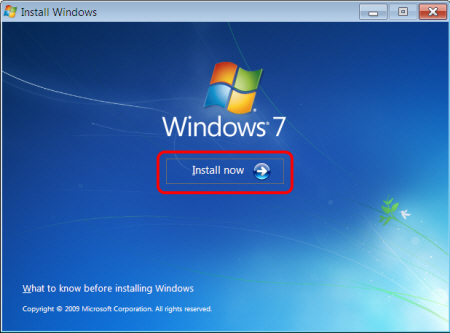
<p style="margin: 6pt 0px 10px; padding: 0px; font-size: 15px; line-height: 19.5px; color: rgb(0, 0, 0); font-family: &#039;Segoe UI&#039;; text-align: justify;"><strong>Bước 2:</strong>&nbsp;Cho đĩa cài đặt Windows 7 vào ổ đĩa DVD, chạy file&nbsp;<strong>setup.exe</strong>. Trong cửa sổ&nbsp;<strong>Install Windows</strong>, chọn&nbsp;<strong>Install now</strong>.</p>

<div class="image-center"><img alt="" height="444" src="https://tocdoviet.com/uploads/blog/2015_08/dd363961-0476-4c98-93a0-713cf16d93c2.jpg" style="border: 0px; margin-top: 9px; margin-bottom: 9px; width: 450px; height: 333px;" width="600" /></div>

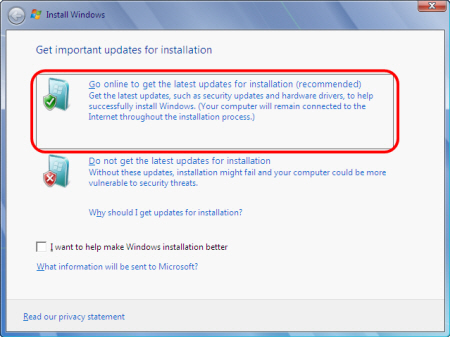
<p style="margin: 6pt 0px 10px; padding: 0px; font-size: 15px; line-height: 19.5px; color: rgb(0, 0, 0); font-family: &#039;Segoe UI&#039;; text-align: justify;"><strong>Bước 3:</strong> Trong cửa sổ Install Windows, chọn&nbsp;<strong>Go online to get the latest up-date for installation (recommended)</strong>. Lưu ý: Bạn cần kết nối máy tính vào Internet khi sử dụng tùy chọn này.</p>

<div class="image-center"><img alt="" height="449" src="https://tocdoviet.com/uploads/blog/2015_08/7c417dd9-52cd-4bbd-9f6a-6814a7859b13.jpg" style="border: 0px; margin-top: 9px; margin-bottom: 9px; width: 450px; height: 337px;" width="600" /></div>

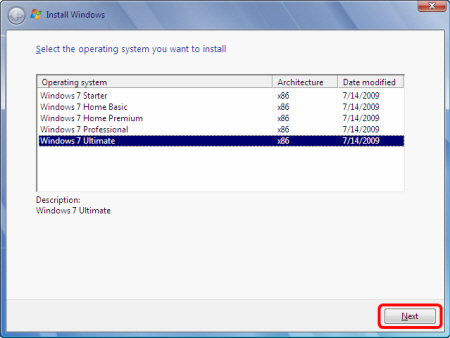
<p style="margin: 6pt 0px 10px; padding: 0px; font-size: 15px; line-height: 19.5px; color: rgb(0, 0, 0); font-family: &#039;Segoe UI&#039;; text-align: justify;">Lựa chọn phiên bản hệ điều hành tương ứng mà bạn đang sử dụng sau đó bấm&nbsp;<strong>Next</strong>.</p>

<div class="image-center"><img alt="" height="451" src="https://tocdoviet.com/uploads/blog/2015_08/ce277db8-3753-4ccf-aca0-0eeff63c6386.jpg" style="border: 0px; margin-top: 9px; margin-bottom: 9px; width: 450px; height: 338px;" width="600" /></div>

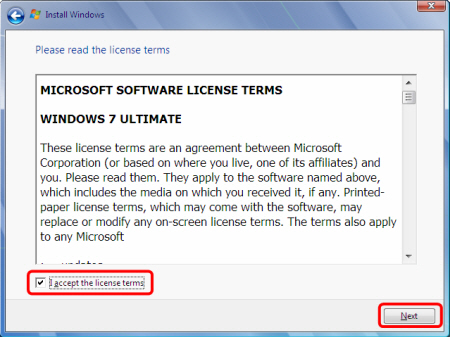
<p style="margin: 6pt 0px 10px; padding: 0px; font-size: 15px; line-height: 19.5px; color: rgb(0, 0, 0); font-family: &#039;Segoe UI&#039;; text-align: justify;"><strong>Bước 4:</strong> Đọc thỏa thuận sử dụng của <strong>Microsoft sau đó chọn&nbsp;I accept the license terms</strong>&nbsp;rồi bấm&nbsp;<strong>Next</strong>.</p>

<div class="image-center"><img alt="" height="449" src="https://tocdoviet.com/uploads/blog/2015_08/8a6e49af-4f0d-4b75-bc2d-297cdc3d8b3f.jpg" style="border: 0px; margin-top: 9px; margin-bottom: 9px; width: 450px; height: 337px;" width="600" /></div>

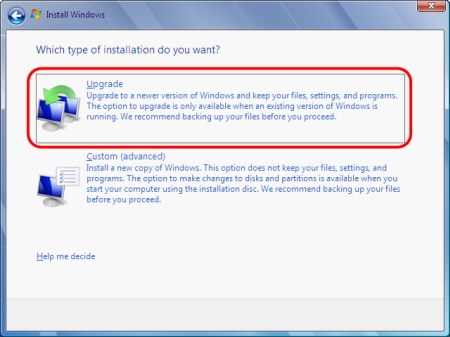
<p style="margin: 6pt 0px 10px; padding: 0px; font-size: 15px; line-height: 19.5px; color: rgb(0, 0, 0); font-family: &#039;Segoe UI&#039;;">Trong cửa sổ mới xuất hiện, bạn chọn&nbsp;<strong>Upgrade</strong>.</p>

<div class="image-center"><img alt="" height="449" src="https://tocdoviet.com/uploads/blog/2015_08/4393b489-698b-4593-9c29-69bbc994d52a.jpg" style="border: 0px; margin-top: 9px; margin-bottom: 9px; width: 450px; height: 337px;" width="600" /></div>

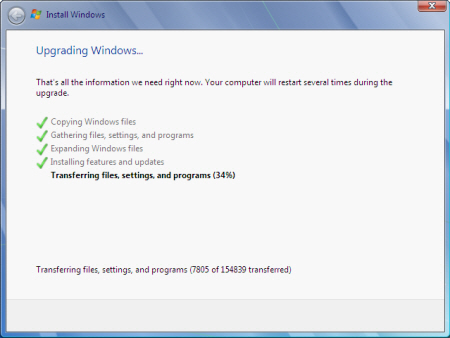
<p style="margin: 6pt 0px 10px; padding: 0px; font-size: 15px; line-height: 19.5px; color: rgb(0, 0, 0); font-family: &#039;Segoe UI&#039;;">Quá trình upgrade bắt đầu. Trong quá trình này, Windows có thể tự khởi động lại vài lần.</p>

<div class="image-center"><img alt="" height="451" src="https://tocdoviet.com/uploads/blog/2015_08/ed4483bb-6b7c-414e-9677-891f5be521cb.jpg" style="border: 0px; margin-top: 9px; margin-bottom: 9px; width: 450px; height: 338px;" width="600" /></div>

<p style="margin: 6pt 0in 0pt; padding: 0px; font-size: 15px; line-height: 19.5px; color: rgb(0, 0, 0); font-family: &#039;Segoe UI&#039;; text-align: justify;"><strong>Lưu ý:&nbsp;</strong>Bạn không nên bấm bất kỳ phím nào khi cửa sổ&nbsp;<strong>Press any key to boot f-rom CD or DVD</strong>…&nbsp;xuất hiện giữa các lần Windows khởi động lại.</p>

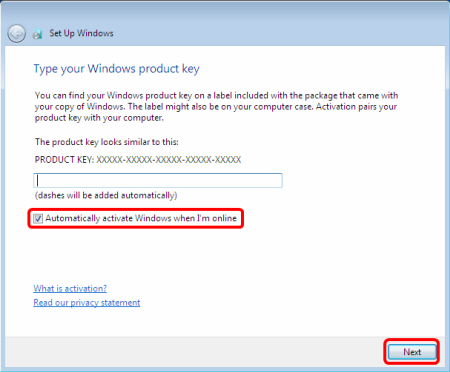
<p style="margin: 6pt 0in 0pt; padding: 0px; font-size: 15px; line-height: 19.5px; color: rgb(0, 0, 0); font-family: &#039;Segoe UI&#039;; text-align: justify;"><strong>Bước 5:</strong> Nhập mã đăng ký mà bạn đã sử dụng để cài Windows, sau đó bấm&nbsp;<strong>Next</strong>&nbsp;để tiếp tục quá trình&nbsp;<strong>Upgrade Windows</strong>.</p>

<p style="margin: 6pt 0px 10px; padding: 0px; font-size: 15px; line-height: 19.5px; color: rgb(0, 0, 0); font-family: &#039;Segoe UI&#039;; text-align: justify;"><strong>Lưu ý:</strong> Nếu chọn&nbsp;<strong>Automatically activate Windows when I’m online</strong>, chế độ đăng ký tự động sẽ kích hoạt sau 3 ngày kể từ lần đăng nhập Windows đầu tiên.</p>

<div class="image-center"><img alt="" height="496" src="https://tocdoviet.com/uploads/blog/2015_08/138fcbff-7f55-41c6-96b9-1c26e596f19c.jpg" style="border: 0px; margin-top: 9px; margin-bottom: 9px; width: 450px; height: 372px;" width="600" /></div>

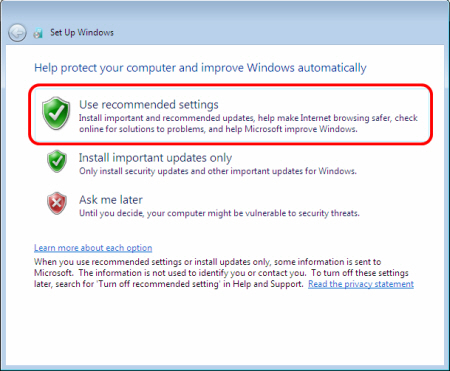
<p style="margin: 6pt 0px 10px; padding: 0px; font-size: 15px; line-height: 19.5px; color: rgb(0, 0, 0); font-family: &#039;Segoe UI&#039;; text-align: justify;">Trong cửa sổ&nbsp;<strong>Set Up Windows</strong>, bạn chọn&nbsp;<strong>Use recommended settings</strong>.</p>

<div class="image-center"><img alt="" height="495" src="https://tocdoviet.com/uploads/blog/2015_08/49e86426-d413-43dc-9d3d-29a7b6200b3e.jpg" style="border: 0px; margin-top: 9px; margin-bottom: 9px; width: 450px; height: 371px;" width="600" /></div>

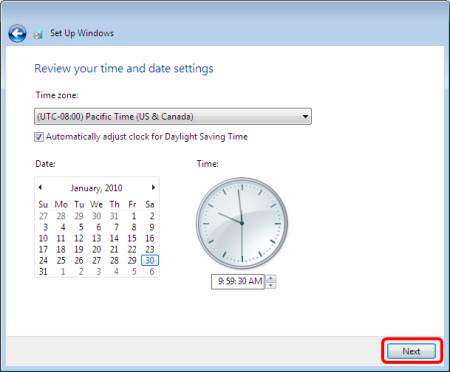
<p style="margin: 6pt 0px 10px; padding: 0px; font-size: 15px; line-height: 19.5px; color: rgb(0, 0, 0); font-family: &#039;Segoe UI&#039;; text-align: justify;">Trong cửa sổ tiếp theo, bạn thiết lập lại thời gian cho hệ thống, sau đó bấm&nbsp;<strong>Next.</strong></p>

<div class="image-center"><img alt="" height="496" src="https://tocdoviet.com/uploads/blog/2015_08/d6c4ac97-ff5a-4cab-9a1a-d38b231dcde6.jpg" style="border: 0px; margin-top: 9px; margin-bottom: 9px; width: 450px; height: 372px;" width="600" /></div>

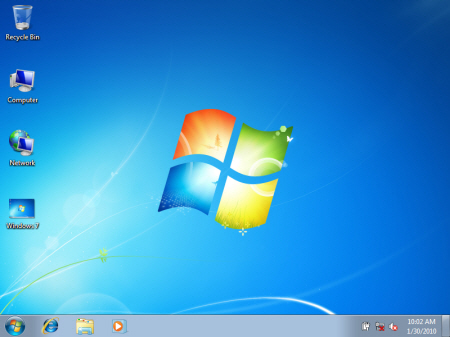
<p style="margin: 6pt 0px 10px; padding: 0px; font-size: 15px; line-height: 19.5px; color: rgb(0, 0, 0); font-family: &#039;Segoe UI&#039;; text-align: justify;">Đến đây, quá trình Upgrade đã hoàn tất.</p>

<div class="image-center"><img alt="" height="449" src="https://tocdoviet.com/uploads/blog/2015_08/e4ac0615-3f8c-4fb2-b61a-ae92afa66fcf.jpg" style="border: 0px; width: 450px; height: 337px;" width="600" /></div>
		</div>
	</div>
	<div id="footer" class="clearfix">
		<div id="url">
			<strong>URL của bản tin này: </strong><a href="https://tocdoviet.com/blog/savefile/Tai-lieu-May-Tinh/huong-dan-su-dung-tinh-nang-upgrade-cua-windows-7-250.html" title="Hướng dẫn sử dụng tính năng Upgrade của Windows 7">https://tocdoviet.com/blog/savefile/Tai-lieu-May-Tinh/huong-dan-su-dung-tinh-nang-upgrade-cua-windows-7-250.html</a>

		</div>
		<div class="clear"></div>
		<div class="copyright">
			&copy; Tốc Độ Việt - Dịch vụ Hosting, Tên miền, Máy chủ, Thiết kế Website
		</div>
		<div id="contact">
			<a href="mailto:loc.thb@bazan.vn">loc.thb@bazan.vn</a>
		</div>
	</div>
</div>
        <div id="timeoutsess" class="chromeframe">
            Bạn đã không sử dụng Site, <a onclick="timeoutsesscancel();" href="https://tocdoviet.com/#">Bấm vào đây để duy trì trạng thái đăng nhập</a>. Thời gian chờ: <span id="secField"> 60 </span> giây
        </div>
        <div id="openidResult" class="nv-alert" style="display:none"></div>
        <div id="openidBt" data-result="" data-redirect=""></div>
        <div id="button-contact-vr" class=""><div id="gom-all-in-one"><div id="zalo-vr" class="button-contact"><div class="phone-vr"><div class="phone-vr-circle-fill"></div><div class="phone-vr-img-circle">
<a target="_blank" href="https://zalo.me/0888037777">
<img src="https://tocdoviet.com/themes/default/images/zalo.png">
</a></div></div></div><div id="phone-vr" class="button-contact"><div class="phone-vr"><div class="phone-vr-circle-fill"></div><div class="phone-vr-img-circle">
<a href="tel:0888037777">
<img src="https://tocdoviet.com/themes/default/images/phone.png">
</a></div></div></div></div></div><div id="popup-form-contact-vr"><div class="bg-popup-vr"></div><div class="content-popup-vr" id="loco-" style=" "><div class="content-popup-div-vr"></div><div class="close-popup-vr">x</div></div></div><div id="popup-showroom-vr"><div class="bg-popup-vr"></div><div class="content-popup-vr" id="loco-" style=" "><div class="content-popup-div-vr"></div><div class="close-popup-vr">x</div></div></div>
<script src="https://tocdoviet.com/assets/js/jquery/jquery.min.js"></script>
<script>var nv_base_siteurl="/",nv_lang_data="vi",nv_lang_interface="vi",nv_name_variable="nv",nv_fc_variable="op",nv_lang_variable="language",nv_module_name="blog",nv_func_name="savefile",nv_is_user=0, nv_my_ofs=-4,nv_my_abbr="EDT",nv_cookie_prefix="nv4",nv_check_pass_mstime=1738000,nv_area_admin=0,nv_safemode=0,theme_responsive=1,nv_recaptcha_ver=2,nv_recaptcha_sitekey="",nv_recaptcha_type="image",XSSsanitize=1;</script>
<script src="https://tocdoviet.com/assets/js/language/vi.js"></script>
<script src="https://tocdoviet.com/assets/js/DOMPurify/purify3.js"></script>
<script src="https://tocdoviet.com/assets/js/global.js"></script>
<script src="https://tocdoviet.com/assets/js/site.js"></script>
<script src="https://tocdoviet.com/themes/default/js/news.js"></script>
<script src="https://tocdoviet.com/themes/default/js/main.js"></script>
<script src="https://tocdoviet.com/themes/default/js/custom.js"></script>
<script type="application/ld+json">
        {
            "@context": "https://schema.org",
            "@type": "Organization",
            "url": "https://tocdoviet.com",
            "logo": "https://tocdoviet.com/assets/images/logo.png"
        }
        </script>
<script src="https://tocdoviet.com/themes/default/js/bootstrap.min.js"></script>
</body>
</html>