<!DOCTYPE html>
    <html lang="vi" xmlns="http://www.w3.org/1999/xhtml" prefix="og: http://ogp.me/ns#">
    <head>
<title>Hướng dẫn truy cập VPS Windows</title>
<meta name="description" content="Hướng dẫn truy cập VPS Windows - Savefile - Blog - https&#x3A;&#x002F;&#x002F;tocdoviet.com&#x002F;blog&#x002F;savefile&#x002F;Tai-lieu-May-Chu&#x002F;huong-dan-truy-cap-vps-windows-102.html">
<meta name="author" content="Tốc Độ Việt - Dịch vụ Hosting, Tên miền, Máy chủ, Thiết kế Website">
<meta name="copyright" content="Tốc Độ Việt - Dịch vụ Hosting, Tên miền, Máy chủ, Thiết kế Website [loc.thb@bazan.vn]">
<meta name="generator" content="NukeViet v4.5">
<meta name="viewport" content="width=device-width, initial-scale=1">
<meta http-equiv="Content-Type" content="text/html; charset=utf-8">
<meta property="og:title" content="Hướng dẫn truy cập VPS Windows">
<meta property="og:type" content="website">
<meta property="og:description" content="Savefile - Blog - https&#x3A;&#x002F;&#x002F;tocdoviet.com&#x002F;blog&#x002F;savefile&#x002F;Tai-lieu-May-Chu&#x002F;huong-dan-truy-cap-vps-windows-102.html">
<meta property="og:site_name" content="Tốc Độ Việt - Dịch vụ Hosting, Tên miền, Máy chủ, Thiết kế Website">
<meta property="og:url" content="https://tocdoviet.com/blog/savefile/Tai-lieu-May-Chu/huong-dan-truy-cap-vps-windows-102.html">
<link rel="shortcut icon" href="https://tocdoviet.com/favicon.ico">
<link rel="canonical" href="https://tocdoviet.com/blog/savefile/Tai-lieu-May-Chu/huong-dan-truy-cap-vps-windows-102.html">
<link rel="alternate" href="https://tocdoviet.com/blog/rss/" title="Blog" type="application/rss+xml">
<link rel="alternate" href="https://tocdoviet.com/blog/rss/Cau-hoi-thuong-gap/" title="Blog - Câu hỏi thường gặp" type="application/rss+xml">
<link rel="alternate" href="https://tocdoviet.com/blog/rss/Tai-lieu-Ten-Mien/" title="Blog - Tài liệu Tên Miền" type="application/rss+xml">
<link rel="alternate" href="https://tocdoviet.com/blog/rss/Tai-lieu-Hosting/" title="Blog - Tài liệu Hosting" type="application/rss+xml">
<link rel="alternate" href="https://tocdoviet.com/blog/rss/Tai-lieu-May-Chu/" title="Blog - Tài liệu Máy Chủ" type="application/rss+xml">
<link rel="alternate" href="https://tocdoviet.com/blog/rss/Tai-lieu-Ma-Nguon/" title="Blog - Tài liệu Mã Nguồn" type="application/rss+xml">
<link rel="alternate" href="https://tocdoviet.com/blog/rss/Tai-lieu-SEO/" title="Blog - Tài liệu SEO" type="application/rss+xml">
<link rel="alternate" href="https://tocdoviet.com/blog/rss/Tai-lieu-Website/" title="Blog - Tài liệu Website" type="application/rss+xml">
<link rel="alternate" href="https://tocdoviet.com/blog/rss/Tai-lieu-Phan-Mem/" title="Blog - Tài liệu Phần Mềm" type="application/rss+xml">
<link rel="alternate" href="https://tocdoviet.com/blog/rss/Tai-lieu-May-Tinh/" title="Blog - Tài liệu Máy Tính" type="application/rss+xml">
<link rel="preload" as="style" href="https://tocdoviet.com/assets/css/font-awesome.min.css" type="text/css">
<link rel="preload" as="style" href="https://tocdoviet.com/themes/default/css/bootstrap.min.css" type="text/css">
<link rel="preload" as="style" href="https://tocdoviet.com/themes/default/css/style.css" type="text/css">
<link rel="preload" as="style" href="https://tocdoviet.com/themes/default/css/style.responsive.css" type="text/css">
<link rel="preload" as="style" href="https://tocdoviet.com/themes/default/css/news.css" type="text/css">
<link rel="preload" as="style" href="https://tocdoviet.com/themes/default/css/custom.css" type="text/css">
<link rel="preload" as="script" href="https://tocdoviet.com/assets/js/jquery/jquery.min.js" type="text/javascript">
<link rel="preload" as="script" href="https://tocdoviet.com/assets/js/language/vi.js" type="text/javascript">
<link rel="preload" as="script" href="https://tocdoviet.com/assets/js/DOMPurify/purify3.js" type="text/javascript">
<link rel="preload" as="script" href="https://tocdoviet.com/assets/js/global.js" type="text/javascript">
<link rel="preload" as="script" href="https://tocdoviet.com/assets/js/site.js" type="text/javascript">
<link rel="preload" as="script" href="https://tocdoviet.com/themes/default/js/news.js" type="text/javascript">
<link rel="preload" as="script" href="https://tocdoviet.com/themes/default/js/main.js" type="text/javascript">
<link rel="preload" as="script" href="https://tocdoviet.com/themes/default/js/custom.js" type="text/javascript">
<link rel="preload" as="script" href="https://tocdoviet.com/themes/default/js/bootstrap.min.js" type="text/javascript">
<link rel="stylesheet" href="https://tocdoviet.com/assets/css/font-awesome.min.css">
<link rel="stylesheet" href="https://tocdoviet.com/themes/default/css/bootstrap.min.css">
<link rel="stylesheet" href="https://tocdoviet.com/themes/default/css/style.css">
<link rel="stylesheet" href="https://tocdoviet.com/themes/default/css/style.responsive.css">
<link rel="StyleSheet" href="https://tocdoviet.com/themes/default/css/news.css">
<link rel="stylesheet" href="https://tocdoviet.com/themes/default/css/custom.css">
<style>
#gom-all-in-one{margin-bottom: 150px;}
@-webkit-keyframes phone-vr-circle-fill {
0% {-webkit-transform: rotate(0) scale(1) skew(1deg); }
10% {-webkit-transform: rotate(-25deg) scale(1) skew(1deg);}
20% {-webkit-transform: rotate(25deg) scale(1) skew(1deg);}
30% {-webkit-transform: rotate(-25deg) scale(1) skew(1deg);}
40% {-webkit-transform: rotate(25deg) scale(1) skew(1deg);}
50% {-webkit-transform: rotate(0) scale(1) skew(1deg);}
100% {-webkit-transform: rotate(0) scale(1) skew(1deg);}
}
@-webkit-keyframes zoom{0%{transform:scale(.9)}70%{transform:scale(1);box-shadow:0 0 0 15px transparent}100%{transform:scale(.9);box-shadow:0 0 0 0 transparent}}@keyframes zoom{0%{transform:scale(.9)}70%{transform:scale(1);box-shadow:0 0 0 15px transparent}100%{transform:scale(.9);box-shadow:0 0 0 0 transparent}}
#button-contact-vr{right:0}
.phone-bar a{
left:auto;right:30px;padding:8px 55px 7px 15px
}
#button-contact-vr.active #gom-all-in-one .button-contact
{
margin-left:100%
}
#button-contact-vr{bottom:30%}
#gom-all-in-one #zalo-vr {
transition: 1s all;
-moz-transition: 1s all;
-webkit-transition: 1s all;
}
#zalo-vr .phone-vr-circle-fill {
box-shadow: 0 0 0 0 #2196f3;
background-color: rgba(33,150,243,.7);
}
.phone-vr-circle-fill {
width: 65px;
height: 65px;
top: 12px;
left: 12px;
position: absolute;
box-shadow: 0 0 0 0 #c31d1d;
background-color: rgba(230,8,8,.7);
border-radius: 50%;
border: 2px solid transparent;
-webkit-animation: phone-vr-circle-fill 2.3s infinite ease-in-out;
animation: phone-vr-circle-fill 2.3s infinite ease-in-out;
transition: all .5s;
-webkit-transform-origin: 50% 50%;
-ms-transform-origin: 50% 50%;
transform-origin: 50% 50%;
-webkit-animuiion: zoom 1.3s infinite;
animation: zoom 1.3s infinite;
}
.phone-vr-img-circle a {
display: block;
line-height: 37px;
}
.phone-vr-img-circle img {
max-height: 25px;
max-width: 27px;
position: absolute;
top: 50%;
left: 50%;
transform: translate(-50%,-50%);
-moz-transform: translate(-50%,-50%);
-webkit-transform: translate(-50%,-50%);
-o-transform: translate(-50%,-50%);
}
#zalo-vr .phone-vr-img-circle {
background-color: #2196f3;
}
.phone-vr-img-circle {
background-color: #e60808;
width: 40px;
height: 40px;
line-height: 40px;
top: 25px;
left: 25px;
position: absolute;
border-radius: 50%;
overflow: hidden;
display: flex;
justify-content: center;
-webkit-animation: phonering-alo-circle-img-anim 1s infinite ease-in-out;
animation: phone-vr-circle-fill 1s infinite ease-in-out;
}
#button-contact-vr .button-contact .phone-vr {
position: relative;
visibility: visible;
background-color: transparent;
width: 90px;
height: 90px;
cursor: pointer;
z-index: 11;
-webkit-backface-visibility: hidden;
-webkit-transform: translateZ(0);
transition: visibility .5s;
left: 0;
bottom: 0;
display: block;
}
#gom-all-in-one #phone-vr {
transition: .7s all;
-moz-transition: .7s all;
-webkit-transition: .7s all;
}
#button-contact-vr .button-contact {
position: relative;
margin-top: 5px;
}
#phone-vr .phone-vr-circle-fill {
opacity: .7;
box-shadow: 0 0 0 0 #d33;
}
.phone-bar a, #phone-vr .phone-vr-circle-fill, #phone-vr .phone-vr-img-circle, #phone-vr .phone-bar a {
background-color: #d33;
}
#button-contact-vr {
bottom: 30%;
}
#button-contact-vr {
position: fixed;
bottom: 0;
z-index: 99999;
}
#popup-showroom-vr, div#popup-form-contact-vr {
display: none;
}
.bg-popup-vr {
position: absolute;
left: 0;
top: 0;
background: rgb(51 51 51/50%);
width: 100%;
height: 100vh;
}
@media (max-width: 673px)
div#popup-form-contact-vr .content-popup-vr {
display: block;
}
.content-popup-vr {
background: #fff;
position: absolute;
left: 50%;
top: 50%;
transform: translate(-50%,-50%);
width: 95%;
border-radius: 5px;
box-shadow: 0 0 14px 5px rgb(0 0 0/49%);
max-width: 600px;
display: flex;
}
.content-popup-vr .content-popup-div-vr {
width: 100%;
padding: 25px;
}
.content-popup-vr .close-popup-vr {
font-family: sans-serif;
width: 23px;
height: 23px;
background: #000;
position: absolute;
top: -10px;
right: -10px;
color: #fff;
text-align: center;
line-height: 23px;
font-size: 17px;
border-radius: 50%;
cursor: pointer;
}
</style>
<style type="text/css">
	body{background: #fff;}
</style>
<style type="text/css"></style>
    </head>
    <body>
<div id="print">
	<div id="hd_print">
		<h2 class="pull-left">Tốc Độ Việt - Dịch vụ Hosting, Tên miền, Máy chủ, Thiết kế Website</h2>
		<p class="pull-right"><a title="Tốc Độ Việt - Dịch vụ Hosting, Tên miền, Máy chủ, Thiết kế Website" href="https://tocdoviet.com/">https://tocdoviet.com</a></p>
	</div>
	<div class="clear"></div>
	<hr />
	<div id="content">
		<h1>Hướng dẫn truy cập VPS Windows</h1>
		<ul class="list-inline">
			<li>Thứ tư - 24/07/2013 03:11</li>
			<li class="hidden-print txtrequired"><em class="fa fa-print">&nbsp;</em><a title="In ra" href="javascript:;" onclick="window.print()">In ra</a></li>
			<li class="hidden-print txtrequired"><em class="fa fa-power-off">&nbsp;</em><a title="Đóng cửa sổ này" href="javascript:;" onclick="window.close()">Đóng cửa sổ này</a></li>
		</ul>
		<div class="clear"></div>
		<div id="hometext">
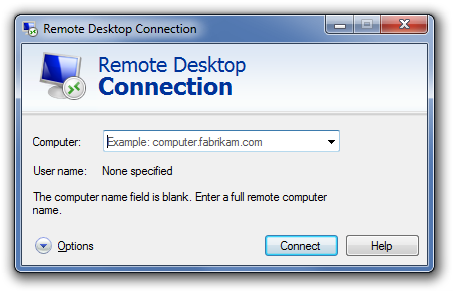
			Chào các bạn, rất nhiều bạn thuê VPS Windows nhưng không biết làm thế nào để có thể truy cập và quản lý,do vậy mình viết tutorial bằng hình ảnh này để hướng dẫn các bạn cách truy cập vào VPS Windows.
		</div>
				<div class="imghome">
			<img alt="Hướng dẫn truy cập VPS Windows" src="https://tocdoviet.com/uploads/blog/2013_07/windows-7-remote-desktop-connection-window-screenshot.png" width="460" class="img-thumbnail" />
		</div>
		<div class="clear"></div>
		<div id="bodytext" class="clearfix">
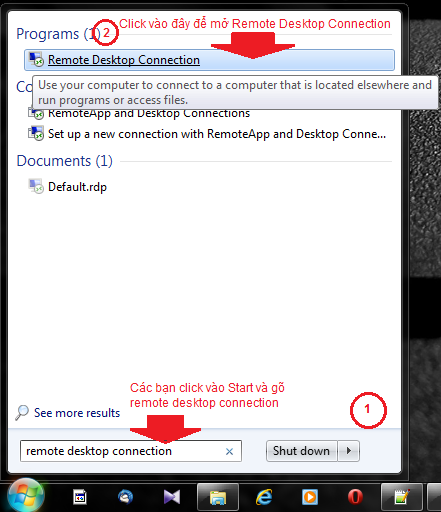
			<strong>Bước 1:</strong> Các bạn chọn Starts sau đó nhập từ khóa <strong>“remote desktop connection”</strong> (Áp dụng cho máy client sử dụng Windows 7,Windows Server 2008 , Windows 8) như hình dưới.
<div class="bodytext">
<div style="text-align: center;">
<div class="image-center"><img alt="" src="https://tocdoviet.com/uploads/blog/2013_07/open-remote-desktop.png" style="width: 441px; height: 512px;" /></div>
</div>

<div><br />
- Đối với Windows XP , Windows Server 2003 … các bạn có thể mở Remote Desktop Connection nhanh chóng :<br />
Vào <strong>Start =&gt; Run =&gt; gõ mstsc =&gt; Enter </strong>(cách này cũng có thể sử dụng trên tất cả các hệ điều hành của Windows)<br />
<br />
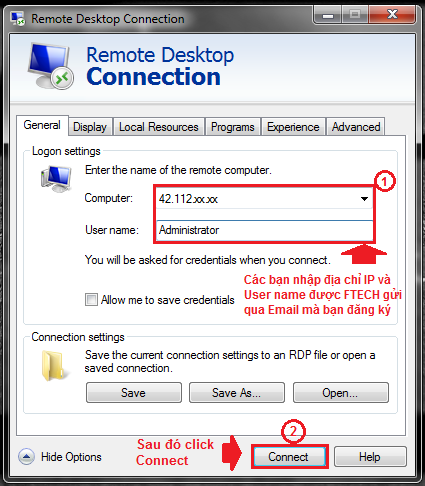
<strong>Bước 2: </strong>Sau khi mở Remote Desktop Connection các bạn nhập thông tin : Địa chỉ IP , User name mà TDV cung cấp cho bạn qua Email.<br />
&nbsp;</div>

<div style="text-align: center;">
<div class="image-center"><img alt="" src="https://tocdoviet.com/uploads/blog/2013_07/login-remote-desktop.png" style="width: 425px; height: 486px;" /></div>
<br />
&nbsp;</div>

<div><br />
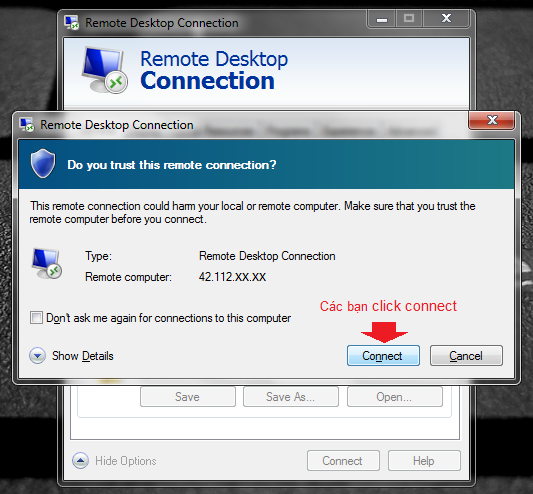
- Chương trình sẽ xác nhận lại “Bạn có muốn truy cập vào máy tính này hay không?” bạn check vào ô <strong>“Don’t ask me again for connection to this computer”</strong> để lần sau bạn truy cập sẽ không hiện lên thông báo này nữa. Sau đó bạn Click chọn <strong>“Connect”</strong><br />
&nbsp;</div>

<div style="text-align: center;">
<div class="image-center"><img alt="" src="https://tocdoviet.com/uploads/blog/2013_07/login-remote-desktop-1.png" style="width: 533px; height: 494px;" /></div>
<br />
&nbsp;</div>

<div><br />
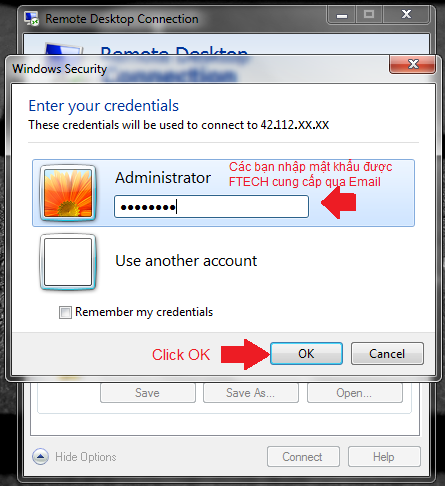
<strong>Bước 3: </strong>Các bạn nhập mật khẩu được cung cấp tương ứng với Username và chọn <strong>“OK”</strong><br />
&nbsp;</div>

<div style="text-align: center;">
<div class="image-center"><img alt="" src="https://tocdoviet.com/uploads/blog/2013_07/login-remote-desktop-2.png" style="width: 445px; height: 486px;" /></div>
<br />
&nbsp;</div>

<div><br />
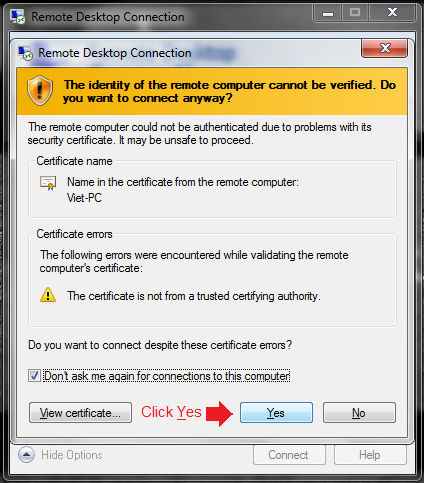
- Tại đây chương trình sẽ hiện ra 1 cửa sổ cảnh báo về chứng chỉ, bạn check vào ô <strong>“Don’t ask me again for connection to this computer”</strong> để lần sau bạn truy cập sẽ không hiện lên thông báo này nữa. Sau đó bạn Click chọn <strong>“Yes”</strong><br />
&nbsp;</div>

<div style="text-align: center;">
<div class="image-center"><img alt="" src="https://tocdoviet.com/uploads/blog/2013_07/login-remote-desktop-3.png" style="width: 424px; height: 483px;" /></div>
</div>

<div><br />
<br />
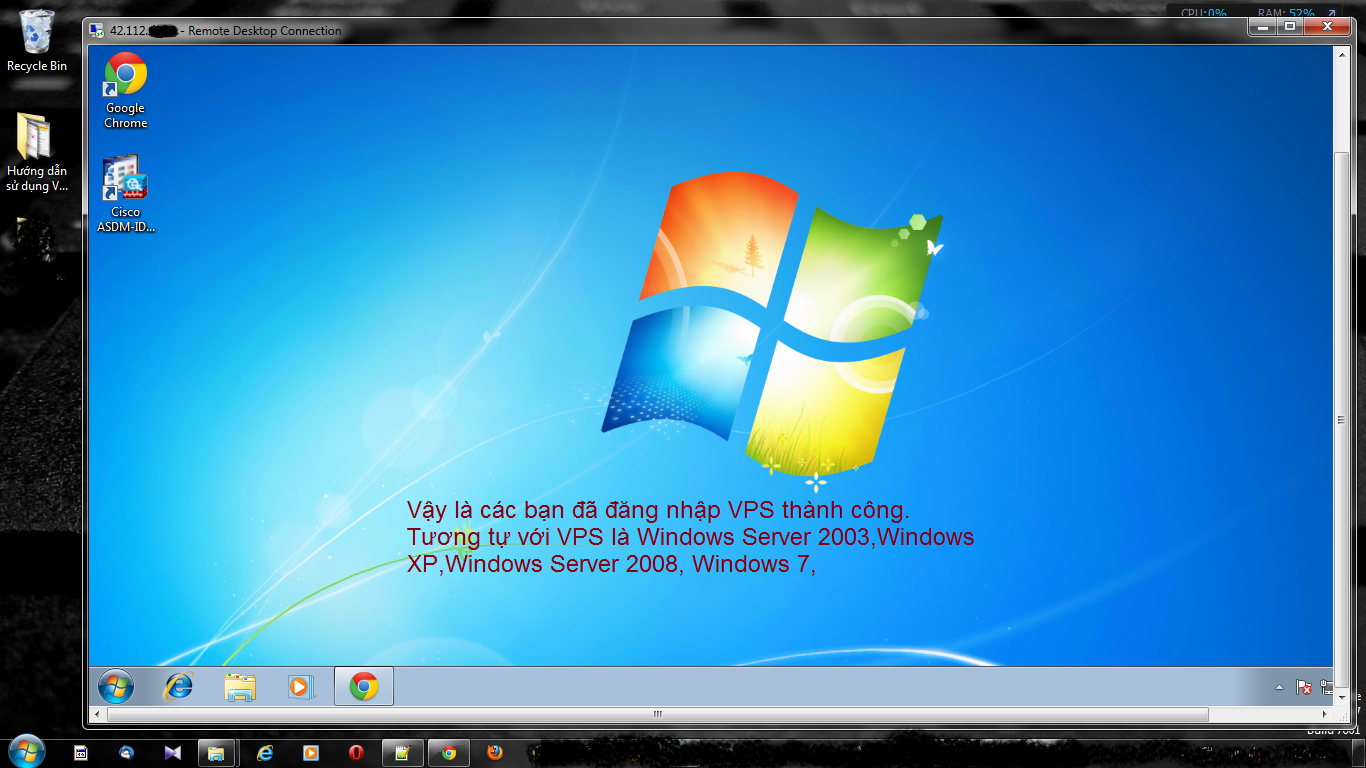
Đây là kết quả đăng nhập thành công:<br />
&nbsp;</div>

<div style="text-align: center;">
<div class="image-center"><img alt="" src="https://tocdoviet.com/uploads/blog/2013_07/finish.png" style="width: 600px; height: 337px;" /></div>
<br />
&nbsp;</div>

<div><br />
<strong>Chúc các bạn thành công!</strong><br />
&nbsp;</div>
</div>
		</div>
	</div>
	<div id="footer" class="clearfix">
		<div id="url">
			<strong>URL của bản tin này: </strong><a href="https://tocdoviet.com/blog/savefile/Tai-lieu-May-Chu/huong-dan-truy-cap-vps-windows-102.html" title="Hướng dẫn truy cập VPS Windows">https://tocdoviet.com/blog/savefile/Tai-lieu-May-Chu/huong-dan-truy-cap-vps-windows-102.html</a>

		</div>
		<div class="clear"></div>
		<div class="copyright">
			&copy; Tốc Độ Việt - Dịch vụ Hosting, Tên miền, Máy chủ, Thiết kế Website
		</div>
		<div id="contact">
			<a href="mailto:loc.thb@bazan.vn">loc.thb@bazan.vn</a>
		</div>
	</div>
</div>
        <div id="timeoutsess" class="chromeframe">
            Bạn đã không sử dụng Site, <a onclick="timeoutsesscancel();" href="https://tocdoviet.com/#">Bấm vào đây để duy trì trạng thái đăng nhập</a>. Thời gian chờ: <span id="secField"> 60 </span> giây
        </div>
        <div id="openidResult" class="nv-alert" style="display:none"></div>
        <div id="openidBt" data-result="" data-redirect=""></div>
        <div id="button-contact-vr" class=""><div id="gom-all-in-one"><div id="zalo-vr" class="button-contact"><div class="phone-vr"><div class="phone-vr-circle-fill"></div><div class="phone-vr-img-circle">
<a target="_blank" href="https://zalo.me/0888037777">
<img src="https://tocdoviet.com/themes/default/images/zalo.png">
</a></div></div></div><div id="phone-vr" class="button-contact"><div class="phone-vr"><div class="phone-vr-circle-fill"></div><div class="phone-vr-img-circle">
<a href="tel:0888037777">
<img src="https://tocdoviet.com/themes/default/images/phone.png">
</a></div></div></div></div></div><div id="popup-form-contact-vr"><div class="bg-popup-vr"></div><div class="content-popup-vr" id="loco-" style=" "><div class="content-popup-div-vr"></div><div class="close-popup-vr">x</div></div></div><div id="popup-showroom-vr"><div class="bg-popup-vr"></div><div class="content-popup-vr" id="loco-" style=" "><div class="content-popup-div-vr"></div><div class="close-popup-vr">x</div></div></div>
<script src="https://tocdoviet.com/assets/js/jquery/jquery.min.js"></script>
<script>var nv_base_siteurl="/",nv_lang_data="vi",nv_lang_interface="vi",nv_name_variable="nv",nv_fc_variable="op",nv_lang_variable="language",nv_module_name="blog",nv_func_name="savefile",nv_is_user=0, nv_my_ofs=-4,nv_my_abbr="EDT",nv_cookie_prefix="nv4",nv_check_pass_mstime=1738000,nv_area_admin=0,nv_safemode=0,theme_responsive=1,nv_recaptcha_ver=2,nv_recaptcha_sitekey="",nv_recaptcha_type="image",XSSsanitize=1;</script>
<script src="https://tocdoviet.com/assets/js/language/vi.js"></script>
<script src="https://tocdoviet.com/assets/js/DOMPurify/purify3.js"></script>
<script src="https://tocdoviet.com/assets/js/global.js"></script>
<script src="https://tocdoviet.com/assets/js/site.js"></script>
<script src="https://tocdoviet.com/themes/default/js/news.js"></script>
<script src="https://tocdoviet.com/themes/default/js/main.js"></script>
<script src="https://tocdoviet.com/themes/default/js/custom.js"></script>
<script type="application/ld+json">
        {
            "@context": "https://schema.org",
            "@type": "Organization",
            "url": "https://tocdoviet.com",
            "logo": "https://tocdoviet.com/assets/images/logo.png"
        }
        </script>
<script src="https://tocdoviet.com/themes/default/js/bootstrap.min.js"></script>
</body>
</html>