<!DOCTYPE html>
    <html lang="vi" xmlns="http://www.w3.org/1999/xhtml" prefix="og: http://ogp.me/ns#">
    <head>
<title>CHMOD là gì? – Và cách CHMOD an toàn cho site của bạn</title>
<meta name="description" content="CHMOD là gì? – Và cách CHMOD an toàn cho site của bạn - Savefile - Blog -...">
<meta name="author" content="Tốc Độ Việt - Dịch vụ Hosting, Tên miền, Máy chủ, Thiết kế Website">
<meta name="copyright" content="Tốc Độ Việt - Dịch vụ Hosting, Tên miền, Máy chủ, Thiết kế Website [loc.thb@bazan.vn]">
<meta name="generator" content="NukeViet v4.5">
<meta name="viewport" content="width=device-width, initial-scale=1">
<meta http-equiv="Content-Type" content="text/html; charset=utf-8">
<meta property="og:title" content="CHMOD là gì? – Và cách CHMOD an toàn cho site của bạn">
<meta property="og:type" content="website">
<meta property="og:description" content="Savefile - Blog - https&#x3A;&#x002F;&#x002F;tocdoviet.com&#x002F;blog&#x002F;savefile&#x002F;Tai-lieu-Hosting&#x002F;CHMOD-la-gi-Va-cach-CHMOD-an-toan-cho-site-cua-ban-200.html">
<meta property="og:site_name" content="Tốc Độ Việt - Dịch vụ Hosting, Tên miền, Máy chủ, Thiết kế Website">
<meta property="og:url" content="https://tocdoviet.com/blog/savefile/Tai-lieu-Hosting/CHMOD-la-gi-Va-cach-CHMOD-an-toan-cho-site-cua-ban-200.html">
<link rel="shortcut icon" href="https://tocdoviet.com/favicon.ico">
<link rel="canonical" href="https://tocdoviet.com/blog/savefile/Tai-lieu-Hosting/CHMOD-la-gi-Va-cach-CHMOD-an-toan-cho-site-cua-ban-200.html">
<link rel="alternate" href="https://tocdoviet.com/blog/rss/" title="Blog" type="application/rss+xml">
<link rel="alternate" href="https://tocdoviet.com/blog/rss/Cau-hoi-thuong-gap/" title="Blog - Câu hỏi thường gặp" type="application/rss+xml">
<link rel="alternate" href="https://tocdoviet.com/blog/rss/Tai-lieu-Ten-Mien/" title="Blog - Tài liệu Tên Miền" type="application/rss+xml">
<link rel="alternate" href="https://tocdoviet.com/blog/rss/Tai-lieu-Hosting/" title="Blog - Tài liệu Hosting" type="application/rss+xml">
<link rel="alternate" href="https://tocdoviet.com/blog/rss/Tai-lieu-May-Chu/" title="Blog - Tài liệu Máy Chủ" type="application/rss+xml">
<link rel="alternate" href="https://tocdoviet.com/blog/rss/Tai-lieu-Ma-Nguon/" title="Blog - Tài liệu Mã Nguồn" type="application/rss+xml">
<link rel="alternate" href="https://tocdoviet.com/blog/rss/Tai-lieu-SEO/" title="Blog - Tài liệu SEO" type="application/rss+xml">
<link rel="alternate" href="https://tocdoviet.com/blog/rss/Tai-lieu-Website/" title="Blog - Tài liệu Website" type="application/rss+xml">
<link rel="alternate" href="https://tocdoviet.com/blog/rss/Tai-lieu-Phan-Mem/" title="Blog - Tài liệu Phần Mềm" type="application/rss+xml">
<link rel="alternate" href="https://tocdoviet.com/blog/rss/Tai-lieu-May-Tinh/" title="Blog - Tài liệu Máy Tính" type="application/rss+xml">
<link rel="preload" as="style" href="https://tocdoviet.com/assets/css/font-awesome.min.css" type="text/css">
<link rel="preload" as="style" href="https://tocdoviet.com/themes/default/css/bootstrap.min.css" type="text/css">
<link rel="preload" as="style" href="https://tocdoviet.com/themes/default/css/style.css" type="text/css">
<link rel="preload" as="style" href="https://tocdoviet.com/themes/default/css/style.responsive.css" type="text/css">
<link rel="preload" as="style" href="https://tocdoviet.com/themes/default/css/news.css" type="text/css">
<link rel="preload" as="style" href="https://tocdoviet.com/themes/default/css/custom.css" type="text/css">
<link rel="preload" as="script" href="https://tocdoviet.com/assets/js/jquery/jquery.min.js" type="text/javascript">
<link rel="preload" as="script" href="https://tocdoviet.com/assets/js/language/vi.js" type="text/javascript">
<link rel="preload" as="script" href="https://tocdoviet.com/assets/js/DOMPurify/purify3.js" type="text/javascript">
<link rel="preload" as="script" href="https://tocdoviet.com/assets/js/global.js" type="text/javascript">
<link rel="preload" as="script" href="https://tocdoviet.com/assets/js/site.js" type="text/javascript">
<link rel="preload" as="script" href="https://tocdoviet.com/themes/default/js/news.js" type="text/javascript">
<link rel="preload" as="script" href="https://tocdoviet.com/themes/default/js/main.js" type="text/javascript">
<link rel="preload" as="script" href="https://tocdoviet.com/themes/default/js/custom.js" type="text/javascript">
<link rel="preload" as="script" href="https://tocdoviet.com/themes/default/js/bootstrap.min.js" type="text/javascript">
<link rel="stylesheet" href="https://tocdoviet.com/assets/css/font-awesome.min.css">
<link rel="stylesheet" href="https://tocdoviet.com/themes/default/css/bootstrap.min.css">
<link rel="stylesheet" href="https://tocdoviet.com/themes/default/css/style.css">
<link rel="stylesheet" href="https://tocdoviet.com/themes/default/css/style.responsive.css">
<link rel="StyleSheet" href="https://tocdoviet.com/themes/default/css/news.css">
<link rel="stylesheet" href="https://tocdoviet.com/themes/default/css/custom.css">
<style>
#gom-all-in-one{margin-bottom: 150px;}
@-webkit-keyframes phone-vr-circle-fill {
0% {-webkit-transform: rotate(0) scale(1) skew(1deg); }
10% {-webkit-transform: rotate(-25deg) scale(1) skew(1deg);}
20% {-webkit-transform: rotate(25deg) scale(1) skew(1deg);}
30% {-webkit-transform: rotate(-25deg) scale(1) skew(1deg);}
40% {-webkit-transform: rotate(25deg) scale(1) skew(1deg);}
50% {-webkit-transform: rotate(0) scale(1) skew(1deg);}
100% {-webkit-transform: rotate(0) scale(1) skew(1deg);}
}
@-webkit-keyframes zoom{0%{transform:scale(.9)}70%{transform:scale(1);box-shadow:0 0 0 15px transparent}100%{transform:scale(.9);box-shadow:0 0 0 0 transparent}}@keyframes zoom{0%{transform:scale(.9)}70%{transform:scale(1);box-shadow:0 0 0 15px transparent}100%{transform:scale(.9);box-shadow:0 0 0 0 transparent}}
#button-contact-vr{right:0}
.phone-bar a{
left:auto;right:30px;padding:8px 55px 7px 15px
}
#button-contact-vr.active #gom-all-in-one .button-contact
{
margin-left:100%
}
#button-contact-vr{bottom:30%}
#gom-all-in-one #zalo-vr {
transition: 1s all;
-moz-transition: 1s all;
-webkit-transition: 1s all;
}
#zalo-vr .phone-vr-circle-fill {
box-shadow: 0 0 0 0 #2196f3;
background-color: rgba(33,150,243,.7);
}
.phone-vr-circle-fill {
width: 65px;
height: 65px;
top: 12px;
left: 12px;
position: absolute;
box-shadow: 0 0 0 0 #c31d1d;
background-color: rgba(230,8,8,.7);
border-radius: 50%;
border: 2px solid transparent;
-webkit-animation: phone-vr-circle-fill 2.3s infinite ease-in-out;
animation: phone-vr-circle-fill 2.3s infinite ease-in-out;
transition: all .5s;
-webkit-transform-origin: 50% 50%;
-ms-transform-origin: 50% 50%;
transform-origin: 50% 50%;
-webkit-animuiion: zoom 1.3s infinite;
animation: zoom 1.3s infinite;
}
.phone-vr-img-circle a {
display: block;
line-height: 37px;
}
.phone-vr-img-circle img {
max-height: 25px;
max-width: 27px;
position: absolute;
top: 50%;
left: 50%;
transform: translate(-50%,-50%);
-moz-transform: translate(-50%,-50%);
-webkit-transform: translate(-50%,-50%);
-o-transform: translate(-50%,-50%);
}
#zalo-vr .phone-vr-img-circle {
background-color: #2196f3;
}
.phone-vr-img-circle {
background-color: #e60808;
width: 40px;
height: 40px;
line-height: 40px;
top: 25px;
left: 25px;
position: absolute;
border-radius: 50%;
overflow: hidden;
display: flex;
justify-content: center;
-webkit-animation: phonering-alo-circle-img-anim 1s infinite ease-in-out;
animation: phone-vr-circle-fill 1s infinite ease-in-out;
}
#button-contact-vr .button-contact .phone-vr {
position: relative;
visibility: visible;
background-color: transparent;
width: 90px;
height: 90px;
cursor: pointer;
z-index: 11;
-webkit-backface-visibility: hidden;
-webkit-transform: translateZ(0);
transition: visibility .5s;
left: 0;
bottom: 0;
display: block;
}
#gom-all-in-one #phone-vr {
transition: .7s all;
-moz-transition: .7s all;
-webkit-transition: .7s all;
}
#button-contact-vr .button-contact {
position: relative;
margin-top: 5px;
}
#phone-vr .phone-vr-circle-fill {
opacity: .7;
box-shadow: 0 0 0 0 #d33;
}
.phone-bar a, #phone-vr .phone-vr-circle-fill, #phone-vr .phone-vr-img-circle, #phone-vr .phone-bar a {
background-color: #d33;
}
#button-contact-vr {
bottom: 30%;
}
#button-contact-vr {
position: fixed;
bottom: 0;
z-index: 99999;
}
#popup-showroom-vr, div#popup-form-contact-vr {
display: none;
}
.bg-popup-vr {
position: absolute;
left: 0;
top: 0;
background: rgb(51 51 51/50%);
width: 100%;
height: 100vh;
}
@media (max-width: 673px)
div#popup-form-contact-vr .content-popup-vr {
display: block;
}
.content-popup-vr {
background: #fff;
position: absolute;
left: 50%;
top: 50%;
transform: translate(-50%,-50%);
width: 95%;
border-radius: 5px;
box-shadow: 0 0 14px 5px rgb(0 0 0/49%);
max-width: 600px;
display: flex;
}
.content-popup-vr .content-popup-div-vr {
width: 100%;
padding: 25px;
}
.content-popup-vr .close-popup-vr {
font-family: sans-serif;
width: 23px;
height: 23px;
background: #000;
position: absolute;
top: -10px;
right: -10px;
color: #fff;
text-align: center;
line-height: 23px;
font-size: 17px;
border-radius: 50%;
cursor: pointer;
}
</style>
<style type="text/css">
	body{background: #fff;}
</style>
<style type="text/css"></style>
    </head>
    <body>
<div id="print">
	<div id="hd_print">
		<h2 class="pull-left">Tốc Độ Việt - Dịch vụ Hosting, Tên miền, Máy chủ, Thiết kế Website</h2>
		<p class="pull-right"><a title="Tốc Độ Việt - Dịch vụ Hosting, Tên miền, Máy chủ, Thiết kế Website" href="https://tocdoviet.com/">https://tocdoviet.com</a></p>
	</div>
	<div class="clear"></div>
	<hr />
	<div id="content">
		<h1>CHMOD là gì? – Và cách CHMOD an toàn cho site của bạn</h1>
		<ul class="list-inline">
			<li>Thứ tư - 24/07/2013 22:36</li>
			<li class="hidden-print txtrequired"><em class="fa fa-print">&nbsp;</em><a title="In ra" href="javascript:;" onclick="window.print()">In ra</a></li>
			<li class="hidden-print txtrequired"><em class="fa fa-power-off">&nbsp;</em><a title="Đóng cửa sổ này" href="javascript:;" onclick="window.close()">Đóng cửa sổ này</a></li>
		</ul>
		<div class="clear"></div>
		<div id="hometext">
			Bạn hãy thử vào bất cứ diễn đàn thảo luận về thiết kế web nào, chắc chắn sẽ bắt gặp câu hỏi: “Thế nào là CHMOD?”. Thực ra không có gì phức tạp trong vấn đề này cả, nhưng dẫu sao để hiểu một cách thấu đáo về nó, chắc phần lớn trong số các bạn đều cần đến sự giúp đỡ. Chúng ta hãy bắt đầu bàn về nó nhé…
		</div>
				<div class="imghome">
			<img alt="CHMOD là gì? – Và cách CHMOD an toàn cho site của bạn" src="https://tocdoviet.com/uploads/blog/2013_07/ipiuy.png" width="460" class="img-thumbnail" />
		</div>
		<div class="clear"></div>
		<div id="bodytext" class="clearfix">
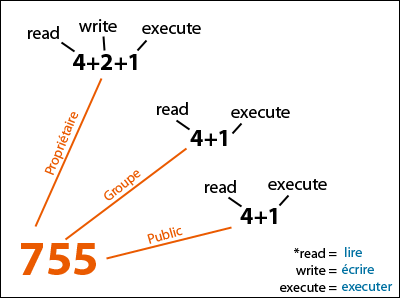
			<span style="color: rgb(0, 0, 0); line-height: 16.796875px;">CHMOD – đó là phạm trù liên quan đến các files và thư mục, có chức năng chỉ ra cho server biết, ai có thể làm gì đối với file hay thư mục nào đó.</span><br  /><br  /><span style="color: rgb(0, 0, 0); line-height: 16.796875px;">Chủ yếu CHMOD đưa ra các lệnh như quyền được đọc, viết vào file (hay thư mục), quyền thực hiện một công việc nhất định. Vì phần lớn các servers làm việc trên cơ sở hệ thống<br  /><br  />UNIX, nên chúng ta sẽ nghiên cứu về cách CHMOD chính cho các servers này.</span><br  /><br  /><span style="color: rgb(0, 0, 0); line-height: 16.796875px;">Trên các hệ thống UNIX, người sử dụng được chia ra làm 3 nhóm: “user” (chủ nhân trực tiếp của các files), “group” (thành viên của nhóm mà người chủ nhân file có tham gia) và “world” (tất cả những trường hợp khác). Khi bạn kết nối với server, nó sẽ xác định xem bạn thuộc về nhóm nào.</span><br  /><br  /><span style="color: rgb(0, 0, 0); line-height: 16.796875px;">Ví dụ bạn kết nối với server bằng FTP, khai báo tên truy cập như một thành viên, chính server sẽ quy bạn vào nhóm “user”. Còn những thành viên khác truy cập bằng FTP thuộc về nhóm “group”. Khi ai đó đến site của bạn bằng trình duyệt web, sẽ được quy vào nhóm “world”. Sau khi xác định nhóm, người sử dụng sẽ được gán quyền hạn nhất định đối với file hoặc thư mục nào đó.</span><br  /><br  /><span style="color: rgb(0, 0, 0); line-height: 16.796875px;">Cụ thể là người sử dụng sẽ được đọc, ghi hay tạo mới (hoặc xóa) file. Để xem thư mục nào đó thì nó phải ủng hộ cho việc xem này. Để được xem nội dung thư mục, thì các files hay thư mục con trong đó cũng phải có chế độ “Cho phép đọc”.</span><br  /><br  /><span style="color: rgb(0, 0, 0); line-height: 16.796875px;">Còn để tạo file hay thư mục mới nằm trong thư mục này lại đòi hỏi phải có quyền ghi. Tóm lại, để thực hiện một trong những việc trên, cần phải đặt vào thư mục chế độ “quyền đọc” và “quyền thực hiện”. Bây giờ chúng ta sẽ thực hành… Như trên đã nêu, có tất cả 3 nhóm người sử dụng và 3 “quyền hạn” đối với files hay thư mục.</span><br  /><br  /><span style="color: rgb(0, 0, 0); line-height: 16.796875px;">Để xác định quyền hạn cho các nhóm nhất định, thống nhất sử dụng các ký hiệu bằng con số như sau: 4 = read (quyền được đọc) 2 = write (quyền được ghi) 1 = execute (quyền được thực hiện) Bằng phép cộng đơn giản các con số này có thể hiển thị được cả một “tổ hợp” quyền hạn khác nhau. Ví dụ:</span><br  /><br  /><span style="background-color: transparent;">3 (2+1) – quyền ghi và quyền thực hiện đối với file (hay thư mục);</span><ul style="margin: 0px; padding-right: 0px; padding-left: 0px; border: 0px; outline: 0px; vertical-align: baseline; list-style: none; color: rgb(0, 0, 0); line-height: 16.796875px;"> <li style="margin: 0px; padding: 0px; border: 0px; outline: 0px; vertical-align: baseline; background-color: transparent;"> 5 (4+1) – quyền đọc và quyền thực hiện;</li> <li style="margin: 0px; padding: 0px; border: 0px; outline: 0px; vertical-align: baseline; background-color: transparent;"> 6 (4+2) – quyền đọc và quyền ghi;</li> <li style="margin: 0px; padding: 0px; border: 0px; outline: 0px; vertical-align: baseline; background-color: transparent;"> 7 (4+2+1) – quyền đọc, ghi và thực hiện.</li></ul><p style="margin: 0px 0px 1em; padding: 0px; border: 0px; outline: 0px; vertical-align: baseline; color: rgb(0, 0, 0); line-height: 16.796875px;"> Tóm lại có tất cả 7 phương án sau:</p><ul style="margin: 0px; padding-right: 0px; padding-left: 0px; border: 0px; outline: 0px; vertical-align: baseline; list-style: none; color: rgb(0, 0, 0); line-height: 16.796875px;"> <li style="margin: 0px; padding: 0px; border: 0px; outline: 0px; vertical-align: baseline; background-color: transparent;"> 7 = read, write &amp; execute</li> <li style="margin: 0px; padding: 0px; border: 0px; outline: 0px; vertical-align: baseline; background-color: transparent;"> 6 = read &amp; write</li> <li style="margin: 0px; padding: 0px; border: 0px; outline: 0px; vertical-align: baseline; background-color: transparent;"> 5 = read &amp; execute</li> <li style="margin: 0px; padding: 0px; border: 0px; outline: 0px; vertical-align: baseline; background-color: transparent;"> 4 = read</li> <li style="margin: 0px; padding: 0px; border: 0px; outline: 0px; vertical-align: baseline; background-color: transparent;"> 3 = write &amp; execute</li> <li style="margin: 0px; padding: 0px; border: 0px; outline: 0px; vertical-align: baseline; background-color: transparent;"> 2 = write</li> <li style="margin: 0px; padding: 0px; border: 0px; outline: 0px; vertical-align: baseline; background-color: transparent;"> 1 = execute</li> <li style="margin: 0px; padding: 0px; border: 0px; outline: 0px; vertical-align: baseline; background-color: transparent;"> &nbsp;</li> <li style="margin: 0px; padding: 0px; border: 0px; outline: 0px; vertical-align: baseline; background-color: transparent;"> Ký hiệu lệnh CHMOD thường có 3 con số: con số đầu thể hiện quyền hạn gán cho người sử dụng thuộc nhóm “user” (Tức là đối với bạn).</li></ul><p style="margin: 0px 0px 1em; padding: 0px; border: 0px; outline: 0px; vertical-align: baseline; color: rgb(0, 0, 0); line-height: 16.796875px;"> Con số thứ hai chỉ ra quyền hạn của người sử dụng thuộc nhóm “group” và con số thứ ba – dành cho nhóm “world”. Trong phần lớn các chương trình FTP hiện đại đều ủng hộ<br  /> <br  /> CHMOD theo kiểu nêu trên (Ví dụ, công cụ truy cập bằng FTP mạnh nhất hiện nay là CuteFTP) Thế nhưng cũng không thừa nếu như ta biết thêm về các lệnh của hệ thống UNIX. lệnh “chmod” trong UNIX có 2 chế độ: tuyệt đối (Bằng các con số) và bằng các ký hiệu chữ.<br  /> <br  /> <span style="color: rgb(34, 34, 34);">Khi sử dụng chế độ tuyệt đối (bằng các con số), thống nhất dùng tổ hợp 3 con số được nêu trên để thể hiện quyền hạn. Trong trường hợp sử dụng ký hiệu chữ, chúng ta sẽ bắt gặp những ký hiệu sau: “r” – quyền được đọc “w” – quyền được ghi “x” – quyền được thực hiện Ngoài ra còn có: “u” – đối với user “g” – đối với group “o” – đối với other (world) “a” – đối với all (tất cả) Ví dụ: 755 = chmod u=rwx,go=rx filename; 644 = chmod u=rw,go=r filename; 600 = chmod u=rw,go= filename; 444 = chmod a=r filename.</span><br  /> <br  /> <strong><span style="color: rgb(34, 34, 34);">CHMOD an toàn</span></strong><br  /> <br  /> <span style="color: rgb(34, 34, 34);">Hiện nay có rất nhiều diễn đàn bị Local Attac</span><span style="color: rgb(34, 34, 34);">k và dẫn đến hiện tượng down forum rất nhiều . Bài hướng dẫn này không hoàn toàn có thể giúp các bạn chống được Local Attack mà chỉ hạn chế được phần nào. Nguyên nhân bị Local do những sai lầm chết người của các Admin, ngay cả VNMagic cũng mắc sai lầm rất đáng trách .<br  /> <br  /> – CHMOD sai, Forum của VNMagic CHMOD file conf_global. khong chap nhan php là 666 do đó dễ dàng bị Edit file và lỗi này được TQN khai thác liên tục mà Kingasawa không hề sửa đổi . Bản thân thư mục CHMOD la 755 do đó trên Server Linux, Config ko kỹ thì toàn bộ cấu trúc Folder và nội dung File đều có thể View được.</span><br  /> <br  /> - Cấu trúc Forum ko có nhiều sửa đổi so với bản gốc nên attacker có thể dễ dành đoán biết vị trí các file quan trọng cần để lấy thông tin .<br  /> <br  /> - Các thông tin quan trọng không hề được mã hóa .(cái này thì hạn chế một chút )<br  /> <br  /> - Các thông tin quan trọng và các Action can thiệp đến CSDL ko được bảo vệ bởi các firewall Thực ra Local Attack có thể làm được rất nhiều thứ nguy hiểm hơn và khả năng chống cự là không thể nếu như bạn ko Zendcode và không có một Server tốt (có thể chống được Remview, CGI Telnet==&gt; đây là hai công cụ Local rất tốt, chưa kể đến SSH Local nếu có Shell) Do đây là bài viết về bảo mật vả lại cũng ko muốn phổ biến kỹ thuật Hack nguy hiểm này nên tôi chỉ trình bày sơ qua các nguyên nhân dẫn đến tình trạng bị Local Attack rất phổ biến hiện nay ở VN .<br  /> <br  /> Từ các phân tích trên có một số khuyến nghị tôi xin đưa ra để mọi người khắc phục :<br  /> <br  /> - Mã hóa thông tin, các bạn có thể mã hóa thông tin lại và việc này sẽ vô hiệu hóa được việc các thông tin quan trọng của bạn bị đánh cắp .<br  /> <br  /> - Tôi sẽ cho các bạn download Zendcode miễn phí của Matrix, có đầy đủ License, các bạn Load tại đây nhé :<br  /> <br  /> <a href="http://www.matrix2kol.net/download/" style="margin: 0px; padding: 0px; border: none; outline: 0px; vertical-align: baseline; background-color: transparent; text-decoration: none; color: rgb(65, 79, 91);">http://www.matrix2kol.net/download/</a><br  /> <br  /> - CHMOD cho đúng, các bước sau đây rất quan trọng để bạn chống Local nên đề nghị các bạn chú ý thực hiện cho đúng :<br  /> <br  /> <span style="background-color: transparent; color: rgb(34, 34, 34);">CHMOD thư mục Public_html thành 710 thay vì 750 mặc định việc này sẽ giúp bạn bảo vệ được cấu trúc Website của mình.</span><br  /> <br  /> <span style="background-color: transparent; color: rgb(34, 34, 34);">CHMOD thư mục là 701 và cố gắng đừng bao giờ CHMOD 777, có một số folder ko quan trọng, bạn có thể CHMOD 755 để có thể hiện thị đúng và đầy đủ một số nội dung trong Folder đó .</span><br  /> <br  /> <span style="background-color: transparent; color: rgb(34, 34, 34);">CHMOD File là 604 và nhớ rằng đừng bao giờ để là 666 nếu có việc cần 666 thì bạn CHMOD tạm để sử dụng lúc đó, sau đó hãy CHMOD lại ngay. Đối với các Server hỗ trợ<br  /> <br  /> CHMOD file 404 bạn hãy CHMOD như vậy, ví dụ Server Eshockhost.net</span><br  /> <br  /> Chú ý thế này, một số Server hỗ trợ CHMOD thư mục được 101, nếu Server của bạn hỗ trợ cái này thì hãy sử dụng nó, vì biện pháp CHMOD này rất an toàn, đến ngay cả Owner cũng ko thể xem được cấu trúc Folder ngay cả khi vào FTP. Hiện tôi chỉ thấy có Server của Eshockhost.net là hỗ trợ cái này<br  /> <br  /> - Thay đổi cấu trúc, tên file mặc định có chứa các thông tin quan trọng . Nếu có thể hãy thay đổi cả cấu trúc CSDL nếu bạn làm được .<br  /> <br  /> - Thiết lập các tường lửa truy cập Admin mà ko sử dụng đến CSDL, mã hóa User/Pass thì càng tốt, ngoài ra có hệ thống kiểm tra tác vụ của MOD, Admin … nếu quyền hạn xác nhận mới được thực hiện (cái này Matrix sử dụng rất thành công) .<br  /> <br  /> Trên đây là hướng dẫn từng bước giúp các bạn cố gắng chống Local attack, dù sao đây cũng chỉ là hướng dẫn cơ bản, trong quá trình thực hiện, các bạn nên linh động hơn một chút, nếu có thêm ý tưởng gì mới thì hãy cùng nhau thảo luận tại đây.<br  /> <br  /> Hy vọng bài viết sẽ giúp các Admin bảo mật tốt hơn cho site của mình.</p>
		</div>
	</div>
	<div id="footer" class="clearfix">
		<div id="url">
			<strong>URL của bản tin này: </strong><a href="https://tocdoviet.com/blog/savefile/Tai-lieu-Hosting/CHMOD-la-gi-Va-cach-CHMOD-an-toan-cho-site-cua-ban-200.html" title="CHMOD là gì? – Và cách CHMOD an toàn cho site của bạn">https://tocdoviet.com/blog/savefile/Tai-lieu-Hosting/CHMOD-la-gi-Va-cach-CHMOD-an-toan-cho-site-cua-ban-200.html</a>

		</div>
		<div class="clear"></div>
		<div class="copyright">
			&copy; Tốc Độ Việt - Dịch vụ Hosting, Tên miền, Máy chủ, Thiết kế Website
		</div>
		<div id="contact">
			<a href="mailto:loc.thb@bazan.vn">loc.thb@bazan.vn</a>
		</div>
	</div>
</div>
        <div id="timeoutsess" class="chromeframe">
            Bạn đã không sử dụng Site, <a onclick="timeoutsesscancel();" href="https://tocdoviet.com/#">Bấm vào đây để duy trì trạng thái đăng nhập</a>. Thời gian chờ: <span id="secField"> 60 </span> giây
        </div>
        <div id="openidResult" class="nv-alert" style="display:none"></div>
        <div id="openidBt" data-result="" data-redirect=""></div>
        <div id="button-contact-vr" class=""><div id="gom-all-in-one"><div id="zalo-vr" class="button-contact"><div class="phone-vr"><div class="phone-vr-circle-fill"></div><div class="phone-vr-img-circle">
<a target="_blank" href="https://zalo.me/0888037777">
<img src="https://tocdoviet.com/themes/default/images/zalo.png">
</a></div></div></div><div id="phone-vr" class="button-contact"><div class="phone-vr"><div class="phone-vr-circle-fill"></div><div class="phone-vr-img-circle">
<a href="tel:0888037777">
<img src="https://tocdoviet.com/themes/default/images/phone.png">
</a></div></div></div></div></div><div id="popup-form-contact-vr"><div class="bg-popup-vr"></div><div class="content-popup-vr" id="loco-" style=" "><div class="content-popup-div-vr"></div><div class="close-popup-vr">x</div></div></div><div id="popup-showroom-vr"><div class="bg-popup-vr"></div><div class="content-popup-vr" id="loco-" style=" "><div class="content-popup-div-vr"></div><div class="close-popup-vr">x</div></div></div>

<div id="run_cronjobs" style="visibility:hidden;display:none;"><img alt="cron" src="/index.php?second=cronjobs&amp;p=p9dT0P0e" width="1" height="1" /></div>
<script src="https://tocdoviet.com/assets/js/jquery/jquery.min.js"></script>
<script>var nv_base_siteurl="/",nv_lang_data="vi",nv_lang_interface="vi",nv_name_variable="nv",nv_fc_variable="op",nv_lang_variable="language",nv_module_name="blog",nv_func_name="savefile",nv_is_user=0, nv_my_ofs=-4,nv_my_abbr="EDT",nv_cookie_prefix="nv4",nv_check_pass_mstime=1738000,nv_area_admin=0,nv_safemode=0,theme_responsive=1,nv_recaptcha_ver=2,nv_recaptcha_sitekey="",nv_recaptcha_type="image",XSSsanitize=1;</script>
<script src="https://tocdoviet.com/assets/js/language/vi.js"></script>
<script src="https://tocdoviet.com/assets/js/DOMPurify/purify3.js"></script>
<script src="https://tocdoviet.com/assets/js/global.js"></script>
<script src="https://tocdoviet.com/assets/js/site.js"></script>
<script src="https://tocdoviet.com/themes/default/js/news.js"></script>
<script src="https://tocdoviet.com/themes/default/js/main.js"></script>
<script src="https://tocdoviet.com/themes/default/js/custom.js"></script>
<script type="application/ld+json">
        {
            "@context": "https://schema.org",
            "@type": "Organization",
            "url": "https://tocdoviet.com",
            "logo": "https://tocdoviet.com/assets/images/logo.png"
        }
        </script>
<script src="https://tocdoviet.com/themes/default/js/bootstrap.min.js"></script>
</body>
</html>